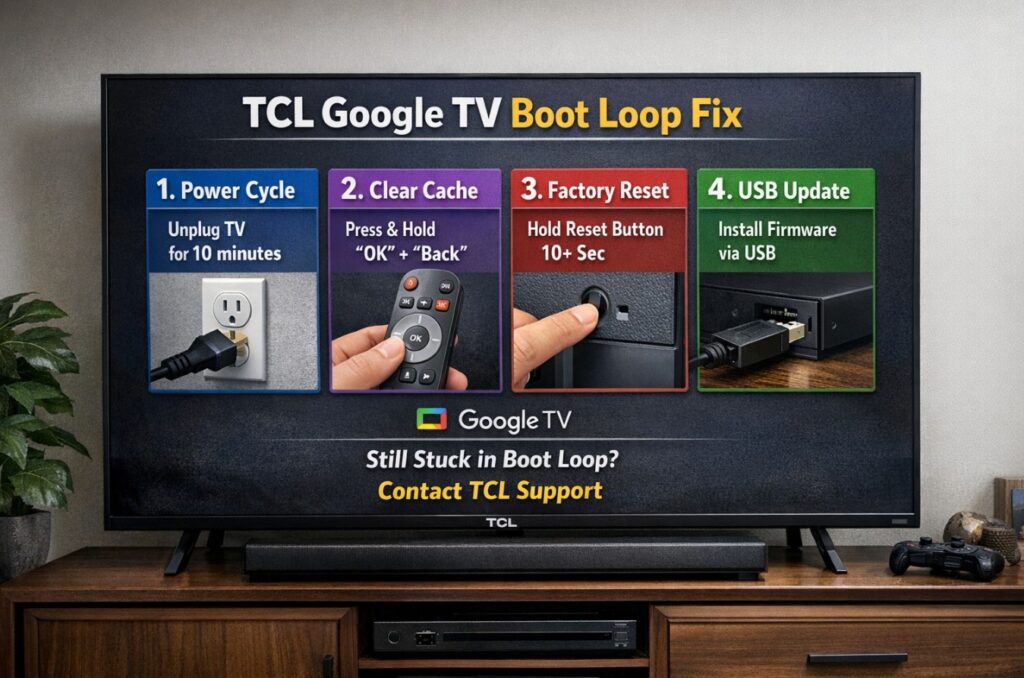

The TCL Google TV boot loop fix is simple in principle: break the loop by resetting power properly, then remove anything that can re-trigger the crash (especially HDMI-CEC/eARC devices). 🔌 If your TCL is stuck on the logo, restarting every few seconds, or rebooting as soon as a console/soundbar wakes up, follow the steps below in order.
Quick Takeaways
- Do a true cold reset (unplug + discharge). Standby power often doesn’t clear the stuck state.
- Boot once with all HDMI disconnected to rule out CEC/eARC/handshake loops.
- If you can reach Home briefly, fix app/storage crashes before you wipe the TV.
- If you can’t reach Settings at all, use Recovery Mode for a factory reset as the last resort. 🧯
What you’re seeing matters (fast symptom map)
| What you see | Most likely cause | What to do first |
|---|---|---|
| Stuck on TCL / Google TV logo for ~10+ minutes | System hang / corrupted boot state | Step 1, then Step 2 |
| Restarts every 10–60 seconds | Crash loop, sometimes triggered by HDMI chain | Step 2, then Step 6 if it persists |
| Boots to Home, then reboots when opening apps | App crash loop or low storage | Step 3 + Step 4 |
| Reboots when console/soundbar turns on | HDMI-CEC/eARC handshake loop | Step 2, then Step 7 |
| Started right after outage/surge | Power event + corrupted state | Step 1 + Step 2 |
Manufacturer claims vs rounded independent measurements
| Item | Manufacturer claims | Rounded independent measurements* |
|---|---|---|
| Normal boot time | Not consistently specified | Usually a few minutes; first boot after updates can be slower |
| “Stuck on logo” threshold | Not consistently specified | If you’re still on the logo after ~10 minutes, treat it as a hang |
| Post-update behavior | Not consistently specified | Slower boot is normal; repeated reboots are not |
*Rounded independent measurements reflect typical behavior in stock conditions across multiple models. Firmware, storage health, and model differences can change results.
TCL Google TV boot loop fix steps
Step 1: True cold reset (unplug + discharge)
- Unplug the TV from the wall outlet.
- Press and hold the physical power button on the TV for 15–20 seconds.
- Keep it unplugged for 60 seconds.
- Plug it back directly into a wall outlet and power on.
If the TV boots normally now, the loop was likely a stuck power/system state.
Step 2: Boot once with all HDMI devices disconnected
This is the fastest way to prove whether your HDMI chain is the trigger.
- Unplug the TV again for 30–60 seconds.
- Disconnect everything from HDMI (consoles, streamer, soundbar/AVR).
- Power on with no HDMI connected.
Interpretation
- If the TV is stable now → go to Step 7 (your HDMI chain is the trigger).
- If it still loops → go to Step 6 (Recovery Mode).
Step 3: If you can reach Home briefly, stop the app crash loop
If the Home screen appears even for a short moment, try this before any reset:
- Settings → Apps → See all apps (menu names/paths vary by model/region/firmware)
- Start with apps used right before the loop began:
- Clear cache
- If it still reboots, clear storage/data for that app (you’ll sign in again)
This often fixes “reboot when opening Netflix/YouTube/Disney+” type loops. 🧭
Step 4: Fix low storage (quiet but common trigger)
If you can access it:
- Settings → Storage
- Uninstall large apps you don’t use and remove downloads/offline content inside apps.
If the TV reboots too fast to reach Storage, skip to Step 6.
Step 5: Setup loop during sign-in? Do one hotspot test
Only do this if your loop happens during setup/Google sign-in:
- Connect to a mobile hotspot temporarily.
- If setup completes on hotspot, your router/DNS/captive portal behavior is the trigger (not the TV).
Audio & Connectivity (I/O map you actually need)
Ports vary by TCL model/region/size, so don’t guess—use the labels printed next to the ports.
| What to check | Why it matters for boot loops |
|---|---|
| Which HDMI is labeled ARC/eARC | eARC negotiation can re-trigger reboots during wake/boot |
| Any HDMI-CEC control setting (name varies) | CEC can cause “wake → handshake → crash → reboot” loops |
| Which device is connected to which HDMI | You’ll reconnect devices one-by-one to find the trigger |
| Optical (SPDIF) availability | Temporary audio alternative to remove eARC from the chain |
Troubleshooting / Pro Tips
Step 6: TCL Google TV boot loop fix in Recovery Mode (factory reset)
Use this if the TV loops even with HDMI disconnected or you can’t reach Settings.
- Unplug the TV.
- Find the physical power button on the TV.
- Press and hold that button.
- While holding it, plug the TV back into power.
- Keep holding until a Recovery screen appears (timing varies).
- Choose Wipe data / factory reset, confirm.
- Select Reboot system now.
A factory reset removes apps, accounts, and most settings.
Step 7: If HDMI devices caused the loop, rebuild your setup safely
If Step 2 made the TV stable, reconnect in this order:
- Boot the TV with no HDMI connected (confirm it stays stable).
- Connect one device only (a basic streamer first, not an AVR).
- Connect the soundbar/AVR to ARC/eARC last.
- Temporarily disable HDMI-CEC for testing (name varies).
- If stable with CEC off, re-enable only what you truly need.
This prevents the loop from being re-triggered the moment your console or bar wakes up.
Step 8: When to stop and use warranty
Escalate if:
- It boot loops after a Recovery Mode factory reset, or
- It loops with no HDMI connected, right after a clean setup, or
- It reboots randomly on the Home screen with nothing open
At that point it may be a firmware defect that needs official handling, or a hardware/storage issue.
FAQ
1) What is the fastest TCL Google TV boot loop fix to try first?
Unplug + discharge (Step 1), then a clean boot with all HDMI removed (Step 2).
2) How long should I wait on the logo screen?
If you’re still stuck after about 10 minutes, treat it as a hang and start Step 1 and Step 2.
3) Do I have to factory reset?
Not always. If you can reach Home briefly, clearing app cache/storage and fixing low storage can stop the loop.
4) Can a soundbar or console really cause reboot loops?
Yes—HDMI-CEC wake events and eARC handshakes can re-trigger crashes during boot.
5) What if Recovery Mode doesn’t appear?
Button sequences vary by model. Try again carefully (unplug, hold the physical button, plug in, hold longer). If it won’t appear reliably, warranty is the safer play.
6) Is this a panel failure?
Usually not. If the TCL/Google logo displays, the screen hardware is typically fine.
7) Should I update firmware again after I fix it?
Only after the TV stays stable on Home. If the loop began after an update, avoid updating during instability.
8) Can Wi-Fi cause a boot loop?
Rarely by itself. It can cause setup loops during sign-in, which is why the hotspot test is useful.
Final Verdict
Most of the time, this isn’t “a dead TV.” It’s a loop you can interrupt: clear the stuck power state, remove HDMI triggers, and only wipe the system if you’ve proven the loop is internal. When it finally stays on, it feels less like a hack and more like normal life returning. ✨
Internal links (TVComparePro)
https://tvcomparepro.com/netflix-not-playing-in-4k-on-tv-fix/
https://tvcomparepro.com/google-tv-remote-not-working-fix/
https://tvcomparepro.com/google-tv-wifi-keeps-disconnecting-fix/