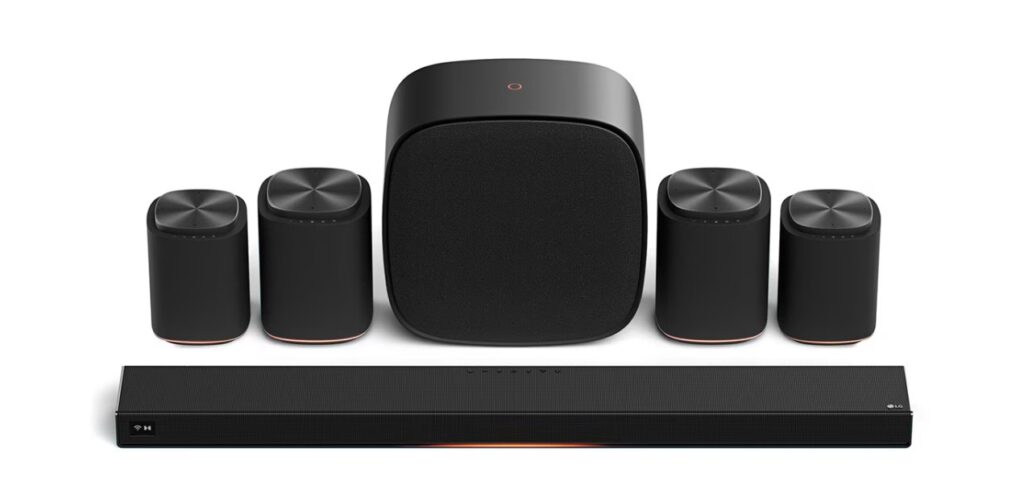

LG Sound Suite FlexConnect is LG’s new take on home audio: a modular, wireless Atmos ecosystem designed to work in real rooms—where couches are off-center, shelves are uneven, and running rear-speaker wires is a non-starter. 🎧
It was introduced as part of LG’s CES announcements, but the bigger story is: should you build a modular speaker system around your TV, or just buy a great soundbar and call it a day?
Below is what’s confirmed, what likely varies by model/region/firmware, and how to decide without getting trapped in “new tech” FOMO.
Quick Takeaways
- LG Sound Suite is built around the H7 soundbar, which LG calls the world’s first soundbar powered by Dolby Atmos FlexConnect.
- You can add wireless pieces (LG lists M7/M5 surround speakers and a W7 subwoofer) and assemble the system in many configurations.
- The main advantage vs a classic soundbar kit is placement flexibility + auto-mapping rather than “more speakers = better.” 🧩
- It’s premium-priced, and the biggest risk is compatibility and rollout timing (TV model, firmware, region).
LG Sound Suite FlexConnect in one table
| Question | Modular LG Sound Suite (FlexConnect) | Traditional Atmos soundbar (eARC) |
|---|---|---|
| What you buy | Start with one core device, add speakers over time | Usually one box + optional rears/sub as a bundle |
| Speaker placement | Flexible placement; system maps speakers to your room | Best results when speakers are placed “as designed” |
| Setup complexity | Can be fast when the ecosystem is supported | Usually simple; fewer moving parts |
| Upgrade path | Add/relocate speakers and re-calibrate | Add compatible rears/sub if the model supports it |
| Best for | Awkward rooms, renters, minimal cabling | People who want “one purchase, done” |
| Biggest pitfall | Compatibility/rollout + wireless environment | Room limitations and fixed speaker geometry |
What LG actually announced (confirmed details)
LG positions LG Sound Suite as a wireless, modular audio system built around the H7 soundbar, with additional wireless components you can mix and match—specifically M7 and M5 surround speakers and the W7 subwoofer.
Two claims matter most:
- Flexibility of configurations
LG says the components can be combined in up to 27 possible configurations, and scaled as high as a 13.1.7-channel layout when building out a full system (as marketed). - FlexConnect as the “brain” that adapts to the room
FlexConnect’s promise is not “more watts.” It’s that the system can intelligently map and tune output based on where speakers are actually placed—so you’re not punished for an imperfect living room.
LG also indicates FlexConnect is coming to parts of LG’s premium TV lineup via software update (availability depends on model/region/firmware). LG’s own release calls out select models and notes rollout timing can vary.
The real comparison: modular system vs soundbar
This is where the decision becomes practical.
When a modular FlexConnect setup can beat a soundbar
1) Your room is “wrong” for surround
If your couch isn’t centered, one side wall is open, or rear speaker placement would be weird, FlexConnect-style mapping can be a genuine advantage (if it works as intended). The value is not perfection—it’s better results in compromised rooms. 🔊
2) You want to grow into Atmos
A lot of people don’t want to drop “full system money” in one go. Modular systems can let you start with a strong baseline and add speakers later—especially if you move homes or change furniture.
3) You hate cable runs
This is the obvious one. Wireless surrounds/sub can be the difference between “I’ll do it someday” and “it’s installed tonight.”
When a classic soundbar is still the smarter buy
1) You want one purchase and zero drama
A good soundbar is still the cleanest “buy once, done” path. Fewer pieces, fewer firmware variables, fewer wireless interactions.
2) You’re mostly chasing dialogue quality
For many living rooms, the biggest improvement is a clean center channel presentation and better dynamics. A strong soundbar can deliver that without needing multiple speakers.
3) Your Wi-Fi environment is crowded
Wireless systems can be brilliant, but congested apartments, mesh networks fighting each other, or interference-heavy rooms can turn “easy” into “why is this dropping?”
Compatibility checklist before you buy
This is the section that saves money.
1) Confirm your TV platform and update path
LG Sound Suite is designed to pair “seamlessly” with LG premium TVs, but the feature layer may depend on TV model and firmware support. Treat support as model-specific, not “all LG TVs.”
If you’re buying the Sound Suite for an existing TV:
- Verify your TV is in the supported lineup (region-specific SKUs matter).
- Assume the experience will improve through updates, but do not buy purely on “future update” promises.
2) Confirm eARC behavior (if mixing devices)
LG notes FlexConnect can work via HDMI when the H7 is the lead device, but real-world behavior can still depend on the HDMI chain (TV ↔ soundbar ↔ sources).
If you use an AVR/soundbar chain today, plan for a clean test:
- TV ↔ Sound Suite first (stable baseline)
- Then add external sources one by one
3) Placement reality check
Even “free placement” has limits. Don’t hide speakers inside cabinets, behind thick curtains, or inside metal shelving. FlexConnect can’t EQ its way out of physics.
Port-by-port I/O map (what to look for)
LG hasn’t published a universal, final port map for every region in the public CES release text, so don’t assume exact counts. What you can do is verify labels on the device and on the TV.
| Port/label to find | Why it matters | Best practice |
|---|---|---|
| HDMI (eARC/ARC) on the TV | Main audio return path | Use the TV’s port labeled eARC/ARC |
| HDMI (TV/eARC) on the soundbar (H7) | The link that carries Atmos and control | Keep this as the “core” connection before adding other devices |
| Optical (if present) | Backup audio path | Use only as a fallback; it’s more limited than eARC |
| Wireless pairing button/menu | Required to add satellites/sub | Pair components with the TV/soundbar in the recommended order |
| Power placement | Wireless isn’t battery | Plan outlets before you plan speaker stands |
Manufacturer claims vs rounded real-world expectations
| Item | Manufacturer claim | Rounded real-room expectation |
|---|---|---|
| FlexConnect mapping | Adapts Atmos staging to room layout without rigid placement rules | More forgiving placement than fixed kits; best results still come from sensible spacing |
| Modular build | Many combinations up to a “full cinema” configuration | The jump from “soundbar only” to “soundbar + 2 satellites + sub” is where most of the magic is |
| Easy recalibration | Re-tune when you move speakers | Recalibration can be fast, but wireless stability and firmware maturity matter |
| Works with TVs | Designed for LG premium TVs; H7 can lead via HDMI | Expect best experience inside the intended ecosystem; cross-brand chains may be less “one-click” |
Buying guide: which path should you choose?
Use this as your decision filter.
Choose LG Sound Suite (FlexConnect modular) if…
- Your room layout is messy and you still want a convincing surround bubble.
- You want to expand gradually instead of buying a full kit on day one.
- You value “living-room friendly” more than “perfect reference room.” 🙂
Choose a traditional Atmos soundbar if…
- You want the simplest setup with the least uncertainty.
- You mainly want dialogue clarity and a wider front stage.
- You don’t want to depend on rollout timing or ecosystem compatibility.
Troubleshooting / Pro Tips (only the essentials)
If you go modular, a few habits prevent 90% of headaches:
- Start with TV + soundbar only, verify stability, then add satellites/sub one at a time.
- If audio feels “off,” re-run calibration after moving furniture or speakers.
- Keep speakers away from heavy metal racks and avoid hiding them in cabinets. ✨
FAQ
1) What is LG Sound Suite FlexConnect?
LG Sound Suite FlexConnect is LG’s modular wireless home audio system built around the H7 soundbar and additional wireless speakers/sub, using Dolby Atmos FlexConnect to adapt the soundstage to your room.
2) Is LG Sound Suite FlexConnect a soundbar or a full home theater?
It can be either. You can start with a soundbar and expand into a multi-speaker setup, depending on which modules you add.
3) Do I need an LG TV for it to work?
LG frames it as designed to work seamlessly with LG premium TVs, and also notes FlexConnect can work via HDMI when the H7 is the lead device. Real-world feature depth can vary by model/region/firmware.
4) Is modular surround actually better than a high-end soundbar?
Not automatically. It’s better when your room layout makes fixed speaker placement unrealistic—or when you want to expand gradually.
5) Will it fix lip-sync issues?
It can reduce placement-related timing problems, but lip-sync can still be affected by your HDMI chain, external devices, and app behavior. Establish a stable baseline before adding complexity.
6) What’s the safest starter setup?
Start with the core soundbar, confirm stable eARC behavior, then add two satellites. That’s usually the biggest real-world leap.
7) Can LG Sound Suite FlexConnect replace an AVR setup?
For many living rooms, yes—especially if the goal is immersive TV audio without wires. For complex multi-source AV racks, an AVR can still offer deeper input switching and control flexibility.
Final Verdict
LG Sound Suite FlexConnect is the most interesting kind of “new audio” because it targets the real enemy: living rooms that refuse to behave like a demo studio. If LG’s rollout and compatibility land cleanly, modular Atmos becomes less of a commitment and more of a path—start simple, expand when you feel like it, and let the system do the mapping.
If you want certainty, a great soundbar remains the calm choice. But if your room is awkward and wires are a deal-breaker, this modular direction feels like the first genuinely modern answer. ✨