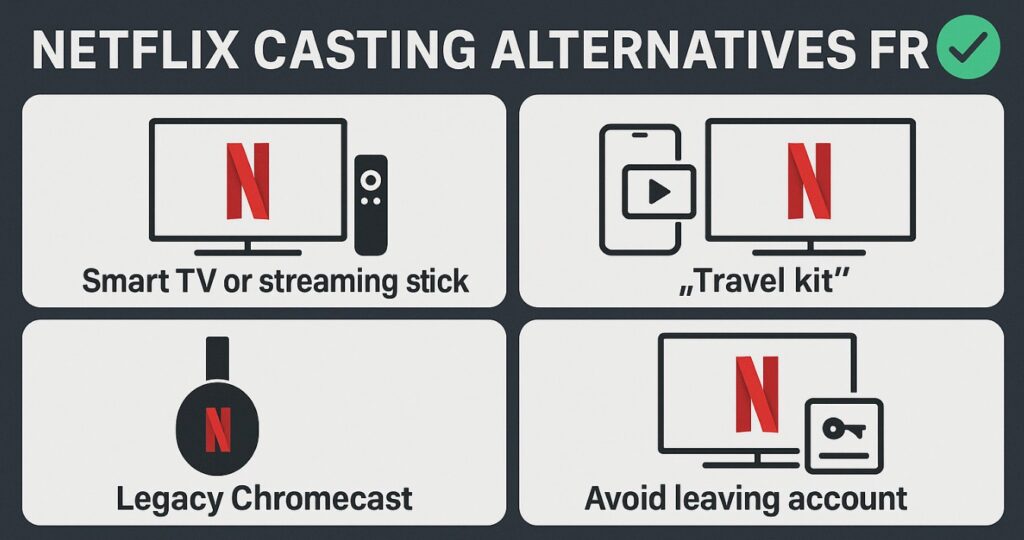

If the Cast icon vanished, here are the best Netflix casting alternatives for TV that work today without headaches. We’ll cover the fastest path on smart TVs and streaming sticks, the “travel kit” that always works, what still functions on legacy Chromecast, and how to avoid leaving your account behind in hotels. No fluff — just reliable workflows. ✅
Best Netflix casting alternatives for TV (quick chart)
| Scenario | Best alternative | Steps (short) | What to expect |
|---|---|---|---|
| Smart TV / streaming stick with Netflix app | Use the native Netflix app (remote) + TV code login | Open Netflix on TV → choose Sign in with a code → enter code at netflix.com/tv on your phone → you’re in | Fastest, no typing of passwords on hotel TVs; stable playback |
| You carry a streaming stick (Roku/Fire TV/Google TV) | Plug into HDMI → connect Wi-Fi → run Netflix app | Use hotel Wi-Fi or phone hotspot → sign in via code → play | Works anywhere there’s HDMI + power; completely bypasses casting |
| Older Chromecast / cast-enabled TVs | Try legacy casting (may still work) | Phone Wi-Fi = TV Wi-Fi → Netflix app → Cast icon → select device | Availability varies by device/firmware/region; not guaranteed |
| No smart features available | Phone/laptop → HDMI | USB-C/HDMI adapter (or laptop HDMI) → switch TV input → open Netflix in browser/app | Bulletproof in rentals/hotels; zero reliance on casting |
(Menu labels can differ by brand/region; update TV/apps first for best compatibility.)
Why native app + code login is the new “easy mode” 🎯
Modern TVs and streaming sticks ship with a full Netflix app and remote. Instead of casting, launch the app, choose Sign in with a code, and complete it from your phone. It’s quicker than pecking passwords on a hotel remote, and it avoids the common cast failures or plan/device restrictions. You also keep app features like profiles, subtitles, audio tracks, and recommendations intact. 👍
One public report documenting the change: Android Authority noted that Netflix has limited/removed mobile casting on most newer Chromecast/Google TV devices, pushing users toward the native app experience (remote + code login).
Travel setup that always works (no casting required) ✈️
Bring a tiny kit and you’re safe anywhere:
- Streaming stick with remote (Roku/Fire TV/Google TV) + USB power
- OR a USB-C to HDMI adapter (for your phone/laptop) and a short HDMI cable
- Optional: compact Ethernet adapter if hotel Wi-Fi is weak
Hotel flow: plug into HDMI → connect to Wi-Fi (or your phone hotspot) → open Netflix → Sign in with a code. Done. If the hotel blocks new devices on Wi-Fi, your phone hotspot is the fallback. 🔐
Legacy Chromecast: when it still works (and when it won’t)
Some older Chromecast or cast-enabled TVs may still accept casting from the Netflix mobile app, but support is inconsistent across models, firmware, and regions. If you depend on this, test at home before you travel. For reliability, treat legacy casting as a bonus — not a plan.
Privacy & sign-out in hotels 🧹
- Inside the Netflix TV app, go to Get Help → Sign out when you leave.
- If you forgot, you can remotely sign out of all devices from your Netflix account settings at home.
- On your streaming stick, use “Reset”/“Sign out of all apps” before packing it up.
Troubleshooting: when the Cast icon is missing
- Same network: phone and TV/streamer must share the exact Wi-Fi network.
- Reboot both devices: power-cycle TV/streamer and phone.
- Update the app/OS: old Netflix builds and outdated TV firmware often block discovery.
- Try the native app instead: if casting is still unavailable, launch the Netflix app on the TV and sign in with a code — it’s the supported path.
Netflix casting alternatives for TV — travel/hotel setup (step-by-step)
- Pick your method: native app + code or streaming stick or HDMI from phone/laptop.
- Connect: HDMI → switch TV input; join Wi-Fi or hotspot.
- Sign in quickly: use the TV code (you’ll enter it on your phone).
- Play & verify: test one title for audio/subs quality; adjust Match Frame Rate/Dynamic Range if your device supports it.
- Before you leave: Sign out on the TV app (and reset your stick if you used one). 🙌
FAQ
Why did Netflix remove casting from the phone app on many devices?
The company is steering users to the native TV app with a remote, where features and account controls are consistent. Legacy casting may still work on some older devices, but it’s no longer the default path.
Is there any downside to using the native app + TV code?
Not really. It’s faster than typing passwords, and playback is generally more stable than phone casting.
Do any Netflix casting alternatives for TV still use my phone as a remote?
Yes: with Roku/Fire TV/Google TV, you can use each platform’s mobile remote app to navigate the native Netflix app — no classic “casting” needed.
Will HDMI from my phone/laptop always work?
Yes, provided the TV accepts the HDMI input and your device allows video out (most laptops; many phones via USB-C). It’s the most universal fallback.
How do I keep my account private in rentals/hotels?
Always Sign out inside the Netflix TV app before checkout, or trigger Sign out of all devices from your account later.
Final Verdict
Classic phone casting is no longer the reliable path. The best Netflix casting alternatives for TV are: native TV app + code login for speed and stability, a travel streaming stick for full control in any HDMI port, and, where it still works, legacy Chromecast casting as a bonus. Pack a compact HDMI adapter as your last-resort option, and you’ll never be stuck staring at a missing Cast icon again. 🎬📺✨
Recommended internal reads (clean, live URLs):
- https://tvcomparepro.com/tcl-tv-hidden-features-2025/
- https://tvcomparepro.com/earc-dropouts-fix-for-ps5-and-xbox-on-tcl-tvs
Notes: Menu names can vary by model/region; update firmware and apps before testing.