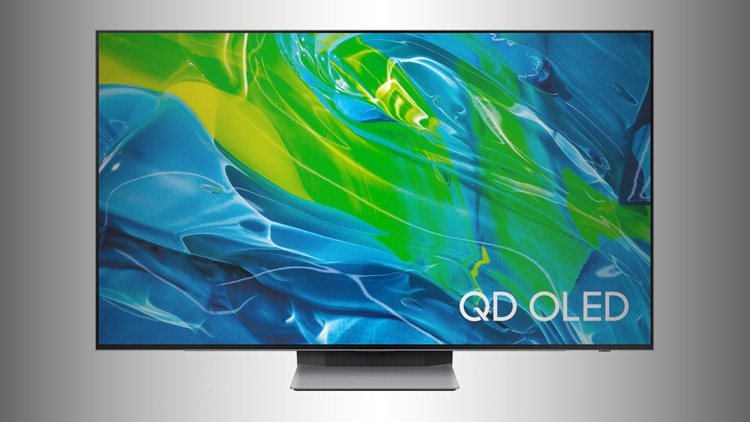

Samsung has just introduced its latest flagship QD-OLED TV for 2025—the Samsung S95F, the successor to last year’s hugely successful Samsung S95D. But what exactly has changed, and is the new model worth upgrading from the S95D?
In this detailed guide, we compare Samsung S95D vs Samsung S95F, breaking down the improvements, specs, real-world performance, gaming features, and much more. By the end, you’ll know exactly if the new Samsung S95F deserves your investment. 🚀
Samsung S95D vs Samsung S95F – Quick Comparison Table
Samsung S95D vs Samsung S95F — Quick Comparison Table (rectificat)
Samsung S95D vs Samsung S95F — Quick Comparison Table
| Feature | Samsung S95D | Samsung S95F |
|---|---|---|
| Panel type | QD-OLED | QD-OLED (newer generation; some sizes/regions can behave slightly differently) |
| Peak brightness (HDR highlights) | ≈ 1,500–1,900 nits (commonly ~1,600 in accurate modes; varies by window size, mode, and sample) | ≈ 2,300 nits (measured peak HDR highlights on many samples; still varies by window size, mode, and sample) |
| Anti-glare tech | Glare-Free matte coating (very effective) | Refined Glare-Free matte coating (better highlight suppression in bright rooms on many units) |
| Gaming features | 4K up to 144Hz (PC), VRR, ALLM, low input lag | 4K up to 165Hz (PC on supported SKUs), VRR, ALLM, low input lag |
| Smart platform | Tizen OS | Tizen OS (newer generation refinements; UI behavior can vary by firmware) |
| HDMI 2.1 | Typically 4 ports (feature support can vary by region/model) | 4 ports (feature support can vary by region/model) |
| Audio features | Dolby Atmos support, Object Tracking Sound (tier varies), Q-Symphony | Dolby Atmos support, Object Tracking Sound (tier varies), Q-Symphony (plus minor tuning changes depending on firmware) |
| Sizes | 55″, 65″, 77″ (market dependent) | 55″, 65″, 77″, 83″ (market dependent) |
| Price (launch) | Premium | Premium (usually higher at launch) |
Note: Peak brightness figures are best treated as directional. Window size, picture mode, panel variance, and firmware can shift what you’ll measure in your room.
Samsung S95F Review – What’s New and Improved?
Samsung’s S95F builds on what made the S95D so popular: punchy QD-OLED color, a glare-resistant matte finish, and strong gaming support. The difference is that S95F feels like Samsung finally gave this formula more breathing room — brighter highlights, more refresh headroom for PC, and a slightly more confident bright-room look. 🙂
Brighter QD-OLED panel (real HDR impact)
In accurate picture modes, S95D commonly lands around ~1,600 nits for HDR highlights, while S95F pushes closer to ~2,300 nits on many samples. That extra headroom is not just a spec flex — it shows up as stronger HDR “spark” (sun glints, neon, metal reflections) and more resilience when you’re watching during the day.
Refined glare-free handling
Both TVs use a glare-free matte approach, which is a big deal in rooms with windows or overhead lighting. The S95F generation tends to handle bright reflections and “hotspots” a bit more gracefully, without feeling quite as easily washed out in tough lighting.
Higher PC refresh ceiling
If you game on PC, S95D’s 144Hz is already excellent. S95F pushes that ceiling to 165Hz on supported SKUs — a niche upgrade, but meaningful if you actually run high frame rates.
Samsung S95D vs Samsung S95F – Brightness and Picture Quality 🎨
Samsung S95D
S95D is still a top-tier QD-OLED experience: deep blacks, strong color volume, and unusually good bright-room usability for an OLED thanks to the matte coating. In accurate modes, HDR highlights often sit around ~1,600 nits (with variation depending on sample and window size). For most people, it already looks “premium OLED” in a way that doesn’t collapse the moment daylight hits the room.
Samsung S95F
S95F is the same flagship idea, just turned up with more confidence. Many measurements place HDR peak highlights around ~2,300 nits, giving HDR content a bigger sense of depth and contrast in bright spaces. 🎨
The practical effect: highlights look more dimensional, and the TV has more room to preserve intensity without making the whole image feel harsh.
Verdict
If brightness is the deciding factor — especially for a bright living room — S95F delivers a genuinely noticeable step up over S95D.
Gaming Comparison 🎮: Samsung S95D vs Samsung S95F
Samsung S95D Gaming
S95D supports 4K gaming up to 144Hz on PC, plus VRR and ALLM with very low input lag. It’s already an excellent match for PS5, Xbox Series X, and high-end gaming PCs.
Samsung S95F Gaming
S95F keeps the same core gaming fundamentals (VRR, ALLM, low input lag) but adds a higher ceiling for PC with up to 165Hz on supported models. 🎮
For console players, the bigger “upgrade you’ll actually notice” is still the brighter HDR headroom rather than the refresh number.
Verdict
Competitive PC gamers benefit most from S95F. Console players will usually feel the brightness improvement more than the refresh upgrade.
Smart TV Features Comparison 📺
Both Samsung S95D and S95F use Tizen OS. However, the S95F includes an improved interface with enhanced navigation, faster app loading, and better integration with Samsung SmartThings and cloud gaming.
- Samsung S95D: Excellent app support, fast navigation, stable performance.
- Samsung S95F: Even smoother navigation, faster app launches, optimized streaming and cloud gaming apps integration.
Audio & Sound 🔊: Samsung S95D vs Samsung S95F
Both TVs support Dolby Atmos passthrough/output features and Samsung’s Object Tracking Sound family (exact tier can vary by size/region), plus Q-Symphony pairing with compatible Samsung soundbars. In practice, they’re both “good for a thin TV,” but neither replaces a real soundbar if you care about dialogue clarity, bass weight, and height effects.
Samsung S95D: Strong clarity for built-in audio; soundbar still transforms the experience.
Samsung S95F: Similar feature set, with minor tuning improvements depending on firmware and model size.
Design & Sizes Comparison 📐
- Samsung S95D: Sleek Infinity One design, available in 55”, 65”, and 77” sizes.
- Samsung S95F: Same elegant Infinity One style, adding a larger 83” model ideal for home cinema setups.
Who Should Upgrade from Samsung S95D to Samsung S95F?
✅ Upgrade if:
- You value significantly improved brightness and anti-glare (bright living rooms).
- You’re a serious gamer wanting the best VRR and input lag performance.
- You desire the larger 83” screen for cinematic viewing.
- You prefer the latest smart features and faster interface.
❌ Stick with S95D if:
- You already own an S95D and brightness isn’t critical.
- Budget constraints are essential—S95D still exceptional for its price.
Samsung S95D vs Samsung S95F FAQ 🔎
Q: Is the brightness upgrade from S95D to S95F noticeable?
A: Yes, especially for HDR content and brightly-lit rooms.
Q: Does Samsung S95F support Dolby Vision?
A: No, Samsung maintains HDR10+ Adaptive, still providing excellent HDR performance.
Q: Is Samsung S95F worth the extra cost over S95D?
A: If you need maximum brightness, advanced gaming, or the larger 83” size, absolutely yes.
Q: Any burn-in improvements with Samsung S95F?
A: Samsung claims further burn-in resistance improvements with the enhanced QD-OLED panel.
Samsung S95D vs Samsung S95F – Conclusion 🏆
Both TVs are flagship QD-OLEDs with Samsung’s glare-free matte approach and excellent gaming fundamentals. The Samsung S95F is the cleaner choice if you want the brightest HDR highlight impact (around ~2,300 nits on many measurements), the added PC refresh ceiling, and the optional 83-inch size. Meanwhile, Samsung S95D remains a strong high-end pick — especially if you find it at a better price and your room lighting doesn’t demand that extra brightness ceiling. ✨
For more detailed comparisons, buying guides, and expert reviews, stay tuned to tvcomparepro.com! 🚀📺✨