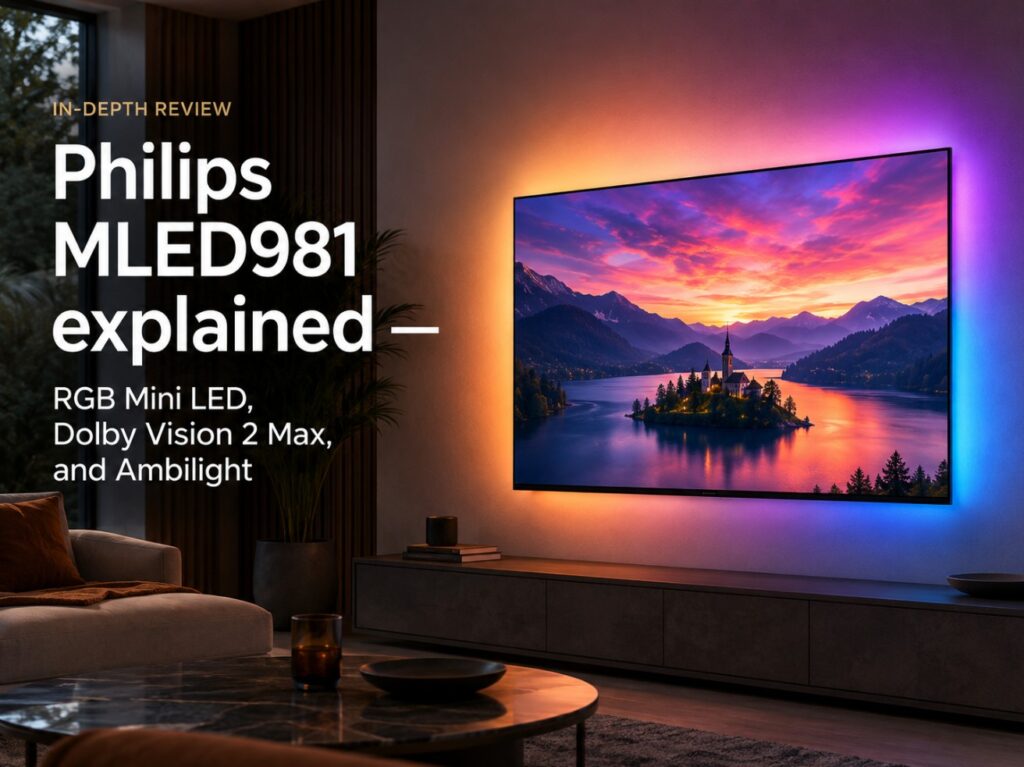

Buying a large premium LCD TV is becoming more complicated now that OLED, Mini LED, RGB Mini LED, and Dolby Vision 2 Max are all competing for attention, which is why Philips MLED981 explained matters as a real buyer guide, not just another model-name breakdown. This is Philips’ first RGB Mini LED TV, and it enters a very specific part of the market: large-screen LCDs that want to feel more advanced than traditional Mini LED, while still sitting below the company’s top OLED models.
That position is important. Philips is not presenting the MLED981 as a simple OLED replacement for every buyer. The company has openly framed RGB Mini LED as useful for large, bright, more affordable screens, while still acknowledging that OLED remains stronger for pixel-level black control. That honesty actually makes the MLED981 more interesting, because it tells you what kind of buyer this TV is really for.
This is not the “OLED killer” version of the story. It is more practical than that: an 85-inch RGB Mini LED TV for buyers who want scale, color, Ambilight, strong HDR format support, and a more reachable alternative to very large OLED. ✨
Philips MLED981 explained — core specs table
| Category | Philips MLED981 |
|---|---|
| TV family | Philips The Xtra / MLED981 |
| Screen size | 85 inches |
| Display type | RGB Mini LED LCD |
| Resolution | 4K Ultra HD |
| Backlight system | RGB Mini LED |
| Local dimming zones | 3,840 dimming zones |
| RGB controls | 11,520 RGB controls |
| Peak brightness claim | Up to 2,500 nits |
| Processor | 10th Gen P5 AI processor |
| Chipset | MediaTek Pentonic 800 platform reported |
| Panel / refresh | 165Hz panel, 97% DCI-P3 coverage claim |
| HDR formats | Dolby Vision 2 Max, Dolby Vision, HDR10, HDR10+, HLG |
| Smart platform | Titan OS, region dependent |
| Ambilight | Three-sided Ambilight |
| Audio | 70W 4.1 integrated sound system |
| HDMI | Four HDMI 2.1 ports |
| Gaming | High-refresh support, FreeSync / G-Sync Compatible features reported |
| Best for | Large-screen bright-room viewing, sports, Ambilight fans, OLED alternatives |
The key detail is the difference between dimming zones and RGB controls. The safe local dimming number is 3,840 zones. The larger 11,520 figure refers to RGB controls tied to the red, green, and blue backlight structure, not 11,520 separate dimming zones.
Technical specifications: what buyers should know
| Specification | Philips MLED981 |
|---|---|
| Model name | Philips MLED981 |
| Size | 85-inch |
| Panel type | LCD |
| Backlight type | RGB Mini LED |
| Local dimming | 3,840-zone local dimming |
| RGB backlight controls | 11,520 RGB controls |
| Brightness claim | 2,500 nits peak light output |
| Processor | 10th Gen P5 AI processor |
| Chipset | MediaTek Pentonic 800 platform reported |
| Motion / refresh | 165Hz panel |
| HDMI connectivity | Four HDMI 2.1 ports |
| HDR support | Dolby Vision 2 Max, Dolby Vision, HDR10, HDR10+, HLG |
| Gaming features | FreeSync / G-Sync Compatible features reported |
| Audio | 70W 4.1 integrated audio system |
| Lighting | Three-sided Ambilight |
| Operating system | Titan OS / Philips smart TV platform, region dependent |
| Market position | Premium Philips LCD, below the flagship OLED range |
Menu names, app support, HDR behavior, gaming options, and smart-platform features can vary by country, firmware, and retail version. Always check the exact local product page before buying.
What makes RGB Mini LED different?
RGB Mini LED changes the backlight story.
Most Mini LED TVs use a blue or white LED backlight, then rely on filters and quantum-dot layers to create the final color. RGB Mini LED uses red, green, and blue light elements in the backlight itself. The idea is to create cleaner primary colors before the image even reaches the LCD layer.
That can help with:
- richer color volume
- stronger saturated highlights
- more controlled color mixing
- more vivid HDR scenes
- better separation between red, green, and blue tones
But this still does not turn an LCD TV into OLED. The MLED981 remains a local-dimming LCD. That means it can be bright and colorful, but black levels, small highlight control, and halo behavior still depend on the dimming system, panel behavior, processing, and scene type.
Practical setup notes before choosing the MLED981
In practical setup terms, the MLED981 makes the most sense if you want a large premium TV for a bright or mixed-light room. It is an 85-inch RGB Mini LED model, so its strengths should be size, brightness, color, and everyday viewing flexibility.
The more interesting part is Philips’ restraint. Instead of chasing the highest peak-brightness number in the category, Philips appears to be positioning the MLED981 around controlled picture quality, halo reduction, motion handling, and the full Ambilight experience. That may be more useful in a real living room than a spec sheet built only around extreme brightness.
If you mostly watch movies in a dark room and care about perfect blacks, Philips’ OLED models still make more sense. If you want a huge screen for sports, streaming, gaming, and daytime use, the MLED981 becomes much more interesting.
Why the 3,840-zone clarification matters
This is one of the most important details in the whole article.
Some early reports around the MLED981 can make the TV sound like it has 11,520 dimming zones. The clearer and safer interpretation is:
| Term | Correct meaning |
|---|---|
| 3,840 dimming zones | The local dimming zone count |
| 11,520 RGB controls | The red, green, and blue control count tied to the backlight structure |
| 2,500 nits | Manufacturer peak brightness claim |
| RGB Mini LED | Backlight technology, not OLED-style pixel control |
That distinction matters because dimming zones control light in larger blocks, while RGB controls describe how the backlight manages red, green, and blue elements. Both are important, but they are not the same thing.
For accuracy, the MLED981 should be described as a TV with 3,840 dimming zones and 11,520 RGB controls, not as an 11,520-zone local dimming TV.
Philips MLED981 explained for Dolby Vision 2 Max buyers
Dolby Vision 2 Max is one of the headline features. It is the higher version of Dolby’s newer HDR platform and is aimed at premium TVs with stronger processing and display capability.
For the MLED981, Dolby Vision 2 Max matters because it fits the TV’s purpose:
- large-screen HDR movies
- ambient-light-aware viewing
- better tone mapping
- future streaming support
- improved motion tools where supported
That said, buyers should keep expectations realistic. Dolby Vision 2 Max support does not mean every streaming app or every title will immediately use the full feature set. The TV may be ready before the content ecosystem fully catches up.
Ambilight: why Philips is still different
Ambilight remains the emotional feature that separates Philips from nearly every other TV brand.
The MLED981 uses three-sided Ambilight, which projects color from the TV onto the wall behind it. On an 85-inch screen, that can make the image feel larger and reduce the hard visual edge between the display and the room.
Ambilight is not just decoration. For many buyers, it changes how the TV feels at night:
- the image can appear less harsh in a dark room
- sports and games feel more immersive
- wall glow can reduce perceived eye strain
- the TV feels more integrated into the room
Not everyone likes it, and it should be adjustable or turned off when accuracy matters. But if you like Philips TVs, Ambilight is still one of the clearest reasons to choose the brand.
MLED981 vs OLED: what Philips is really saying
The MLED981 is interesting partly because Philips does not need to pretend OLED is weak. OLED still has the cleaner black-level story because every pixel can switch itself off. That gives OLED a level of precision local-dimming LCDs cannot fully match.
But OLED also becomes expensive at very large sizes. That is where RGB Mini LED has a clearer role. It gives Philips a way to offer a large, bright, premium-feeling TV without pushing buyers into the most expensive OLED category.
| Buyer priority | Better fit |
|---|---|
| Perfect black levels | Philips OLED |
| Pixel-level contrast | Philips OLED |
| Large-screen value | Philips MLED981 |
| Bright-room sports | Philips MLED981 |
| Ambilight with big-screen scale | Philips MLED981 |
| Movie accuracy in a dark room | Philips OLED |
| Daytime HDR impact | Philips MLED981 |
The MLED981 should not be judged as an OLED replacement for everyone. It should be judged as Philips’ large-screen RGB Mini LED alternative for buyers who want size, brightness, and color without jumping to the most expensive OLED option.
Brightness, color, and halo control
The MLED981’s peak brightness claim is 2,500 nits, which is strong but not the most aggressive number in the 2026 RGB Mini LED conversation. That may actually be the point.
Philips appears to be aiming for a balanced premium LCD rather than a spec-sheet brightness contest. The emphasis is on:
- controlled halo behavior
- improved motion handling
- better contrast consistency
- strong color volume
- premium processing
- Ambilight immersion
That approach could work well if the dimming system and P5 AI processing are tuned carefully. A TV does not need to be the brightest in the category to look good. It needs to keep bright highlights, dark scenes, motion, and color under control across real content.
Gaming on Philips MLED981
The MLED981 should be a serious gaming TV on paper. It is listed with a 165Hz panel, four HDMI 2.1 ports, and support for gaming features such as FreeSync and G-Sync Compatible behavior in reported specs.
| Gaming feature | Philips MLED981 |
|---|---|
| HDMI | Four HDMI 2.1 ports |
| Refresh | 165Hz panel |
| VRR | Supported / reported |
| FreeSync | Reported |
| G-Sync Compatible | Reported |
| Best console target | 4K 120Hz with VRR |
| Best PC target | High-refresh 4K gaming, depending on GPU and HDMI behavior |
| Ambilight gaming | Strong immersion feature, optional for accuracy |
For PS5 and Xbox, the practical target is still 4K 120Hz with VRR. For PC gaming, the 165Hz panel is more interesting, especially if the local model exposes the right HDMI modes and low-latency settings.
Port-by-port I/O map
| Port / feature | Philips MLED981 | Why it matters |
|---|---|---|
| HDMI 1 | HDMI 2.1 | Console, PC, or high-bandwidth source |
| HDMI 2 | HDMI 2.1 | Second console or gaming source |
| HDMI 3 | HDMI 2.1 / eARC behavior to verify locally | Soundbar, AVR, or premium source |
| HDMI 4 | HDMI 2.1 | Extra console, PC, or streamer |
| eARC | Supported on one HDMI port, verify exact labeling | Needed for soundbar / AVR audio return |
| VRR | Supported / reported | Smoother gaming |
| FreeSync / G-Sync Compatible | Reported | Useful for compatible PC or console setups |
| Network / USB / tuner | Region dependent | Check local product listing |
Four HDMI 2.1 ports are a strong advantage if confirmed on the local model. It makes the MLED981 easier to live with if you use multiple consoles, a gaming PC, a soundbar, and an external streaming box.
Manufacturer claims vs rounded real-world expectations
| Area | Philips MLED981 |
|---|---|
| Manufacturer positioning | Premium RGB Mini LED LCD below flagship OLED |
| Brightness claim | Up to 2,500 nits |
| Dimming claim | 3,840 dimming zones |
| RGB control claim | 11,520 RGB controls |
| Color expectation | Strong RGB Mini LED color volume, but real performance depends on processing |
| Black-level expectation | Better than basic LCD, not OLED-level pixel control |
| Motion expectation | Strong, helped by 165Hz panel and P5 processing |
| Gaming expectation | Strong on paper, especially with four HDMI 2.1 ports |
| Main risk | First-generation RGB Mini LED tuning and local dimming behavior need real reviews |
The safe reading is that the MLED981 is a serious premium LCD, not a proven OLED replacement. It needs real testing before anyone can say how well Philips has balanced brightness, color, halo control, and motion.
Who should buy Philips MLED981?
The Philips MLED981 makes the most sense if you want:
- an 85-inch premium TV
- RGB Mini LED color and brightness
- Ambilight immersion
- strong HDR format support
- Dolby Vision 2 Max readiness
- a large-screen alternative to expensive OLED
- four HDMI 2.1 ports for a modern setup
It is especially interesting for living rooms where OLED pricing, size limits, or bright-room use make a large LCD more practical.
Who should skip it?
You may want to skip the MLED981 if:
- you mostly watch in a dark cinema room
- OLED black levels matter more than brightness
- you want the most proven panel technology
- you prefer Google TV over Titan OS
- you do not care about Ambilight
- you want to wait for full independent reviews before buying first-generation RGB Mini LED
That last point is important. The MLED981 has strong specs, but RGB Mini LED is still new in consumer TVs. Early adopters should expect some unknowns.
Common buying mistakes
Confusing RGB controls with dimming zones
The correct local dimming number is 3,840 zones, not 11,520 zones.
Assuming RGB Mini LED equals OLED
It does not. RGB Mini LED is still LCD-based.
Buying only for Dolby Vision 2 Max
Dolby Vision 2 Max is promising, but content support will take time.
Ignoring Titan OS
The smart platform matters. Check whether your most-used apps are available and stable in your region.
Forgetting Ambilight needs wall space
Ambilight works best when the TV has room behind it and a suitable wall surface.
Assuming all HDMI features work identically everywhere
Always verify the exact local model and firmware behavior.
Which buyer does this TV really suit?
The Philips MLED981 is for someone who wants a premium 85-inch TV with more brightness and scale than most OLED buyers can reasonably afford, but who still wants a distinctive picture experience rather than a generic LCD. Ambilight, Dolby Vision 2 Max, RGB Mini LED, and four HDMI 2.1 ports make it a genuinely interesting 2026 TV.
It is not the safest choice for dark-room purists. It is not the obvious choice for people who want the most proven OLED performance. But for buyers who want a large, bright, colorful Philips TV with Ambilight and next-generation HDR support, the MLED981 has a clear reason to exist.
The cleanest way to think about it is this: choose OLED for pixel-level precision; choose the MLED981 if you want a large RGB Mini LED Philips with brightness, Ambilight, and a more accessible path to 85-inch premium viewing.