
A 65-inch OLED can look impressive on a spec sheet. The harder question is what happens when a film pushes its brightest highlights, a streaming app serves up messy compression, or a gaming PC asks for more than 120Hz. That’s why the Sony BRAVIA 6 vs LG C6 comparison is much more interesting to me than a simple list of features.
I’m comparing the 65-inch Sony BRAVIA 6 (K-65A60) and the 65-inch LG C6 (OLED65C6) only. Those are the models behind the technical discussion and the buying recommendation here. Different regional suffixes may apply, so check the exact model in your market.
My own HDR measurements on the two 65-inch TVs give this comparison a much firmer starting point. The C6 has substantially more peak brightness headroom and a higher-tier picture processing platform, while Sony makes its case with Google TV, broad DTS support and, when discounted, an appealing OLED experience for a controlled room. I also want to mention the cheaper LG B6, not to turn this into a three-TV comparison, but because its existence changes what makes the Sony worth buying.
At 65 Inches, the Difference Is More Than 120Hz vs 165Hz
Both sets deliver self-emissive OLED blacks, wide viewing angles, Dolby Vision and four HDMI 2.1 connections. That already makes the BRAVIA 6 far less restricted than older entry-level Sony OLEDs. Yet the two televisions aim at different levels of picture performance.
| What matters | Sony BRAVIA 6, 65-inch | LG C6, 65-inch |
|---|---|---|
| 65-inch model reference | K-65A60 (regional K-65A60 variants) | OLED65C6PUA in the US; regional OLED65C6 variants elsewhere |
| Panel and resolution | 4K WOLED, 3840 × 2160 | 4K OLED evo / WOLED, 3840 × 2160 |
| Refresh rate | Native 120Hz, up to 4K120 | Native 120Hz, up to 165Hz VRR from compatible PCs |
| HDR formats | HDR10, HLG, Dolby Vision | HDR10, HLG, Dolby Vision |
| Picture platform | MediaTek Pentonic 800 (P800) SoC; no dedicated Sony XR image-processing co-processor. | Alpha 11 AI Processor 4K Gen3 |
| HDMI 2.1 gaming inputs | Four; 4K120, VRR and ALLM on HDMI 1–4 | Four; 4K120, VRR, ALLM, QMS and QFT support |
| PC gaming extras | HDMI VRR, up to 120Hz; G-SYNC/FreeSync certifications not listed by Sony | G-SYNC Compatible, FreeSync Premium, up to 165Hz VRR |
| Smart TV system | Google TV | webOS 26 |
| Surround audio formats | Dolby Atmos and DTS/DTS:X support | Dolby Atmos; DTS support not provided |
| Best fit | Dark-room OLED, Google TV, DTS and a lower purchase price | Higher HDR impact, brighter-room use, mixed-quality streaming and PC gaming |
The important point here is size discipline: every LG performance figure I discuss belongs to the 65-inch C6. I am not carrying brightness results across other diagonals or panel revisions.
HDR Brightness: What I Measured on Both 65-Inch TVs
Here’s the number that first made me rethink the BRAVIA 6 as a value proposition: in my testing, the 65-inch Sony BRAVIA 6 reached approximately 750 nits on a 10% HDR window. That’s enough for attractive OLED contrast in a dim room, but it leaves a relatively modest amount of headroom for the brightest highlights in demanding HDR films.
On the 65-inch LG C6, my 10% HDR measurement came in at around 1,350 nits. I prefer to keep both figures rounded rather than suggest a level of precision that wouldn’t change the buying decision. What stood out to me was the extra room the C6 has for bright reflections, headlights and small specular highlights. I wouldn’t use a single 10% window result to predict every scene, though. Full-screen brightness, picture mode and tone mapping are separate parts of the experience.
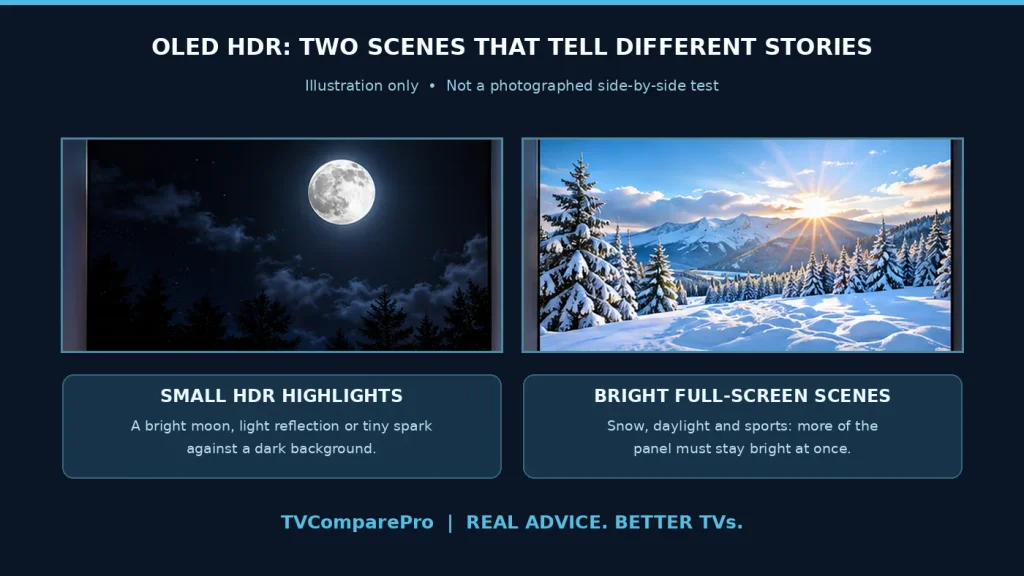
Imagine a streetlight reflecting off a car in a dark scene. OLED’s perfect black level makes that reflection stand out on either TV, but the C6 has more headroom to make it look intense without making the surrounding black any deeper. Then picture a snowfield or a bright football match. Now brightness across a larger area matters, and a 10% peak reading alone cannot tell the whole story.
That leads to a second term worth understanding: automatic brightness limiting, or ABL. OLED panels manage power and heat by reducing output as a larger portion of the screen becomes bright. The C6 still has ABL. It isn’t a magic solution for sunlight or a replacement for a very bright Mini LED TV. What it offers over the BRAVIA 6 is a more useful amount of HDR and SDR headroom in typical viewing conditions.
If most of your watching takes place at night, I’d care more about near-black control, tone mapping and whether highlights retain texture. If you’re buying a 65-inch TV for a bright family room, the extra brightness becomes harder to dismiss.
Tone Mapping and PQ EOTF: A Brighter TV Is Not Automatically a More Accurate One
This is where the comparison gets interesting technically. A TV follows the PQ EOTF to decide how bright each HDR signal level should appear. Ideally, the display follows the intended curve until it runs out of luminance; then it must decide how to handle information above its capabilities.
In my own PQ EOTF checks, the BRAVIA 6 followed the intended curve closely through much of its usable HDR range. That’s an important strength, and it explains why I wouldn’t judge the Sony simply by its lower peak brightness. As it approaches that ceiling, though, there is less room to preserve the brightest gradations. The challenge is handling detail near the sun or a powerful reflection without pushing it into an indistinct white patch.
The C6 has more light output to work with and can roll off the brightest part of the signal more gradually. It also offers Dynamic Tone Mapping, which can brighten perceived highlights and scenes, although turning it on changes the reference presentation. I would compare the TVs in accurate movie modes first, then decide whether the more dramatic processing suits the room. A brighter image is not always a more faithful one.
There’s a trap in comparing OLEDs through photos or a single peak number. Camera exposure, picture mode, firmware, mastering metadata and the size of the bright area can all change the impression. My 10% HDR readings tell me something meaningful about highlight headroom; they don’t replace looking at real scenes or checking how brightness behaves across the rest of the screen.
Processing: Sony’s Reputation Does Not Automatically Win This Round
Sony is well known for picture processing, so I wouldn’t blame anyone for assuming the cheaper BRAVIA 6 inherits the same advantages as a high-end BRAVIA. It doesn’t use the same dedicated XR processing arrangement. That matters, especially with the content people actually watch every evening.
Low-bitrate streaming is difficult for any television. Faces can develop macroblocking, sharp edges can pick up mosquito noise, and skies or dim interiors can show posterization. The difficult part is reducing those artifacts without erasing skin texture and fine detail. I would pay particular attention to how the BRAVIA 6 handles heavily compressed 1080p material rather than assume that a clean 4K demo tells the full story.
The C6’s Alpha 11 Gen3 processor gives LG a more advanced processing platform and a wider set of picture controls. That is a meaningful distinction on paper, especially for mixed streaming, broadcast TV and YouTube. I still wouldn’t promise that every low-quality clip will look better without comparing the same source, picture mode and settings. Marketing labels are much less useful than checking whether real detail survives noise reduction.
I wouldn’t claim the Sony always looks worse on every Blu-ray. A clean 4K source gives both TVs far less work to do. The distinction grows when the source itself is compromised, precisely the situation in which better processing earns its place.
Motion: The 165Hz Label Doesn’t Fix Slow Movie Pans
Both OLEDs switch pixels extremely quickly. That helps gaming, but it can also make low-frame-rate stutter easier to see during slow camera pans. A 24fps film is still a 24fps film whether the panel can refresh at 120Hz or 165Hz.
It’s also important to distinguish a clean native 24p signal from a film carried inside a 60p output, such as a cable box or external streamer. The latter may introduce a 3:2 cadence that produces visible judder even when the panel itself is capable of smooth 24p playback. I would compare those signal paths separately, with motion interpolation disabled first, rather than call either TV the winner based only on a refresh-rate specification.
Motion interpolation can help if you’re comfortable with the processed look, and it can also introduce artifacts. For films, I’d start with the most natural setting. For games, I wouldn’t accept extra input lag simply to disguise 30fps judder.
PS5 Pro and Xbox Series X: 120Hz Is Enough for Both
Both 65-inch TVs are genuinely strong console partners. Each has four HDMI 2.1 inputs, supports 4K120, VRR and ALLM, and offers the instantaneous pixel response that makes OLED gaming feel clean and responsive. The BRAVIA 6 no longer forces you to reserve only two high-bandwidth HDMI inputs for gaming devices.
For a PS5 Pro, the Sony’s 120Hz maximum is not a meaningful handicap. The console’s video output tops out at 120Hz. The same applies to current Xbox Series X console output. If a game runs at 30fps, neither TV creates extra game frames just by having a faster panel.
What you will notice more often is HDR. A bright explosion, headlight or sunlit landscape gives the C6 room to deliver a stronger highlight. But there’s no reason to invent a specific console input-lag difference without matching measurements under the same resolution and mode.
Gaming PC: This Is Where LG C6 Pulls Further Ahead
Connect a sufficiently powerful PC and the 65-inch C6 can accept a 4K signal at up to 165Hz with VRR. Sony stops at 120Hz. That extra headroom is useful if your GPU and game can actually exceed 120fps, especially in lighter competitive titles.
LG also publishes support for NVIDIA G-SYNC Compatible and AMD FreeSync Premium, plus a mature Game Optimizer interface. Sony supports HDMI Forum VRR and common HDMI 2.1 gaming features, but I wouldn’t assign it certifications that Sony does not officially list.
There is a practical distinction between refresh rate and performance. A 165Hz TV connected to a PC running a game at 70fps is not delivering 165 unique game frames. VRR helps the display follow fluctuating output; it does not turn a slow GPU into a faster one.
For someone using the TV as a large monitor for both PC games and video content, I would lean toward the C6 even before comparing the price, provided the room can accommodate a glossy 65-inch screen.
Google TV, webOS 26 and the Formats That Matter
Sony’s strongest everyday advantage is not necessarily picture quality. It’s the overall ecosystem. Google TV is familiar, flexible with apps and useful if your home already revolves around Google services. The BRAVIA 6 also brings unusually broad audio-format support for this price class, including DTS and DTS:X support.
LG’s webOS 26 is a different experience. I like how Game Optimizer brings together VRR, low-latency controls and gaming information. The C6 also supports the usual big streaming apps, Dolby Vision and Dolby Atmos, and integrates well with LG’s connected-home features.
Neither TV supports HDR10+ in the way a compatible Samsung or Panasonic TV might. Both support Dolby Vision. More importantly for disc collectors, LG does not provide DTS audio passthrough on this model. If your library includes DTS soundtracks and your setup depends on the TV to process or pass them along, Sony may be the simpler choice. An external player connected directly to a compatible AVR can change that decision.
Before treating audio as an automatic Sony victory, I would check the precise source-to-TV-to-soundbar path. HDMI eARC, optical audio and internal app decoding do not all behave identically.
What About the Cheaper 65-Inch LG B6?
The LG B6 belongs in this conversation for one reason: it makes the price gap visible. It is a separate 65-inch entry OLED with a native 120Hz panel, four HDMI 2.1 ports, Dolby Vision and very capable console gaming. It doesn’t have the C6’s HDR brightness headroom or its higher-end Alpha 11 processing platform.
For me, the B6 is useful because it offers the core OLED experience and 4K120 gaming at a lower price, while the C6 adds substantially more HDR headroom and a higher-tier processing platform. I wouldn’t turn the Sony-versus-B6 choice into a single brightness claim here. Google TV, DTS support and the exact street price can still change which of those two entry-level options makes sense for a particular setup.
I’ve already covered that different buying decision in my Sony BRAVIA 6 vs LG B6 comparison. Here, the B6 is just the value reference. The main question remains whether paying more for the 65-inch C6 improves the experience enough to justify it.
65-Inch Pricing: What an Extra $200 Really Buys
US offers checked around November 13, 2026 placed the 65-inch BRAVIA 6 near $1,200 and the 65-inch LG C6 near $1,400. Those are snapshots, not permanent recommendations or guaranteed prices. Retailers, bundle promotions and region-specific model suffixes can change the comparison quickly.
At a difference of roughly $200, I would pay the extra for the C6 if HDR impact, daytime viewing or PC gaming matters. That is enough of a performance improvement to feel relevant over years of ownership. If Sony falls substantially further below LG, or Google TV and DTS solve a specific problem in your setup, the calculation changes.
I would also check the discounted B6 before committing to either. In some November US promotions the 65-inch B6 has approached $1,000, making it a serious value reference. But a one-day deal should not decide a purchase without checking warranty, regional specification and availability.
| Your 65-inch TV priority | What I would choose | Why |
|---|---|---|
| HDR films and stronger highlights | LG C6 | More peak HDR headroom in my 10% measurements, plus a higher-tier processing platform |
| PS5 Pro / Xbox, mainly in a dark room | Either, based on price | Both handle 4K120, VRR and ALLM; HDR still favors C6 |
| Gaming PC above 120fps | LG C6 | 165Hz VRR, G-SYNC Compatible and FreeSync Premium |
| Google TV, DTS-heavy local media collection | Sony BRAVIA 6 | App preference and broader audio-format support may outweigh the image gap |
| Lowest-cost 65-inch OLED | Check LG B6 too | Value reference, not a replacement for the main BRAVIA 6 versus C6 comparison |
These three 2026 OLEDs make sense for different budgets and setups. Check the latest price and confirm the exact 65-inch model before buying.
Affiliate links: TVComparePro may receive a commission on qualifying purchases.
My choice for stronger HDR highlights and PC gaming up to 165Hz.
Check Price on AmazonA compelling alternative for Google TV, DTS audio and 4K120 gaming.
Check Price on AmazonThe value option for OLED contrast and console gaming at 4K120.
Check Price on AmazonWhich 65-Inch OLED Would I Buy?
My preference is the 65-inch LG C6 if the price difference stays modest. The main reason isn’t the 165Hz badge. It’s the stronger HDR highlight headroom I found in my measurements, together with LG’s higher-tier processing platform and extra PC gaming flexibility. Those advantages matter across films and games, not just in a specification table.
I still see a sensible audience for the 65-inch Sony BRAVIA 6. In a darker room, with good-quality sources, its OLED contrast remains compelling. Four HDMI 2.1 ports, Google TV and DTS make it more practical than Sony’s entry OLEDs once were. At a meaningful discount, I would consider it without hesitation for someone who values those features more than maximum HDR punch.
The one thing I wouldn’t do is assume that a Sony badge automatically brings Sony’s highest-end processing, or that LG’s higher refresh number makes 24p films smoother. Judge these specific 65-inch televisions for the actual pictures and sources you’ll use.
For more options at this size, see my 65-inch TV picks by budget and use.