
If you’ve ever needed a long HDMI cable for your TV or gaming setup, you probably know how tricky finding a reliable one can be. That’s why I was excited to try two different 10-meter cables for this RUIPRO 8K fiber optic HDMI cable review: the One-Piece model with fixed connectors and the Detachable version with removable ends.
After spending time with both, I can say I’m genuinely impressed. I tested them with my PS5 Pro at 4K 120Hz with HDR, VRR and ALLM, and everything worked beautifully. What I liked most wasn’t the 8K branding or the long list of specifications. It was simply being able to enjoy smooth gaming and great picture quality over a 10-meter connection without worrying about the distance.
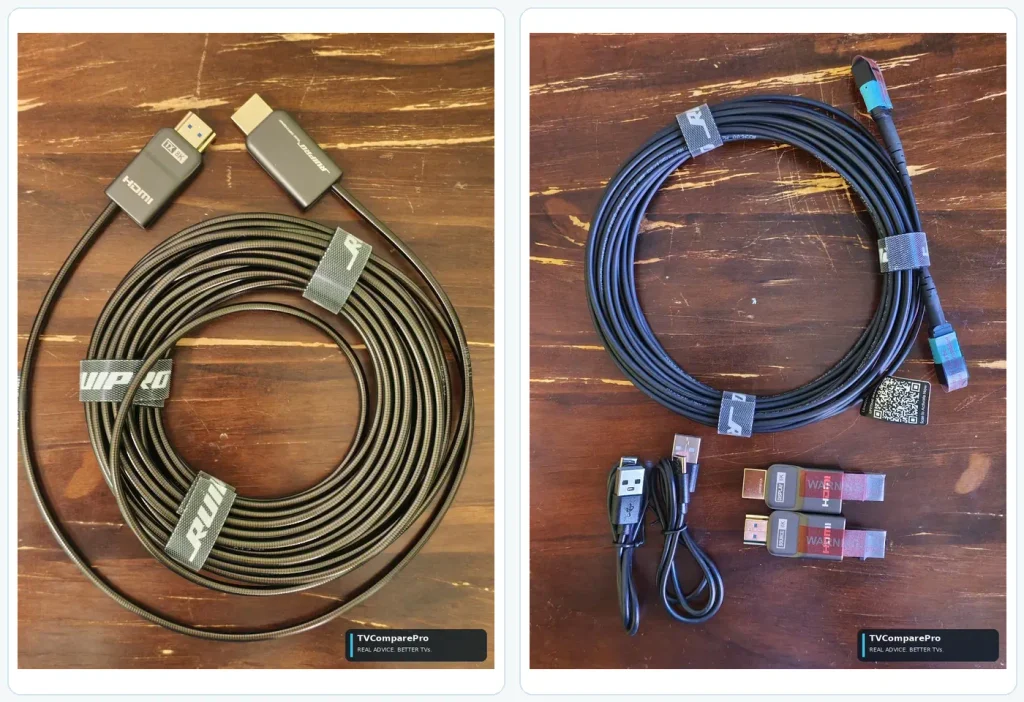
Left: One-Piece GEN4BK: the fixed HDMI ends stay attached to the 10m fiber cable. Right: Detachable GEN4AK: the slimmer cable and removable HDMI modules are separate pieces.
One-Piece or Detachable: what is the difference?
Imagine two garden hoses that do the same job. One has permanent ends. The other lets you unscrew the ends before passing the hose through a narrow space. These RUIPRO cables follow a similar idea, except they carry digital video and audio using light inside glass fiber.
| What matters | One-Piece GEN4BK | Detachable GEN4AK |
|---|---|---|
| Length I used | 10 m (33 ft) | 10 m (33 ft) |
| HDMI ends | Fixed to the cable | Removable TX/RX modules |
| Cable thickness | About 4 mm | About 3 mm |
| 4K 120Hz HDR, VRR and ALLM | Worked in my PS5 Pro setup | Worked in my PS5 Pro setup |
| Maximum advertised bandwidth | 48 Gbps | 48 Gbps |
| Best reason to choose it | Simple installation with fewer detachable parts | Easier routing through tighter openings and replaceable end modules |
Both felt well suited to a long run. The choice is more about how you install the cable than which one gives a magically sharper picture.
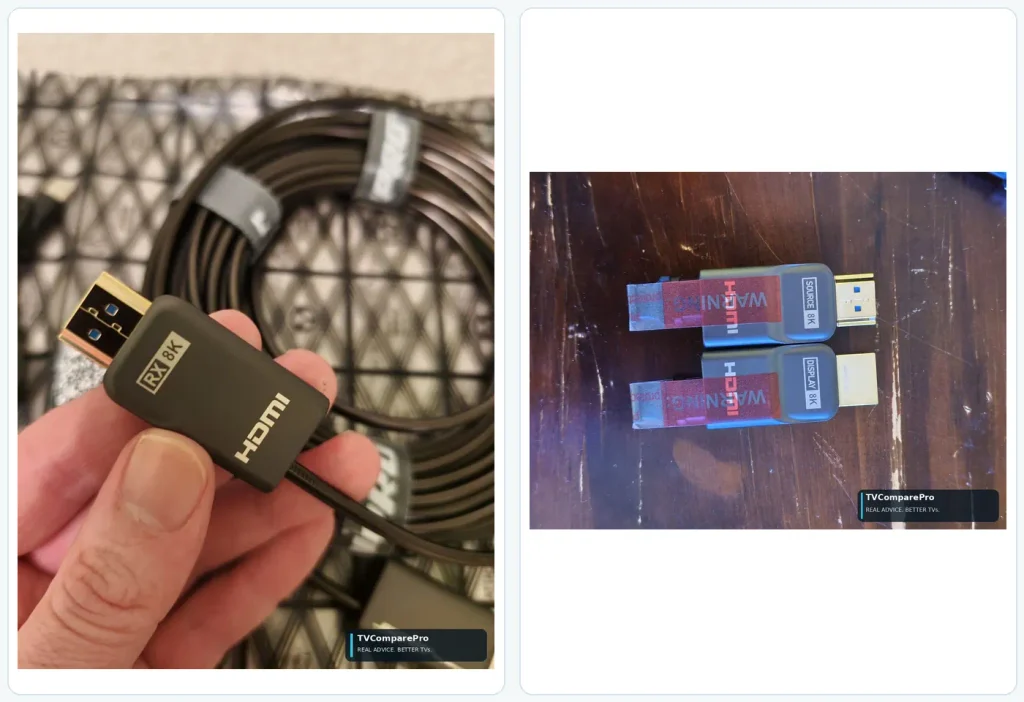
Left: One-Piece: its RX connector is part of the cable. Right: Detachable: separate SOURCE and DISPLAY modules plug onto the fiber.
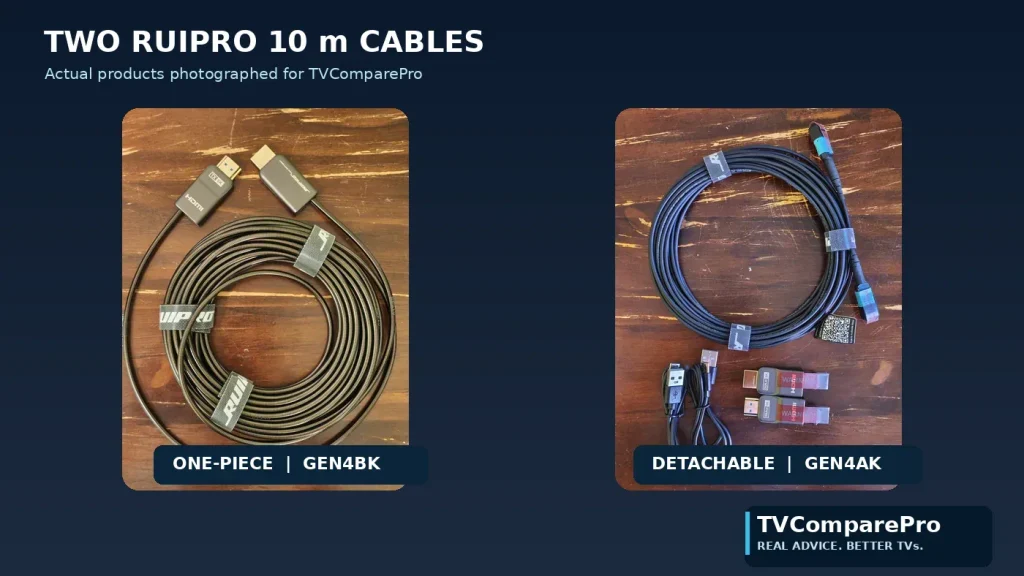
Both cables serve the same purpose; the main difference is how their ends are attached.
What comes in the detachable kit?
The Detachable package includes the fiber run, separate HDMI end modules, protective pieces, small cleaning swabs and installation guidance. I like that the parts are protected, but the extra steps are worth respecting when fitting the connectors.
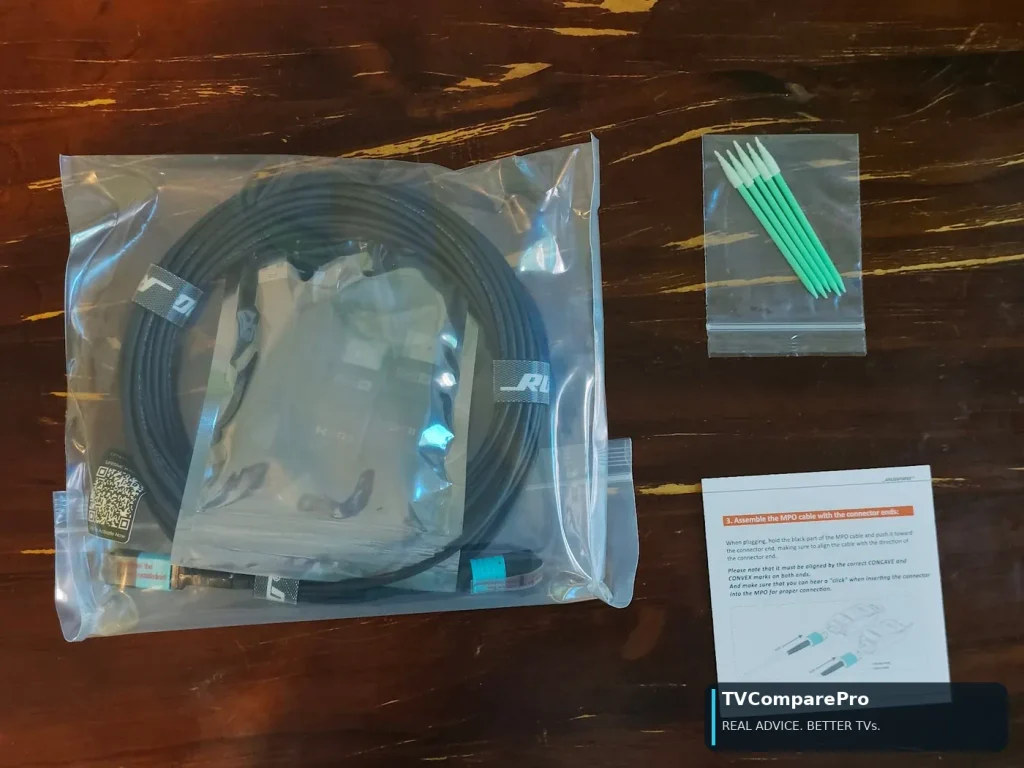
Inside the Detachable kit: protected optical parts, cleaning swabs and assembly instructions.
How does a fiber HDMI cable work?
A normal copper HDMI cable sends very fast electrical signals down metal wires. That works well over shorter distances. At longer distances, keeping a demanding signal stable gets harder.
A full-fiber HDMI cable works a little like a flashlight sending a message. The TX (Source) end turns the signal into light, the light travels through tiny glass fibers, and the RX (Display) end turns it back into a signal your TV understands. You do not see that conversion happening.
Fiber is much less bothered by electrical interference along the long cable run. It does not add new pixels or extra colors to a signal that already works perfectly through copper. Its advantage is helping that same picture travel much farther reliably.
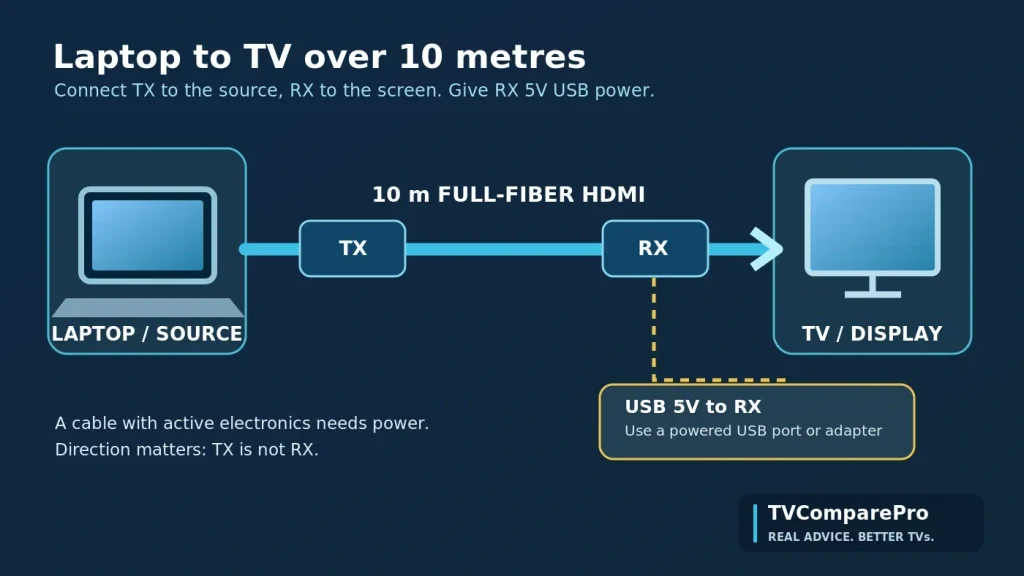
A simple connection diagram: TX goes to the laptop or console, RX goes to the TV, and the RX module receives 5V USB power.
What I actually tested: 4K 120Hz, HDR and full 4:4:4 color
With my PS5 Pro, both 10m RUIPRO cables worked at 4K, 120Hz with HDR, VRR and ALLM. VRR helped the display follow the game’s frame rate, while ALLM enabled its low-latency gaming mode automatically. All five functions worked in my tested setup, and I did not need to move the console closer to the screen.
On my laptop-to-TV connection, the TV’s display information in Windows showed 3840 × 2160 (4K), 120Hz, 10-bit color, YCbCr 4:4:4 and HDR all at the same time. This was the highest signal combination I verified in the TV’s display information. In simple terms, 4:4:4 keeps all the color detail, which helps small text and sharp edges look clean.
What I tested, and what RUIPRO says these cables can do
Both cables are advertised as HDMI 2.1 products with up to 48Gbps bandwidth. RUIPRO also lists 8K 60Hz, 4K 120Hz, VRR, ALLM, eARC, Dolby Vision and HDR10+ compatibility.
| Feature | Status in this review |
|---|---|
| PS5 Pro: 4K 120Hz, HDR, VRR and ALLM | Worked in my testing on both 10m cables |
| Laptop to TV: highest signal displayed | 3840 × 2160, 120Hz, 10-bit, YCbCr 4:4:4 and HDR simultaneously |
| Current maximum rated bandwidth | Up to 48Gbps, as specified by RUIPRO for both HDMI 2.1 cables |
| Other listed features | RUIPRO also lists 8K 60Hz, eARC, Dolby Vision and HDR10+ support |
For me, those real 4K 120Hz HDR results, especially full 4:4:4 color from the laptop and working VRR/ALLM from the PS5 Pro, say more about everyday performance than the big numbers on the packaging.
Why I would choose fiber instead of a long copper cable
When a TV is across the room, length is no longer a small detail. A passive copper HDMI cable can be inexpensive and excellent at a short distance. At ten metres, demanding high-refresh signals can be more challenging, especially if the cable and setup are not well matched.
The RUIPRO cables use thin, lightweight optical runs that resist electromagnetic interference. I found the overall long-distance experience impressive. I also like that RUIPRO sells much longer versions: the One-Piece datasheet describes runs up to 200 m, while the Detachable family is offered in lengths up to 300 m. Those are RUIPRO’s product claims and options, not lengths I personally tested.
If your console is next to the TV, I would still start with a suitable certified copper HDMI cable. Fiber is most compelling when distance or installation becomes the challenge.
The USB power detail worth remembering
Because these are active cables, the RX end at the TV needs 5V USB power. That part is important for the cable to work. In normal use, TX usually receives enough power from the HDMI source.
The one practical catch I would keep in mind is standby HDMI-CEC. If the TV stops supplying USB power when it switches off, the active module can lose power, and automatic control or wake-up may stop working. A suitable always-powered USB source can help. RUIPRO’s detachable instructions also recommend powering both ends for some CEC situations.
I would check how the TV’s USB port behaves before hiding the cable behind furniture. That is easier than wondering later why one remote no longer turns everything on.
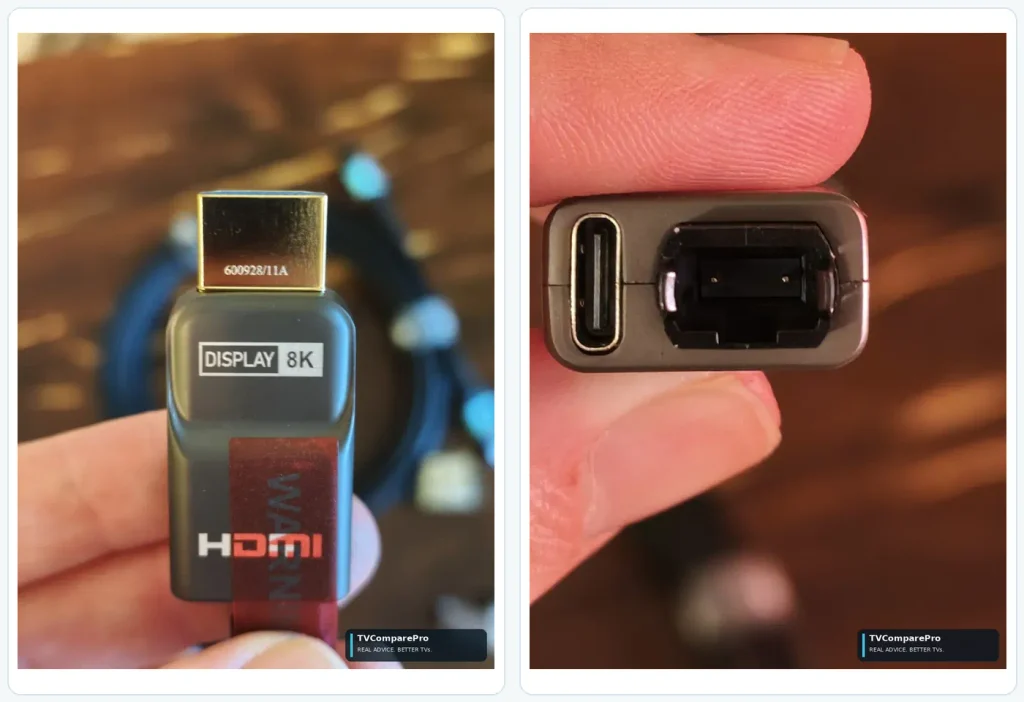
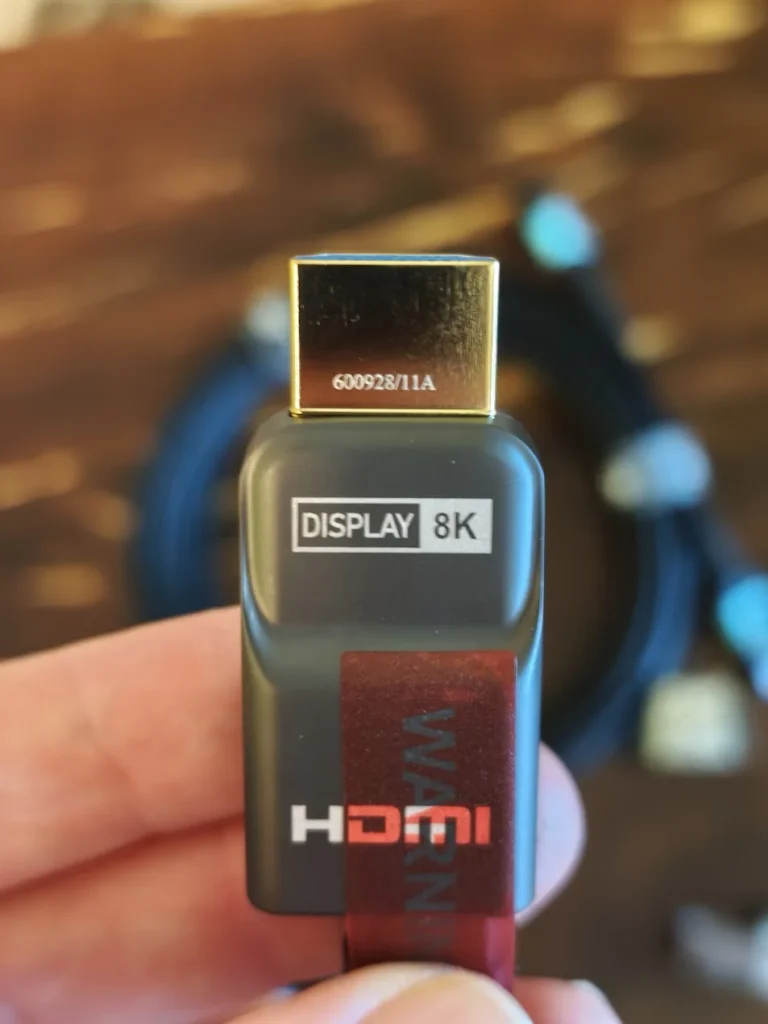
Left: The DISPLAY / RX module is the end that plugs into the screen. Right: The removable end has a dedicated MPO socket and USB-C power connection.
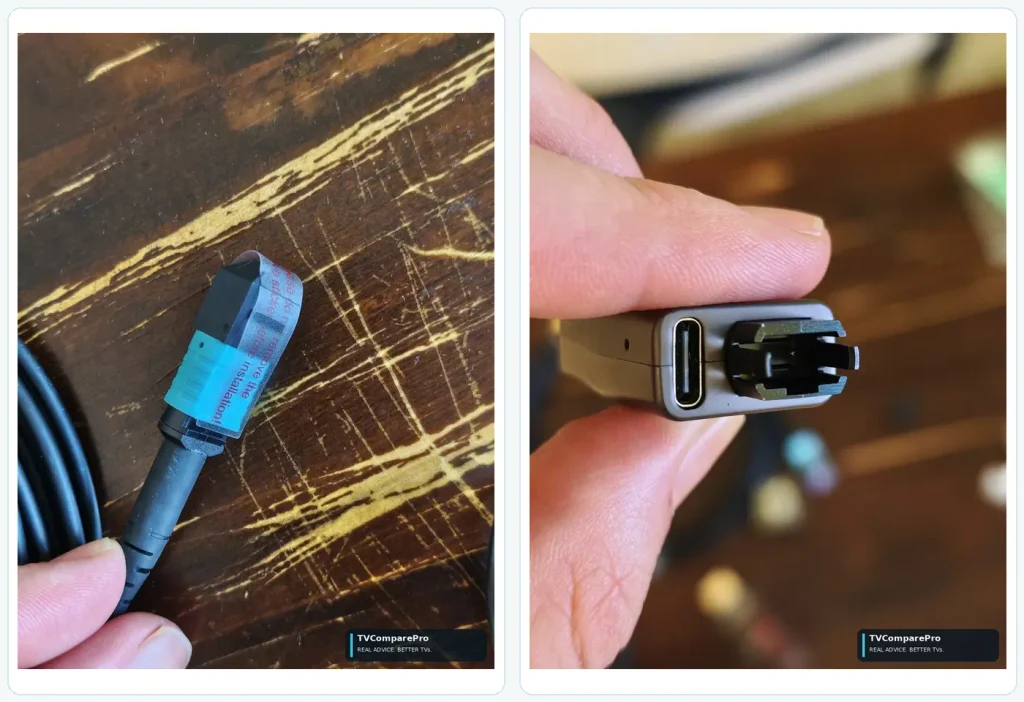
Left: The fiber end should stay covered until you are ready to install it. Right: The connector has a shaped lock. Align it gently; never force it.
Does Detachable mean a future HDMI 2.2 upgrade?
One of the things I really like about the RUIPRO Detachable GEN4AK is that its removable connectors make it more flexible than a traditional HDMI cable. Unlike the One-Piece model, which has permanently attached connectors, the Detachable is the only one of these two models designed to support replaceable and potentially upgradeable modules.
I wanted to learn more about what this could mean in the future, so I contacted RUIPRO directly. In its reply on November 3, 2026, the company shared some interesting details about its plans.
What surprised me is that RUIPRO already offers detachable DisplayPort and DisplayPort-to-HDMI modules for its seven-core MPO fiber system. So the idea of changing the connection type without replacing the entire fiber cable isn’t just a future possibility. It’s something RUIPRO has already started offering.
And there’s more on the way. RUIPRO told me it’s working on USB-C to USB-C, USB-C to DisplayPort, USB-C to HDMI, and DisplayPort to USB-C connections. These new products are currently a higher development priority, and the company plans to make them compatible with the same MPO fiber cable used in its existing Detachable lineup.
I think that’s a clever approach. If you’ve installed a 10-meter fiber cable through a wall or conduit, being able to change the modules at either end could save you from having to install another cable whenever your equipment changes.
RUIPRO also confirmed plans to develop HDMI 2.2 TX/RX modules capable of supporting up to 96Gbps. Its engineers believe the existing seven-core MPO fiber has the potential to handle that speed, although full validation results haven’t been published yet.
For now, both the One-Piece GEN4BK and Detachable GEN4AK are rated for 48Gbps under HDMI 2.1. RUIPRO mentioned late 2027 as the earliest possible timeframe for the HDMI 2.2 upgrade, but there’s no confirmed launch date or guarantee that these modules will become available.
Personally, I think this makes the Detachable model particularly appealing for a long-term installation. Its removable connectors are useful today, and the existing DisplayPort options already show what a modular fiber cable can offer. If RUIPRO eventually releases the planned USB-C connections and 96Gbps HDMI 2.2 modules, the same cable could become even more versatile.
The important distinction is that only the Detachable model can have its connector modules replaced. The One-Piece GEN4BK has fixed HDMI connectors and cannot be upgraded this way.
Which RUIPRO 10m cable makes more sense?
After testing both cables, I can honestly say I was impressed with what they delivered. They both worked beautifully over 10 meters, but I think the best choice comes down to how you plan to use them.
If you simply want to connect your console, PC or other device to a TV, I’d go with the One-Piece GEN4BK. It’s straightforward to set up, with fixed HDMI connectors and no extra parts to worry about. Just connect the ends in the correct direction, provide USB power where needed, and you’re good to go.
The Detachable GEN4AK is the one I’d choose for a more complicated installation, especially if you’re running a cable through walls, narrow spaces or conduits. Being able to remove the HDMI connectors makes installation easier, and it’s also the only model that could support future connector upgrades. The One-Piece doesn’t offer that option. Just remember that RUIPRO’s planned 96Gbps upgrade is not yet confirmed or available.
As for performance, I had a great experience with both. My PS5 Pro worked at 4K 120Hz with HDR, VRR and ALLM. I also connected my laptop directly to the TV using the RUIPRO cables, and Windows showed an active 4K 120Hz, 10-bit YCbCr 4:4:4 signal with HDR enabled at the same time.
For me, there isn’t a bad choice here. I’d pick the One-Piece for simplicity and the Detachable for flexibility and its potential for future upgrades.
RUIPRO 10m Fiber HDMI Cables
Fixed connectors. Simple installation.
View on Amazon →Removable modules. Flexible installation.
View on Amazon →As an Amazon Associate, TVComparePro may earn from qualifying purchases.
What I would remember before installing one
Make sure the HDMI end marked Source / TX goes to the console or laptop, and Display / RX goes to the TV. Give RX its required USB power. If you are using the Detachable, keep its optical caps clean and avoid sharp bends.
That is really the heart of it. I went into this comparison looking for a dependable way to carry 4K HDR 120Hz across a room. Both delivered an excellent result in my setup, and I can see why full-fiber HDMI becomes attractive over distances that would make me hesitate with an ordinary passive copper cable.
If your setup still falls back to 60Hz, read my guide to 4K 120Hz dropping to 60Hz. For console-specific setup decisions, see my PS5 Pro 4K HDR and VRR settings guide.
RUIPRO provided the two cables used for this comparison. The findings and opinions are my own.