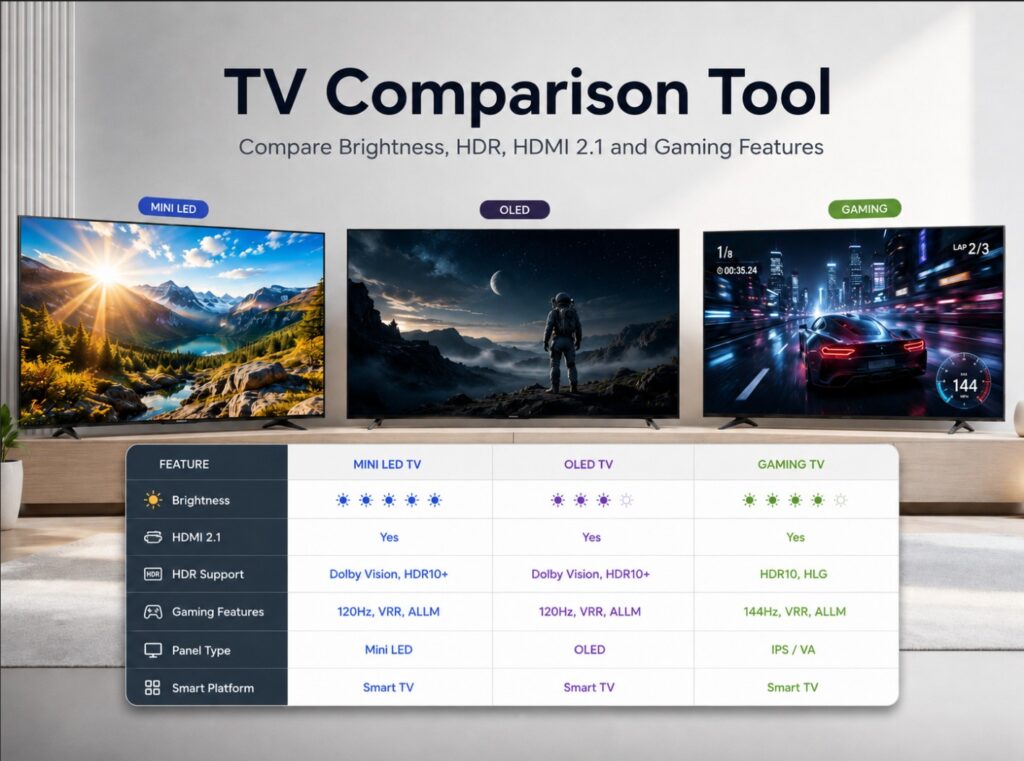

Buying a new TV is harder than it should be, especially when brands use different names for the same technologies, different model names by region, and different brightness claims by screen size. This TV Comparison Tool is built to make that decision easier by putting key specifications side by side in one place.
Use it to compare recent TCL, Samsung, LG, Hisense, Philips, Sony and Panasonic TVs by panel type, Mini LED or OLED technology, brightness claims, dimming zones, HDMI 2.1 support, HDR formats, refresh rate, gaming features and smart TV platform.
The goal is not to replace a full review. It is to help you quickly understand which TV makes more sense for your room, your console, your streaming apps and your budget. A TV with stronger peak brightness may be better for a bright living room, while an OLED may still be the better choice for dark-room movies. A model with four HDMI 2.1 ports may also be easier to live with if you use a PS5 Pro, Xbox Series X, gaming PC and soundbar at the same time.
Specifications can vary by country, screen size, firmware and retailer model code, so always check the exact local product page before buying. Still, this tool gives you a practical starting point before reading deeper guides.
How to use the TV Comparison Tool
Choose one TV in the first dropdown and another TV in the second dropdown, then press Compare TVs. The tool will show a side-by-side comparison with the most important buying details: display type, brightness claim, dimming system, refresh rate, HDMI support, HDR formats, gaming features, audio and best-use recommendation.
For the cleanest comparison, start with TVs from the same class. For example, compare TCL C8L / QM8L with Hisense UR9S, or compare Samsung R95H with Samsung S95H if you are deciding between Micro RGB and OLED.
TV Comparison Tool
Compare recent TCL, Samsung, LG, Hisense, Philips, Sony and Panasonic TVs by panel type, brightness claims, dimming zones, HDMI 2.1, gaming features, HDR formats and smart platform.
Specs are based on manufacturer listings and public technical sheets where available. Exact features can vary by size, region, firmware and retailer model code. Choose first TVChoose second TV Compare TVsSwapRandom comparison
This tool is designed for buyer guidance. Always verify the exact local product page before buying, especially for HDMI 2.1 count, refresh rate, tuner, brightness claims and panel type.
Side-by-side comparison
Two TVs. A clearer choice.
Look beyond the model name. Compare the display, gaming features and connections that matter to you.
Find your TVs
Compare the right version. Specs belong to the market and screen size shown. “Not verified” means we do not have enough confirmed data; it does not mean unsupported. Announced features may require a future update.
Key differences
What matters for your setup
Every detail, side by side
Differences require two verified values. Not-verified or pending values are excluded. Brightness claims do not establish real-world performance.
Practical setup notes
Use an Ultra High Speed HDMI cable for high-bandwidth gaming, enable the TV’s enhanced HDMI input mode and check which port is shared with eARC. PC refresh support does not mean a console outputs that refresh rate. Recheck the exact regional product code before buying.
TV terms, in plain English
.
What the comparison results mean
The comparison table is designed for practical buying decisions, not laboratory scoring. Brightness claims are usually manufacturer figures and may not match real-world measurements in every picture mode. Dimming-zone counts can also vary by screen size, especially on Mini LED and RGB Mini LED TVs.
For gaming, HDMI 2.1 support matters, but the exact layout matters even more. Some TVs have four HDMI 2.1 inputs, while others have two HDMI 2.1 ports or a different setup such as USB-C DisplayPort for PC gaming. If you use more than one console, a gaming PC and a soundbar, always check the port map before buying.
For HDR, do not look only at the logo list. Dolby Vision, HDR10+, HDR10, HLG and Dolby Vision 2 can all matter, but the final image still depends on panel brightness, tone mapping, local dimming, processing and the streaming app or disc source.
Best way to compare TVs before buying
Start with your room first. A bright living room usually benefits from Mini LED, RGB Mini LED or Micro RGB brightness. A dark cinema-style room may still favor OLED because of per-pixel black levels. Sports fans should pay attention to brightness, motion handling and screen size, while gamers should prioritize HDMI 2.1, VRR, ALLM, refresh rate and input flexibility.
The best TV is not always the one with the biggest claim on the box. It is the one that fits your room, your sources and your daily use. Use this tool as a first filter, then read the deeper TVComparePro guides linked below each article for model-specific settings, troubleshooting and buyer advice.