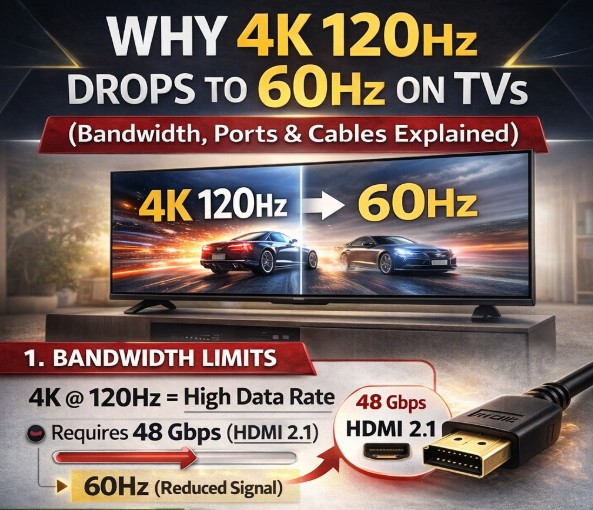

4K 120Hz drops to 60Hz is one of the most frustrating problems for console and PC gamers. Everything looks correct—HDMI 2.1 cable, a “120Hz” TV, a PS5 or Xbox set to 120Hz—yet the TV silently falls back to 60Hz during real use.
This guide explains why it happens, how to identify the exact bottleneck, and what you can do to keep 4K at 120Hz stable without guesswork.
Quick Takeaways
- 4K 120Hz requires far more than “HDMI 2.1” written on the box
- Many TVs have only one or two full-bandwidth HDMI ports
- Cables, soundbars, and AVRs can silently force a 60Hz fallback
- VRR, HDR, and chroma settings often trigger refresh drops
- Fixing the chain—not just one setting—is the key 🎮
The Most Common Symptoms
| Symptom | What You See | What’s Actually Happening |
|---|---|---|
| TV shows 120Hz menu but runs 60Hz | Smooth UI, choppy gameplay | Signal falls back after handshake |
| 120Hz works only in SDR | HDR disables 120Hz | Bandwidth exceeded |
| 120Hz works without VRR | VRR turns it off | Port or chipset limitation |
| Works direct → fails via soundbar | ARC/eARC chain breaks | Intermediate device caps bandwidth |
Why 4K 120Hz Is So Easy to Break
Running 4K at 120Hz pushes the HDMI pipeline to its limits. The moment any link in the chain can’t keep up, the TV drops to 60Hz—often without warning.
Key pressure points:
- Resolution (3840×2160)
- Refresh rate (120Hz)
- HDR metadata
- Color depth & chroma
- VRR signaling
Add just one extra demand, and the system protects itself by lowering refresh rate.
HDMI Ports: Not All “HDMI 2.1” Are Equal
Many TVs advertise HDMI 2.1, but internally:
- Only 1–2 ports may support full bandwidth
- Some ports cap out at 24–32 Gbps, not full spec
- eARC ports sometimes share bandwidth lanes
What to check
- Plug the console/PC into the highest-bandwidth HDMI port
- Avoid shared eARC ports for gaming if possible
- Enable “Enhanced / 4K 120 / Game” mode per port
Cable Problems (Even When the Cable Says “8K”)
HDMI cables are the #1 silent killer of 4K 120Hz.
Common issues:
- Long cables (>2m) failing at high bandwidth
- Passive cables mislabeled as “HDMI 2.1”
- Old cables reused from 4K 60 setups
Fast test
If 4K 120Hz works briefly, then drops after minutes → cable instability ⚠️
VRR + HDR: The Most Common Trigger
VRR and HDR together significantly increase signaling complexity.
What often happens:
- 4K 120Hz works
- Enable VRR → drops to 60Hz
- Enable HDR → drops again
This usually means:
- The HDMI port doesn’t support VRR + 120Hz + HDR simultaneously
- Or the TV chipset prioritizes stability over refresh rate
🎯 Try testing:
- 4K 120Hz + SDR
- 4K 120Hz + HDR (VRR off)
- 4K 120Hz + VRR (HDR off)
Soundbars & AVRs: The Hidden Bottleneck
If your chain is:
Console → Soundbar/AVR → TV
Then the weakest device dictates the max refresh.
Common problems:
- HDMI passthrough limited to 4K 60Hz
- ARC vs eARC confusion
- Soundbar firmware not updated
✅ Best practice:
- Connect console directly to TV
- Use eARC only for audio return
TV Settings That Force a 60Hz Fallback
Look for these silent killers:
- Chroma set to 4:4:4 when bandwidth is tight
- 12-bit color depth forced
- Motion interpolation enabled in Game Mode
- Picture presets overriding input settings
Even one enabled feature can push the signal over the limit 🎯
Hardware Reality Check (I/O Awareness)
When troubleshooting 4K 120Hz drops to 60Hz, always confirm:
- Number of HDMI ports that truly support 120Hz
- Which port supports VRR + HDR
- Whether eARC shares bandwidth
- Firmware version (TV + console)
If specs vary by model or region, always assume conservative limits.
Common Mistakes
- Assuming “HDMI 2.1” guarantees 120Hz everywhere
- Running gaming signals through soundbars
- Ignoring per-port TV settings
- Trusting the UI instead of real signal info
FAQ
Why does my TV say 120Hz but games run at 60Hz?
Because the handshake initially accepts 120Hz, then drops once bandwidth limits are exceeded.
Can a cable really cause 4K 120Hz drops to 60Hz?
Yes. It’s one of the most common causes, especially with longer or low-quality cables.
Does VRR reduce HDMI bandwidth?
VRR itself doesn’t, but combining VRR with HDR and high color depth often exceeds what the port can handle.
Is this a console bug?
Usually no. It’s almost always a chain or port limitation.
Why does it work sometimes and not others?
Signal negotiation can change based on app, game engine, or refresh timing.
Can firmware updates change this behavior?
Yes—updates often alter HDMI handling, sometimes improving stability, sometimes reducing max throughput.
Final Verdict
If 4K 120Hz drops to 60Hz, the TV isn’t “broken”—it’s protecting signal stability. The fix is almost never a single toggle. You must evaluate ports, cables, devices, and settings as a chain.
Once the weakest link is removed, 4K at 120Hz stays locked—and gaming finally feels the way it should 🎯
https://tvcomparepro.com/google-tv-wifi-keeps-disconnecting-fix/
https://tvcomparepro.com/tcl-google-tv-tips-tricks-2025/
https://tvcomparepro.com/netflix-casting-alternatives-for-tv/