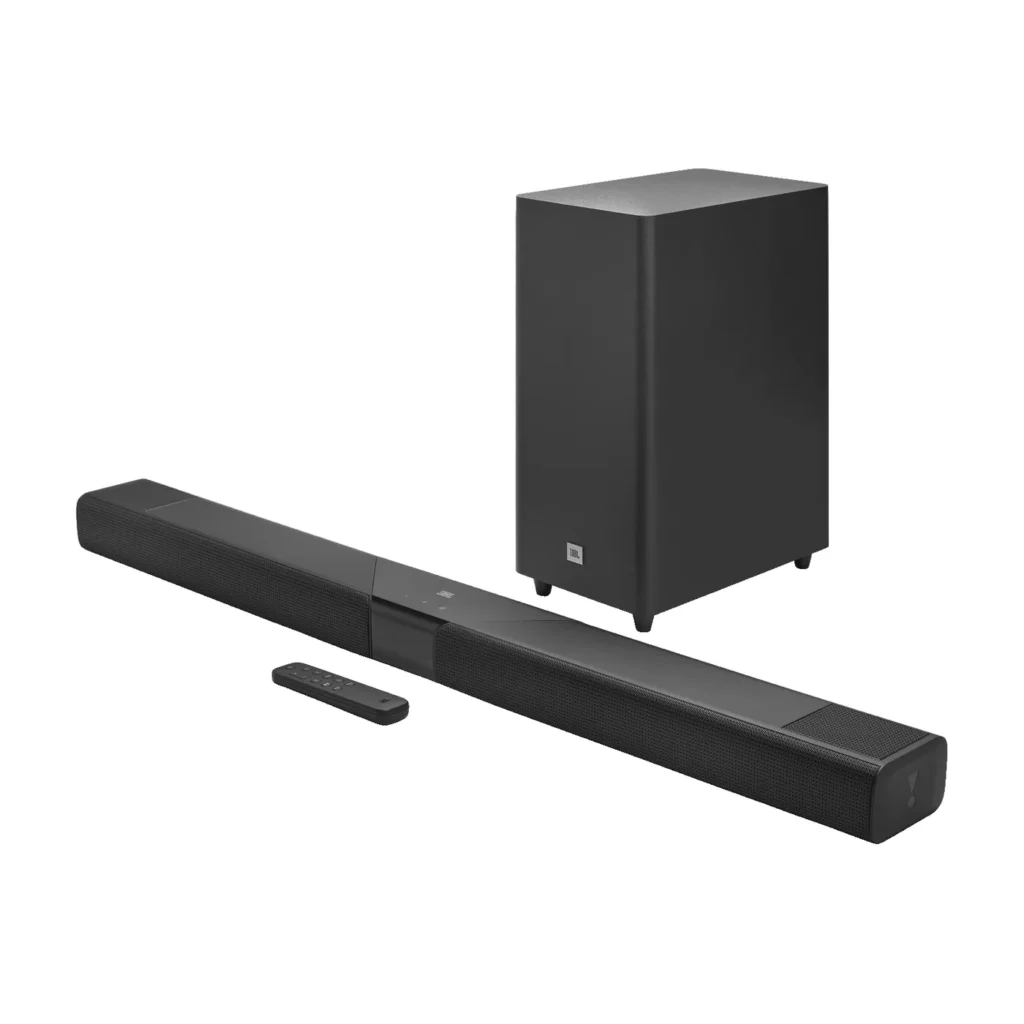

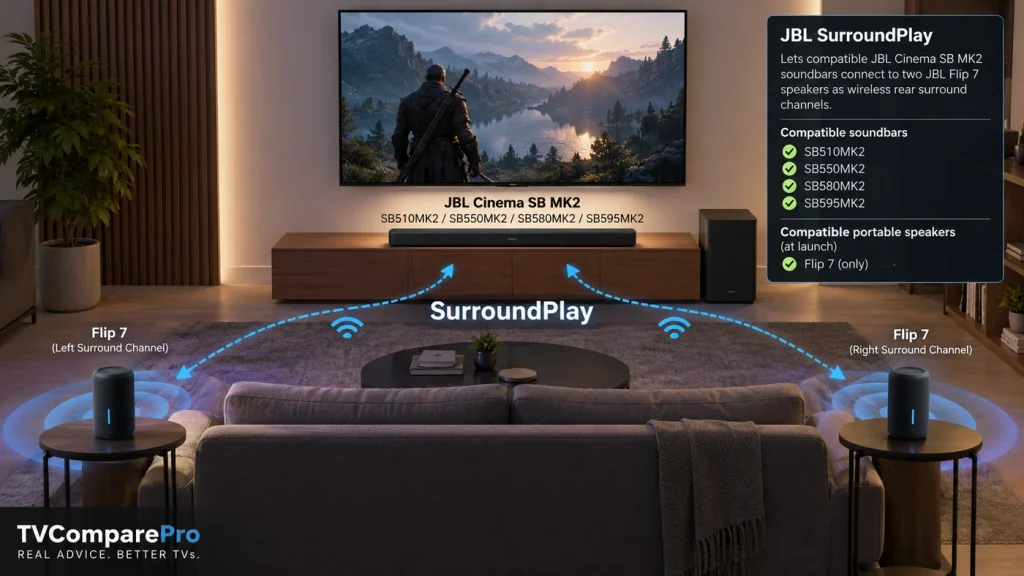
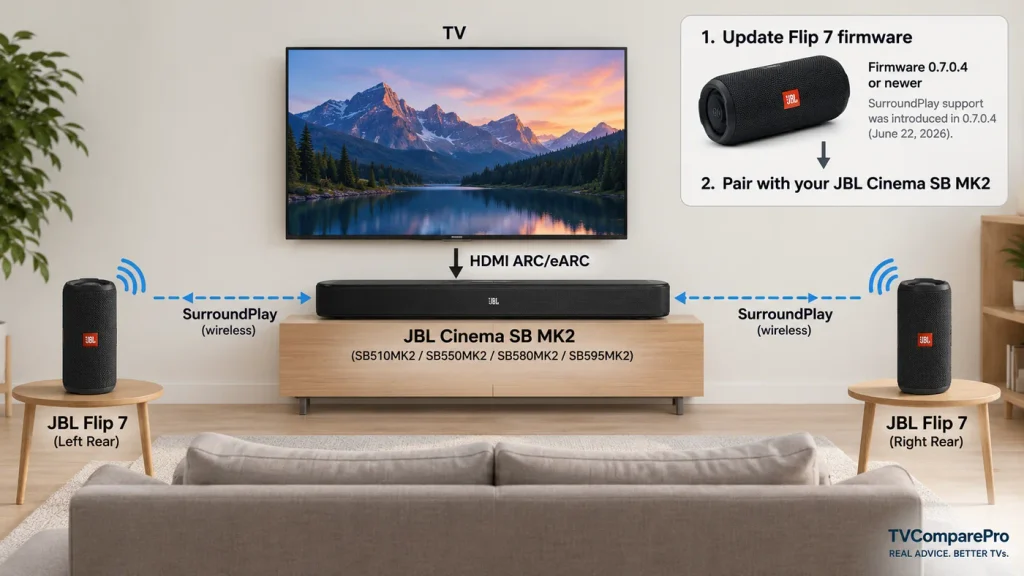
JBL SurroundPlay turns two compatible JBL portable speakers into wireless rear channels for the new Cinema SB MK2 soundbars. At launch, the compatible portable speaker is the JBL Flip 7, while the soundbar side includes the SB510MK2, SB550MK2, SB580MK2 and SB595MK2.
The useful part is not just that JBL added another wireless feature. If you already own two Flip 7 speakers, they can become part of your TV setup instead of sitting unused when you watch a movie. JBL introduced SurroundPlay support to the Flip 7 through firmware before the new soundbars reached stores, giving the feature a clear upgrade path rather than making it a one-off launch trick. 🔊
Quick answer: you currently need a compatible Cinema SB MK2 soundbar and a pair of JBL Flip 7 speakers. Flip 7 firmware version 0.7.0.4 introduced SurroundPlay support. Newer firmware should be installed before setup. JBL has not yet confirmed other portable models such as Charge, Xtreme or Boombox for SurroundPlay.
How JBL SurroundPlay works
JBL describes SurroundPlay as a proprietary system that connects a compatible Cinema SB MK2 soundbar to a pair of portable JBL speakers and assigns those speakers to the rear of the room. In practical terms, the soundbar remains the front-stage device, while the two Flip 7 speakers add sound from behind the listener. That is fundamentally more useful for movies and games than simply playing the same stereo audio from several speakers.
JBL also lists Bluetooth and Auracast among the core wireless technologies of the Cinema SB MK2 family. However, the public documentation available at launch does not fully detail the transport method used by SurroundPlay, its codec, its channel-routing protocol or measured wireless latency. We therefore would not label it as lossless, zero-latency or equivalent to a specific wireless home-theater standard until JBL publishes those details or independent measurements become available.
That distinction matters. “Wireless rear channels” tells us what the Flip 7 speakers do in the system. It does not automatically tell us every technical detail about how the audio reaches them.
JBL SurroundPlay compatible soundbars
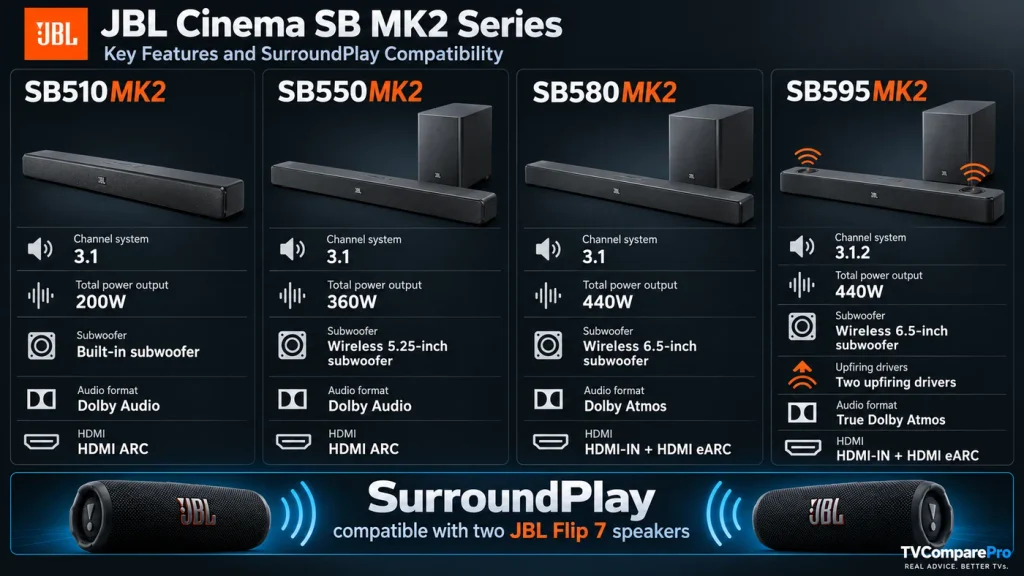
All four Cinema SB MK2 models announced with SurroundPlay support it. The soundbars differ substantially in amplification, subwoofer design and Dolby capability, so adding the same pair of Flip 7 speakers does not make the four systems technically identical.
| Soundbar | Base layout | Power | Subwoofer | Dolby format | TV connection | SurroundPlay |
|---|---|---|---|---|---|---|
| JBL SB510MK2 | 3.1 | 200W | Built in | Dolby Audio | HDMI ARC | Yes |
| JBL SB550MK2 | 3.1 | 360W | Wireless 5.25-inch | Dolby Audio | HDMI ARC | Yes |
| JBL SB580MK2 | 3.1 | 440W | Wireless 6.5-inch | Dolby Atmos | HDMI input + eARC | Yes |
| JBL SB595MK2 | 3.1.2 | 440W | Wireless 6.5-inch | True Dolby Atmos | HDMI input + eARC | Yes |
Which portable JBL speakers support SurroundPlay?
At launch, JBL officially lists JBL Flip 7 as the compatible portable model. The Flip 7 software release notes show that firmware 0.7.0.4, dated June 22, 2026, added SurroundPlay support for all four Cinema SB MK2 soundbars. JBL’s later 0.7.2.0 firmware is listed as a performance update, so owners should simply keep both speakers on current software rather than trying to stay on the original SurroundPlay release.
| Portable speaker | Official SurroundPlay status | What to know |
|---|---|---|
| JBL Flip 7 | Supported | Official launch model. A pair is used for the rear channels. |
| JBL Flip 7 Tomorrowland | Firmware lists support | The same JBL firmware notes apply to this edition. |
| JBL Charge 6 | Not confirmed | Auracast support alone should not be treated as SurroundPlay compatibility. |
| JBL Xtreme / Boombox models | Not confirmed | No official SurroundPlay support was listed at launch. |
| Older Flip models | Not confirmed | Do not assume backward compatibility from normal Bluetooth pairing. |
This is what makes the page worth keeping as a compatibility reference. JBL specifically called the Flip 7 the compatible model at the time of launch, language that leaves room for the supported-speaker list to grow later. If JBL adds more models through firmware, this table is the part that should be updated.
Practical setup notes
JBL’s launch material says SurroundPlay can turn the two portable speakers into rear channels at the touch of a button, but the public support pages we checked do not yet provide a full button-by-button pairing guide for every Cinema SB MK2 model. It would be misleading to invent one. The safe setup sequence is therefore based only on what is currently confirmed. 🔧
1. Update both Flip 7 speakers. SurroundPlay support first appeared in Flip 7 firmware 0.7.0.4. Check that both speakers are running current software before troubleshooting the soundbar.
2. Connect the soundbar to the correct TV HDMI port. SB595MK2 and SB580MK2 use HDMI eARC and also provide an HDMI input. SB550MK2 and SB510MK2 use HDMI ARC. Match the soundbar to the TV port physically labeled ARC or eARC.
3. Place the two Flip 7 speakers behind the listening position. Think of them as rear-left and rear-right channels, not as extra front speakers. Start roughly behind the sofa at similar distances from the main seat, then fine-tune placement after you confirm both channels are active.
4. Use the soundbar’s SurroundPlay control. JBL says the feature activates at the touch of a button. If the retail manual or on-device menu for your exact SB MK2 model provides a specific pairing sequence, follow that model-specific instruction rather than a generic Bluetooth procedure.
5. Verify with real surround content. Use a scene with obvious movement behind the listener, not only stereo music. A working rear pair should produce distinct activity behind you rather than simply duplicating the front soundstage. 🎬
Rear channels do not automatically mean height channels
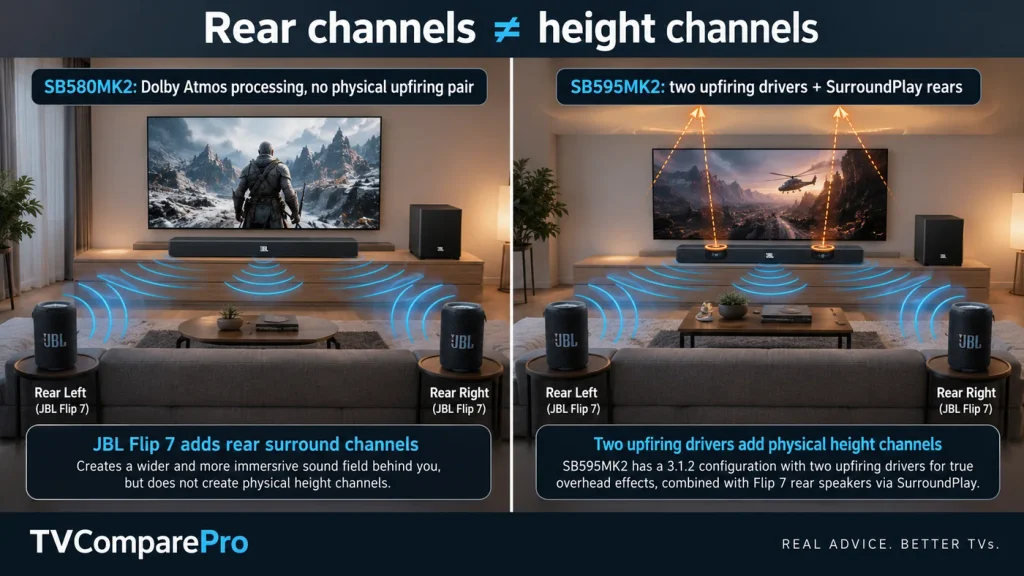
This is the easiest part of the system to misunderstand. Adding two Flip 7 speakers creates rear surround channels, but it does not add physical upfiring height drivers to a soundbar that does not already have them.
The SB595MK2 is the model with a native 3.1.2 layout and two upfiring drivers, which is why JBL calls out True Dolby Atmos on that model. The SB580MK2 is a 3.1 soundbar with Dolby Atmos processing but no physical upfiring pair. SurroundPlay adds rear presence to both, but it does not erase that hardware difference.
We would also avoid inventing a new total channel label after the Flip 7 pair is connected. JBL describes the portable speakers as rear channels, but its launch documentation does not publish a new formal channel count for each expanded system. The most accurate description is the soundbar’s base layout plus two SurroundPlay rear speakers.
Can one Flip 7 be used instead of two?
JBL consistently describes SurroundPlay as using a pair of compatible portable speakers. There is no official launch documentation confirming a single Flip 7 rear-channel mode. If you are buying specifically for this feature, plan on two Flip 7 speakers.
Can you mix Flip 7 with another JBL speaker?
There is no official mixed-pair support listed at launch. Even if another JBL portable speaker supports Bluetooth or Auracast, that does not mean it can join a SurroundPlay rear pair. The same caution applies to combining one standard Flip 7 with a different product family.
The Flip 7 Tomorrowland edition appears in JBL’s own firmware release notes alongside the standard Flip 7, but JBL has not published a detailed mixed-edition pairing matrix. Two matching speakers remain the simplest setup until more documentation appears.
Does SurroundPlay replace a dedicated rear-speaker kit?
Not necessarily. The clever part of SurroundPlay is flexibility. The Flip 7 is still a portable speaker when you are not watching TV, so owners can reuse hardware they already have. A dedicated home-theater rear kit may still make more sense if you want permanently powered speakers, fixed mounting and a system designed to remain in place every day.
For a smaller room or an apartment, the JBL approach is attractive because the rear speakers can disappear when you do not need them. For a permanent cinema room, battery-powered portable speakers may be less convenient than dedicated surrounds. The best use case is therefore someone who already owns Flip 7 speakers or values the ability to move them between portable and TV use.
What JBL has confirmed, and what is still unknown
| Confirmed | Still not publicly detailed at launch |
|---|---|
| Two Flip 7 speakers can act as rear channels | Exact wireless codec and transport details |
| SB510MK2, SB550MK2, SB580MK2 and SB595MK2 support SurroundPlay | Measured SurroundPlay latency |
| Flip 7 firmware 0.7.0.4 introduced support | Whether one-speaker SurroundPlay mode exists |
| Flip 7 is the launch-compatible portable model | Future Charge, Xtreme or Boombox compatibility |
| SB595MK2 has two physical upfiring drivers | A revised total channel label with the rear pair attached |
That separation is important. It lets the page stay useful after launch without turning unconfirmed assumptions into specifications. ✅
Is JBL SurroundPlay worth paying attention to?
SurroundPlay is more interesting than a normal multi-speaker Bluetooth feature because JBL is assigning the portable speakers a home-theater role behind the listener. For existing Flip 7 owners, that can lower the cost of adding rear channels. For new buyers, it creates an upgrade path across all four Cinema SB MK2 soundbars without forcing them to buy rear speakers on day one.
The biggest limitation at launch is the narrow portable-speaker compatibility list. Two Flip 7 units are required for the officially documented setup, and JBL has not yet confirmed that other Auracast-capable speakers can join SurroundPlay. The feature becomes significantly more valuable if JBL expands that list later.
For now, the clearest buying rule is simple: choose the Cinema SB MK2 model for the front-stage, bass and Dolby capability you want, then treat SurroundPlay as an optional way to add a pair of Flip 7 rear channels. Do not choose a cheaper SB model expecting the rear speakers to reproduce the physical height hardware found in the SB595MK2.
JBL SurroundPlay compatibility tracker
Current status: October 1, 2026. JBL officially supports the Flip 7 with the SB510MK2, SB550MK2, SB580MK2 and SB595MK2. The Cinema SB MK2 range launched in select markets from October 1, 2026. This compatibility section should only change when JBL publishes new supported portable speakers, firmware requirements or additional Cinema SB models.