
The Plex 2026.19.1 update is reaching Android and Google TV devices, and some owners say files that played fine before now behave differently. If your Shield, Sony TV or Fire TV is having trouble, check the symptoms before changing your server settings or buying new hardware.
Quick answer: Plex 2026.19.1 was released in October, but Plex has not confirmed that every issue below was caused by this version. Owners have reported problems on some NVIDIA Shield, Sony BRAVIA, Google TV and Fire TV setups. First check your app version, then try the same file on another Plex player.
What the Plex 2026.19.1 update actually changed
The Plex 2026.19.1 update was announced for Android through Google Play on October 1, 2026, with a staggered rollout. The official public changelog for this point release is short: bug fixes and performance improvements. Larger changes to TV navigation and the playback experience were introduced across preceding releases and preview builds; receiving 2026.19.1 does not mean every problem started in that precise build.
If playback breaks just after an update, the TV app is a sensible place to start looking. That timing is a clue, not proof that the update caused the problem.
Here, reported means someone has documented the issue, documented behavior refers to how Plex officially says a feature works, and confirmed fix requires verifiable evidence. These hardware combinations have not been independently tested by TVComparePro.
Plex 2026.19.1 update: reported TV issues by device
| Device or platform | What owners reported | Evidence status | Best first check |
|---|---|---|---|
| NVIDIA Shield TV / Pro | HEVC files with TrueHD or DTS-HD MA unexpectedly transcode; some Dolby Vision clips do not trigger expected refresh-rate switching. | Individual forum reports; not universal | Compare video and audio streams in the Plex server Dashboard. Test HDR10 and Dolby Vision separately. |
| Sony BRAVIA / Google TV | Some 4K files fall back to lower-resolution transcoding; AAC surround is heard as stereo in one reported setup; character encoding breaks certain subtitles. | Individual forum reports | Play the same file from the Library and inspect both the video and audio stream decisions. |
| Google TV Streamer / Android TV boxes | Playback spins without starting, or an item in Watchlist loses its local-server Play button. | Device-specific owner reports | Try Library or Search rather than Watchlist; compare with Plex Web or a mobile client. |
| Amazon Fire TV | A TrueHD-capable setup is treated as incompatible and its audio converted; earlier preview-era complaints also describe a sluggish interface. | Reports span versions and models | Identify the exact Fire TV model and test one known-good soundtrack before adjusting audio passthrough. |
| Android TV interface | Slower navigation, delayed button response, missing controls or an apparently empty Recommended view. | Multiple user reports | Switch to the actual Library/Browse view; check if media is still available on Plex Web. |
This is a symptom matrix, not an exhaustive affected-model list or a Plex-issued bug tracker.
First, tell a client bug from a server problem
Pick a movie or episode you know used to play correctly. Keep its audio and subtitle tracks the same. Try it on the affected TV, then on Plex Web or another supported player on the same network. While you do that, watch the session in the Plex Media Server Dashboard.
| Result | What it suggests | What it does not prove |
|---|---|---|
| Only the updated TV app fails | Investigate client version, audio capability reporting or navigation regression | Not automatic proof that Plex released a universal bug |
| Every client fails on the same file | Check file integrity, server state and permissions | Not enough evidence to blame the TV app |
| Video becomes 720p or audio changes format | Inspect video, audio and subtitle transcode reasons | Not necessarily weak internet or insufficient TV processing power |
| Library plays but Watchlist does not | Investigate Watchlist’s source-selection or detail-page behavior | Not evidence that the media disappeared from the server |
Change one variable at a time. Record the Plex client version, Plex Media Server version, TV/streamer model, operating system, video codec, audio codec and selected subtitle type. Those details are much more useful than “Plex is broken.”
Direct Play stopped working: decode the message correctly
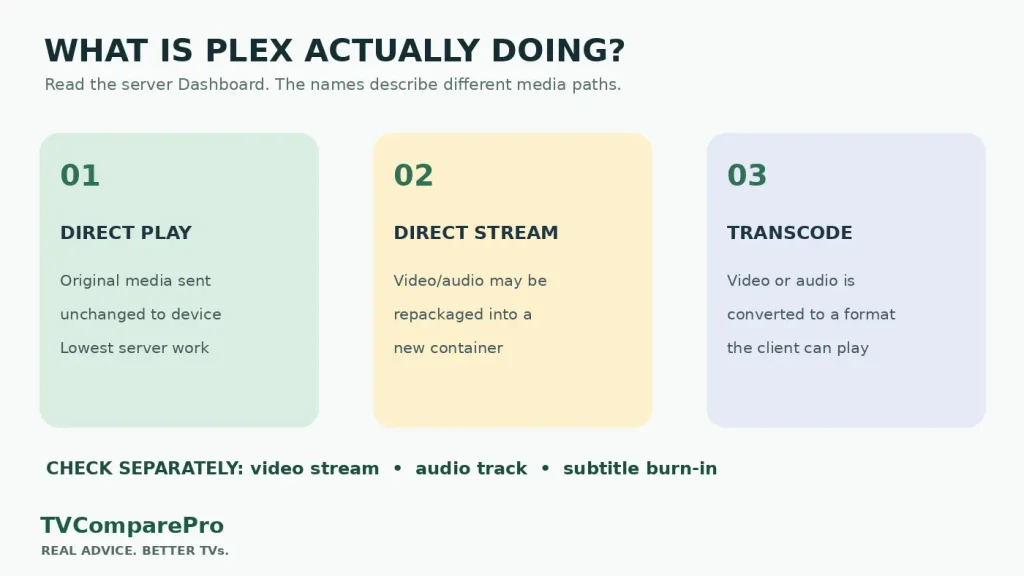
A file can look perfectly normal on screen while Plex handles it in three very different ways:
Direct PlayOriginal container, video and audio streams are sent without conversion.
Direct StreamCompatible tracks may be repackaged into another container with relatively little processing.
TranscodeIncompatible video or audio is converted, possibly lowering resolution or changing surround format.
On a Shield or Sony TV, a video that suddenly transcodes after the update could reflect a client capability/profile change, an audio-track mismatch, a selected incompatible subtitle or a quality setting. It does not establish that HEVC or MKV is universally unsupported. In particular, some owners report that the new client rejects material their older installation played directly.
Check the Dashboard’s expanded Now Playing entry while the problem is happening. If video is direct but audio transcodes, do not describe it as a full 4K video transcode. If subtitles trigger burn-in, Plex may have to transcode the video even when its codec is natively supported. Re-test the same scene with subtitles temporarily disabled, then re-enable them to compare.
Force Direct Play can be used cautiously as a diagnostic on clients exposing that option. It is not a universal fix: a device unable to decode the format may show a black screen, silence, stuttering or a playback error. Restore the original setting immediately if a test fails. Do not permanently force it across your library based on a single successful movie.
NVIDIA Shield: TrueHD, DTS and Dolby Vision refresh rate
On NVIDIA Shield, keep the audio and video questions separate. Why is Plex converting a TrueHD or DTS-HD MA track? And why is a 23.976 fps Dolby Vision movie staying at 60 Hz instead of matching the frame rate? Those symptoms do not automatically point to the same HDMI problem.
For audio, note whether the Shield connects directly to an AVR or first passes through the TV, then record the AVR’s detected codec and the Plex Dashboard’s stream information. Test a familiar TrueHD title and a separate Dolby Digital Plus title. A change limited to TrueHD suggests different capability handling from a failure affecting all sound formats.
For Dolby Vision, compare one known 24 fps Dolby Vision file with an HDR10 file of similar frame rate. One owner reported failed refresh switching for Dolby Vision while HDR10 still switched correctly. A later beta was reported to improve the behavior, but that is not confirmation that stable 2026.19.1 or all devices have been repaired. Preserve the original refresh setting and avoid installing experimental software without understanding the risks.
Sony BRAVIA: stereo audio, subtitles and 4K fallback
A Sony Google TV owner reported that AAC 5.1 material sounded stereo on an attached Denon setup after the client change. Another described 4K content converting to 720p, while a separate report concerned Central European subtitles requiring UTF-8 conversion.
Begin with a single repeatable file. Compare the internal Plex app against another player using the same server, then check the TV audio output and the server stream details. For character encoding problems, test a correctly encoded subtitle file without modifying the original media. If the source works on another Plex client, include the player version and a short description of the discrepancy in a bug report.
A new HDMI cable will not repair the software decoder inside a TV app. Check the playback details before spending money on accessories.
Server unavailable or your Library appears empty?
If your library looks empty, first check whether Plex Web can open it on the same network. If Plex Web works, take a closer look at the TV app’s navigation and selected source before touching the server. A Watchlist item may show streaming-service offers while its local-library version still works under the Library tab; this exact behavior has been reported for 2026.19.1.
If the TV client reports the server offline, restart only the Plex app once and compare the TV’s local network with the server’s. Plex also documents conditions in which DNS rebinding protection, secure-connection requirements, VPNs or complex subnets can make a local server appear remote or unavailable. Do not globally disable router protections or security settings as a casual workaround.
Clearing the TV app cache is a reasonable later check, once you have noted the app version and current settings. Do not confuse clearing the cache with wiping all app data.
Practical setup notes
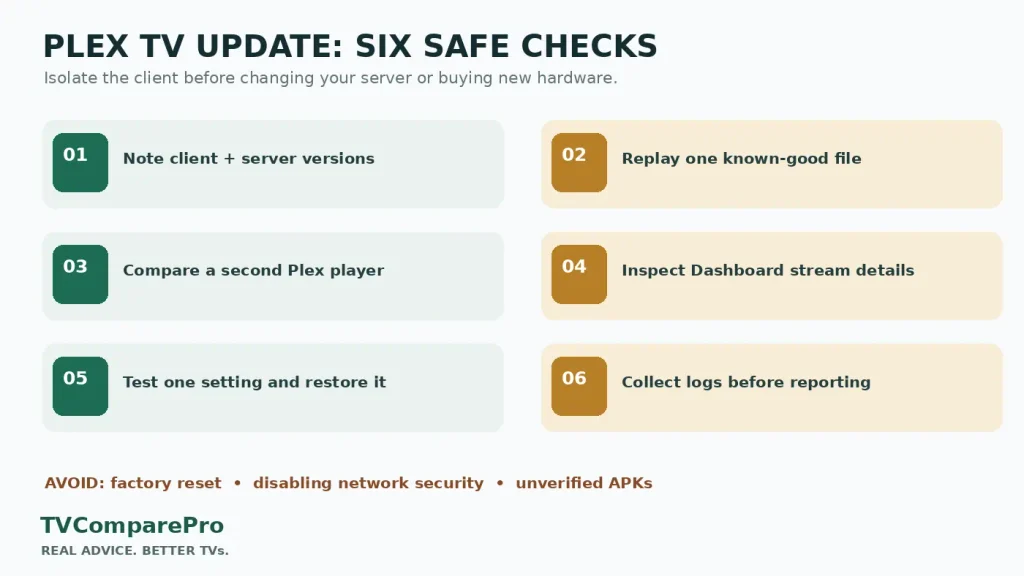
- Check the version: locate About in Plex and note whether the TV is on 2026.19.1 or another release.
- Repeat one known-good title: keep subtitles and audio selection consistent for comparison.
- Compare a second player: Plex Web, mobile or another TV platform can show whether the issue follows the client.
- Check the Dashboard: record Direct Play, Direct Stream, or the separate audio/video transcoding decisions.
- Try low-risk changes: restart the client; check Library rather than Watchlist; test subtitles off and restore them afterward.
- Preserve evidence: make notes on versions, codec and connection path before requesting support. Plex provides an Android TV log-download route under Settings → About on newer players.
Do not factory-reset a television, purchase a replacement streamer, delete a Plex library or permanently relax network security merely because the issue appeared after an update.
Should you downgrade Plex or install the new beta?
Rolling back to an older Plex app may sound tempting. Some users say an older Android TV package brought back the interface they preferred, but that is not a verified fix for every playback problem. APKs from third-party sources also bring security, compatibility and future-update risks.
As of October 8, 2026, Plex has posted 2026.20.0 beta notes, including additional TV interface fixes. A beta is not the same as a tested stable fix for Direct Play, server discovery or every Dolby Vision case. Unless you deliberately participate in testing, waiting for a stable update is usually the lower-risk option.
What to watch in the next Plex release
A release note that names the problem is a useful start. Better still is being able to replay the same file on the same device and see that the problem has genuinely gone away. For a Direct Play regression, that means the same HEVC title uses the intended video and audio paths again. For a server-discovery problem, the TV client should reconnect without changing server security. For Dolby Vision refresh matching, the output should switch appropriately with the same reference file.
Until those conditions are verified, treat individual workarounds as temporary tests rather than guaranteed solutions. If Plex keeps failing only on one updated device, report the exact reproduction steps and app logs through the official Plex forum. That is more informative than guessing whether a new TV, HDMI cable or subscription would fix it.
Related TVComparePro guides
- Sony BRAVIA audio out of sync after an update: isolate the source
- Fire TV Stick 4K 2026 apps: know the Vega OS compatibility limits
Research status: October 8, 2026. Reported software behavior can change with subsequent Plex releases.