A slim laptop and a large OLED TV rarely make the perfect gaming pair on their own. The ASUS ROG XG Station 3 offers a rather different approach: leave a desktop graphics card beside the television and connect it to the computer when you want to play.
What interests me is whether Thunderbolt 5 makes that idea practical enough to replace a dedicated living-room gaming PC. At €399 before you add a graphics card or power supply, this dock needs to offer more than a neat way of displaying an expensive GPU. The bandwidth, the rest of your hardware and the way you connect the TV all matter.
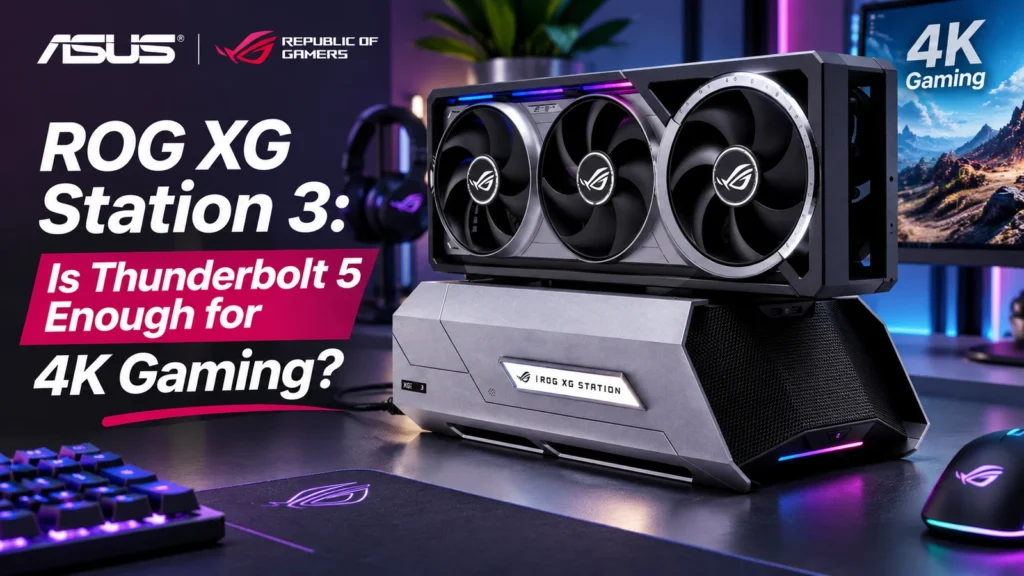
What is the ASUS ROG XG Station 3?
ASUS announced the production model in November 2026 and confirmed retail availability on November 25 in Germany, Austria and Switzerland. The recommended price is €399 in Germany and Austria, or CHF 399 in Switzerland. Unlike the ROG XG Mobile, this open-frame external graphics dock is designed around a replaceable desktop graphics card and a separately purchased compact PSU. The laptop still supplies the CPU, memory and storage.
That modular approach is appealing if you already own a compatible laptop or plan to upgrade the graphics card later. ASUS specifies support for current NVIDIA GeForce RTX 50, RTX PRO 6000, AMD Radeon RX 9000 and Intel Arc graphics families, subject to physical fit, power and host compatibility.
| Specification | ROG XG Station 3 |
|---|---|
| Host interface | Thunderbolt 5; backward compatibility with Thunderbolt 4 |
| Link bandwidth | 80 Gbps bidirectional; up to 120 Gbps in display-oriented boost mode |
| Dock dimensions | 324.6 × 173.0 × 104.7 mm |
| Maximum GPU size | 361 × 139.3 × 93.9 mm (L × W × H, ASUS product page) |
| Recommended PSU | 750W or higher, SFX / SFX-L, 80 PLUS Gold or above |
| GPU / PSU included | Neither |
| Laptop charging | Up to 140W USB Power Delivery |
| Downstream connections | Thunderbolt 5 (up to 36W PD), 2 × USB-C 10 Gbps |
| BTF support | GC-HPWR connector for compatible cards |
| Included cable | 1 m Thunderbolt 5 USB-C cable |
| European launch price | €399 / CHF 399, including VAT in the announced markets |
Thunderbolt 5 bandwidth: why 120 Gbps is not GPU bandwidth
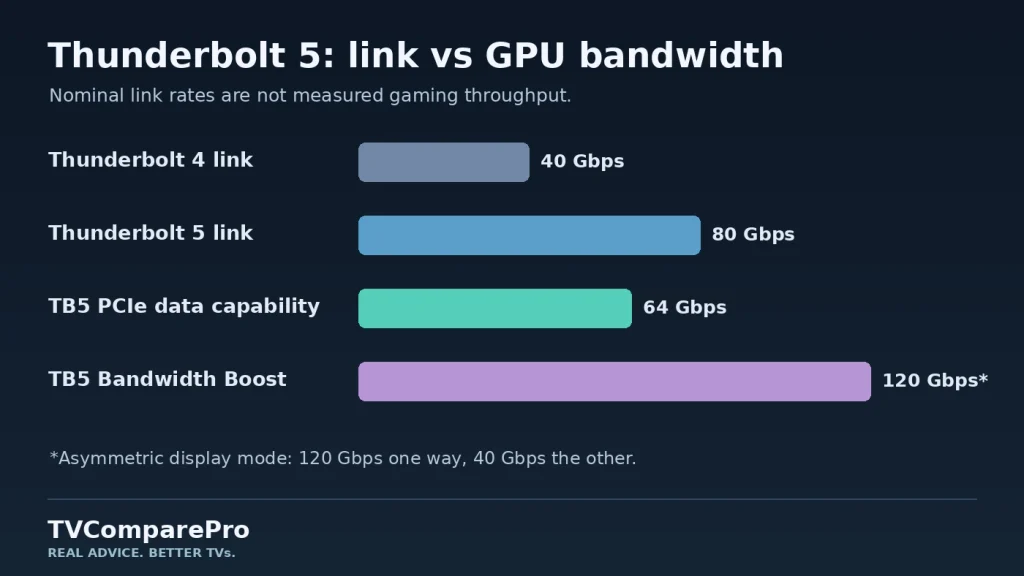
The biggest improvement over older external graphics docks is the faster connection to the host. Thunderbolt 4 provides a 40 Gbps link, whereas Thunderbolt 5 doubles the nominal bidirectional rate to 80 Gbps. Intel specifies a PCIe data capability of 64 Gbps for Thunderbolt 5, corresponding to four PCIe 4.0 lanes before encoding and protocol overhead.
The advertised 120 Gbps Bandwidth Boost is a different feature. It reallocates link capacity asymmetrically for demanding display traffic, leaving 40 Gbps in the opposite direction. It does not turn the external graphics card into a 120 Gbps PCIe device. Nor does the physical full-length GPU slot inside the dock guarantee a desktop-class x16 connection back to the laptop.
Why does that matter at 4K? Games continuously move commands and resources between the processor, memory and GPU. A narrower, tunneled connection can add overhead, particularly when a game streams assets aggressively or needs the CPU to prepare frames at a high rate. Once a game becomes primarily limited by GPU rendering, the relative impact can become smaller, but it does not disappear in every title.
I would not assign a universal performance-loss percentage to the ASUS ROG XG Station 3. Without comparable measurements of this exact dock, the same GPU and the same game on an identical host, an FPS prediction would be misleading. Average FPS alone would also miss inconsistent frame times, which are especially noticeable on a fast OLED.
Can it deliver 4K 120Hz, HDR and VRR on an OLED TV?
Yes, the setup can be capable of that output when the installed graphics card, cable and TV support it. I would connect the television directly to the HDMI output on the desktop GPU rather than use the laptop’s HDMI port or route the picture back to its internal display. The graphics card then sends the completed video signal straight to the television.
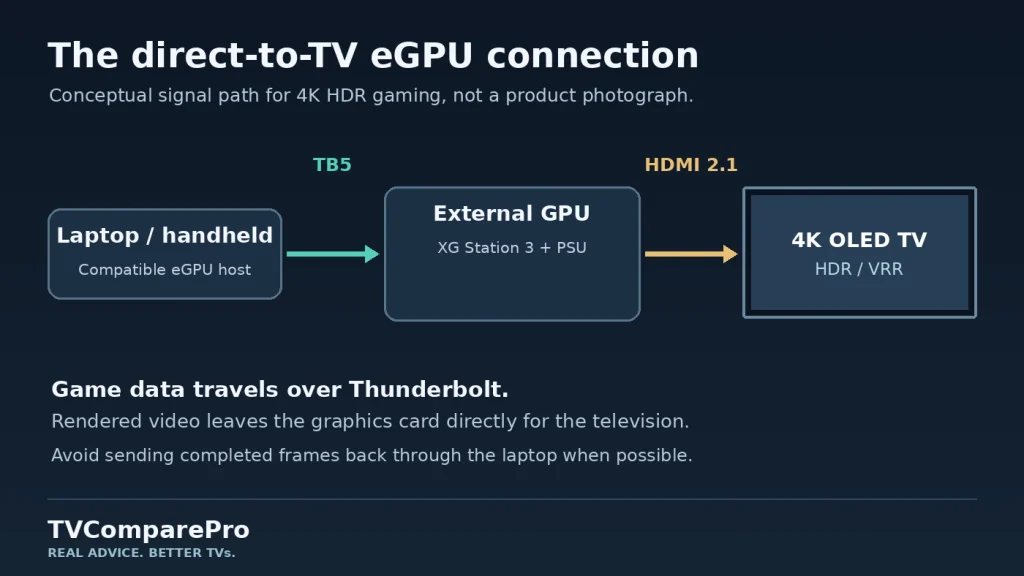
For the TV connection, use a suitable Ultra High Speed HDMI cable and a TV input capable of 4K120. Enable the enhanced HDMI signal mode or PC/game mode where the television requires it, select 3840 × 2160 at 120Hz in Windows, then enable HDR and the compatible VRR option in the GPU driver and TV settings. Verify the received signal on the television if its information screen exposes those details.
For desktop use I would also check that the GPU is sending an appropriate 10-bit RGB or YCbCr 4:4:4 signal when supported. That matters for small text and fine interface elements. The exact maximum format depends on the graphics card output, the HDMI bandwidth of the TV and the negotiated mode. Avoid assuming that every port marked HDMI 2.1 offers the same capabilities.
Running Windows at 120Hz is not the same as rendering a demanding game at 120 FPS. Upscaling can reduce rendering load and frame generation can raise the displayed frame rate, but neither automatically fixes a CPU bottleneck, a transfer bottleneck or poor underlying frame pacing. I would prefer a stable frame rate within the TV’s VRR range to chasing a larger number on an overlay.
Which graphics card makes the most sense?
For a 4K television, I would start by comparing the RTX 5070 Ti and RX 9070 XT rather than automatically buying a flagship. Both offer 16GB of VRAM and modern HDMI output capabilities. The RTX 5080 becomes interesting if ray tracing and higher quality settings are more important to you; the RTX 5090 is a more difficult value proposition when the host link and laptop processor can prevent it from reaching its full potential.
| GPU | VRAM | Reference system PSU guidance | My use case |
|---|---|---|---|
| GeForce RTX 5070 Ti | 16GB | 750W | Balanced 4K option with DLSS and ray tracing |
| Radeon RX 9070 XT | 16GB | 750W | 4K raster gaming and FSR; compare game support |
| GeForce RTX 5080 | 16GB | 850W | More rendering headroom for demanding games |
| GeForce RTX 5090 | 32GB | 1000W | Flagship workloads; hardest to justify for eGPU gaming |
PSU figures are GPU vendors’ reference desktop-system recommendations, not measured dock consumption or a guarantee of compatibility. Board-partner cards may differ.
Before choosing a specific card, check its complete dimensions against the dock’s limits, including the clearance needed for power connectors. A GPU can fit within the length limit and still be too tall or thick. The ASUS BTF system is optional: a compatible card can receive power through GC-HPWR, while a standard card uses its own PSU cable. ASUS explicitly advises against using both power paths together.
ASUS Prime GeForce RTX 5070 Ti OC 16GB
My preferred starting point for a balanced Thunderbolt 5 eGPU setup. With 16GB of GDDR7 memory, DLSS and HDMI 2.1b, this compact graphics card is a sensible option for 4K HDR gaming on an OLED TV.
Check Price on AmazonTVComparePro may earn a commission from qualifying purchases through this link.
Choosing a power supply: is 850W enough?
The dock needs a compact SFX or SFX-L PSU. A short ATX unit is not a substitute, even if the wattage is correct. ASUS recommends at least 750W and 80 PLUS Gold efficiency; I would look at the exact GPU’s power requirement, the available connectors and the laptop charging load before choosing a unit.
An 850W model could be a sensible candidate for an RTX 5080 configuration, provided the card vendor’s recommendations and actual power budget allow it. For a 5090 I would look at 1000W or higher compact options and check the specific board’s requirements. The graphics card and up to 140W of laptop charging both draw from the dock’s power system, along with its other circuitry and connected devices. There is no reason to size the PSU around the television itself, which has a separate power supply.
Check the supplied cable set before buying a modular PSU. A suitable modern native GPU cable and sufficient length are important; never mix modular PSU cables across incompatible units. The dock’s open layout gives the GPU access to room air, yet does not guarantee a quiet gaming experience. Fan noise, coil whine and PSU behavior still matter when you are watching a film or playing a quiet game a few meters away.
Laptop compatibility matters more than the USB-C connector
ASUS lists Thunderbolt 5 and backward compatibility with Thunderbolt 4, but the host must actually support an external GPU. A USB-C connector alone tells you very little. For USB4 hosts, verify PCIe tunneling and eGPU support with the computer manufacturer rather than treating every USB4 port as interchangeable. ASUS lists Windows 11 version 25H2 or later in its specifications.
There is also a macOS caveat. Although the dock’s specifications list macOS, Apple documents eGPU support for Intel-based Macs and specific supported GPU architectures. Do not buy this dock expecting a modern RTX or Radeon gaming card to work on an Apple Silicon Mac merely because it has a Thunderbolt port.
The supplied Thunderbolt 5 cable is one meter long, so I would keep the host and dock near one another, with the longer run on the HDMI side if needed. A gaming laptop requiring more than the dock’s 140W charging capacity may still need its own power adapter. ASUS also notes that an external screen connected to the GPU may remain blank until Windows and the graphics driver load, so use the laptop’s built-in display if you need to access its BIOS.
Is €399 worth paying instead of building a desktop?
The purchase decision changes completely depending on what you already own. Consider an illustrative budget of €750 for a GPU and €150 for a suitable PSU: the €399 dock takes the total to €1,299, before any laptop or HDMI cable purchase. Those two component prices are hypothetical, not current retail quotes. The important comparison is the entire cost of the external setup against a desktop using the same graphics card.
If you already have a powerful compatible laptop, travel with it regularly and want one Windows installation for both work and gaming, the modular dock has a clear purpose. If you are starting from scratch and the system will stay beside a television, I would usually put that money towards a compact desktop instead. Direct PCIe connectivity, a desktop CPU and predictable cooling are valuable for demanding games and high refresh rates.
For the rest of the system, my 4K 120Hz OLED gaming PC build guide covers the desktop alternative. The NCASE SFX850 analysis goes into compact PSU and cable choices, while my RUIPRO fiber optic HDMI cable review covers longer HDMI runs from real testing.
For me, the ASUS ROG XG Station 3 is most convincing as an upgrade to a computer you already like, rather than a reason to buy an expensive laptop and an external GPU from scratch. Thunderbolt 5 makes the concept much more attractive, especially with the TV connected directly to the graphics card. I would still want to see exact-model gaming tests, including frame times and noise, before spending flagship GPU money on this setup.