
A premium soundbar should disappear into the room, so a one-second interruption during a film or game quickly becomes impossible to ignore. When your Samsung TV sound cuts out with Sonos Arc Ultra, the fault is usually somewhere in the HDMI audio chain rather than a failed speaker.
The interruption may happen every few minutes, only when Dolby Atmos starts, after waking the TV from standby, or when you switch between a console and a streaming app. Some systems also fall temporarily from HDMI-eARC to normal HDMI-ARC before the sound returns.
Do not disable every premium audio feature at once. That may stop the interruption, but it can also remove Dolby Atmos, multichannel PCM or lossless Dolby TrueHD without revealing which setting caused the problem.
The better approach is to simplify the setup, identify the affected source and rebuild the audio chain one setting at a time. 🔊
Quick diagnosis
| What you notice | Most likely area to check first |
|---|---|
| Audio cuts for less than two seconds | HDMI handshake, eARC or audio-format switching |
| Dropouts happen only with Dolby Atmos | Dolby MAT, Dolby Digital Plus, TrueHD or Pass-Through |
| The TV changes from HDMI-eARC to HDMI | Anynet+, cable connection or eARC negotiation |
| Only Apple TV 4K is affected | Dolby MAT or Continuous Audio Connection |
| Only PS5 or Xbox is affected | Console audio format or multichannel PCM path |
| Samsung apps work, but an HDMI device cuts out | External source, HDMI input or Pass-Through |
| Every source is affected | TV-to-Sonos HDMI link, firmware or hardware |
| The Arc Ultra continues but the rear speakers disappear | Sonos wireless connection rather than TV eARC |
| Sonos music is stable, but TV audio is not | HDMI audio chain rather than the Arc Ultra amplifier |
Why Samsung TV sound cuts out with Sonos Arc Ultra
Your sound does not travel directly from a film to the Arc Ultra. With an external source, the complete path normally looks like this:
Apple TV, console or player → Samsung TV → HDMI eARC → Sonos Arc Ultra
Each device must agree on the audio format, channel layout and HDMI control state. A short interruption can occur when that agreement is lost or rebuilt.
Samsung calls HDMI-CEC Anynet+. It helps the TV detect the soundbar, control its volume and maintain ARC or eARC communication. However, another connected device can also send CEC commands, wake the system or change an input at the wrong moment.
The audio format adds another layer. A streaming app may use Dolby Digital Plus with Atmos, while Apple TV can send Dolby MAT and a game console may send multichannel PCM. The same cable can appear stable with one format and fail with another.
Arc Ultra audio capabilities that matter
| Audio feature | Connection normally required | Why it matters |
| Stereo PCM | ARC or eARC | Useful as a diagnostic format |
| Dolby Digital | ARC or eARC | Compressed surround format |
| Dolby Digital Plus | ARC or eARC | Common format for streaming services |
| Dolby Atmos over Dolby Digital Plus | ARC or eARC | Common with TV streaming apps |
| Multichannel PCM | eARC | Used by consoles and some external devices |
| Dolby Multichannel PCM | eARC | May be delivered through Dolby MAT |
| Dolby TrueHD | eARC | Lossless format used by compatible disc players and local media |
| Dolby Atmos over TrueHD | eARC | Requires the higher-bandwidth eARC path |
Turning eARC off is therefore a useful test, but it is not always a good permanent solution. Regular ARC may continue to carry compressed Atmos from a Samsung streaming app, while lossless TrueHD, Dolby MAT and multichannel PCM may be lost or converted.
What this setup is like in daily use
When the HDMI chain is stable, you should be able to turn on the Samsung TV, control the Arc Ultra volume with the Samsung remote and move between apps without thinking about the soundbar.
Problems tend to become more obvious during transitions:
- waking the television and soundbar from standby;
- changing from a Samsung app to Apple TV;
- starting a Dolby Atmos title;
- moving between stereo menus and multichannel content;
- changing frame rate or dynamic range;
- launching a 120Hz console game;
- switching between PCM and Dolby audio.
That is why a dropout does not automatically mean the Arc Ultra is defective. A system can play music perfectly for hours and still lose TV audio when the HDMI connection renegotiates.
1. Identify exactly where the sound cuts out 🔍
Before changing settings, test four controlled sources:
- A Samsung TV streaming app.
- One external HDMI device.
- TV Speaker without the Arc Ultra.
- Music played directly through the Sonos app.
Use the same setup for at least 20 to 30 minutes if your interruptions are infrequent.
| Test result | What it suggests |
| Samsung app and HDMI device both cut out | TV-to-Arc Ultra connection is the main suspect |
| Only one HDMI source cuts out | Source settings, input port or source cable |
| TV Speaker also cuts out | App, source or Samsung TV problem |
| Sonos music cuts out too | Sonos network, system software or soundbar issue |
| Only surrounds or Sub disconnect | Sonos wireless communication issue |
| PCM is stable but Atmos cuts out | Audio-format or eARC problem |
| eARC Off is stable but eARC Auto cuts out | eARC negotiation, bandwidth or firmware issue |
Do not use Bluetooth as your main comparison. Bluetooth follows a different audio path and does not test the Samsung-to-Sonos HDMI connection.
2. Perform a complete HDMI cold boot
A normal standby restart may not clear the HDMI control state. Use this sequence instead:
- Stop playback on every device.
- Turn off the Samsung TV, Arc Ultra and all HDMI sources.
- Unplug the TV and Arc Ultra from power.
- Disconnect the HDMI cable at both ends.
- Leave the system disconnected for about one minute.
- Reconnect the Arc Ultra directly to the Samsung port labelled HDMI ARC or HDMI eARC.
- Connect the cable to the Arc Ultra’s HDMI eARC port.
- Power on the Samsung TV first.
- Allow the TV to reach its home screen.
- Power the Arc Ultra back on.
- Wait for the TV to detect Receiver HDMI or Receiver HDMI-eARC.
- Reconnect and power on your external sources one at a time.
This order gives the TV and soundbar a clean opportunity to establish Anynet+, ARC and eARC before a console or streaming box begins sending its own HDMI commands. 🔌
If the sound is stable until one particular device is reconnected, you have probably found the part of the chain that needs attention.
3. Check the HDMI port and cable
Arc Ultra should be connected directly to the Samsung TV’s ARC/eARC-labelled HDMI port. On TVs with a One Connect Box, use the labelled port on the box rather than a port assumed from another Samsung model.
Port numbers vary. Do not assume every Samsung television uses HDMI 3 for eARC.
Start with the HDMI cable supplied with the Arc Ultra. If the interruption continues, test one known-good HDMI cable that supports Ethernet and a stable ARC/eARC connection.
Avoid during diagnosis:
- HDMI couplers;
- wall adapters;
- splitters;
- switches;
- capture devices;
- unusually long cable runs;
- routing the TV audio through another converter.
A cable does not need to lose the picture completely to cause audio trouble. The video source may remain visible while the return-audio or control channel becomes unstable.
Also inspect both connectors. A heavy cable pulling sideways on the One Connect Box or Arc Ultra can create an intermittent connection even when the plug appears inserted.
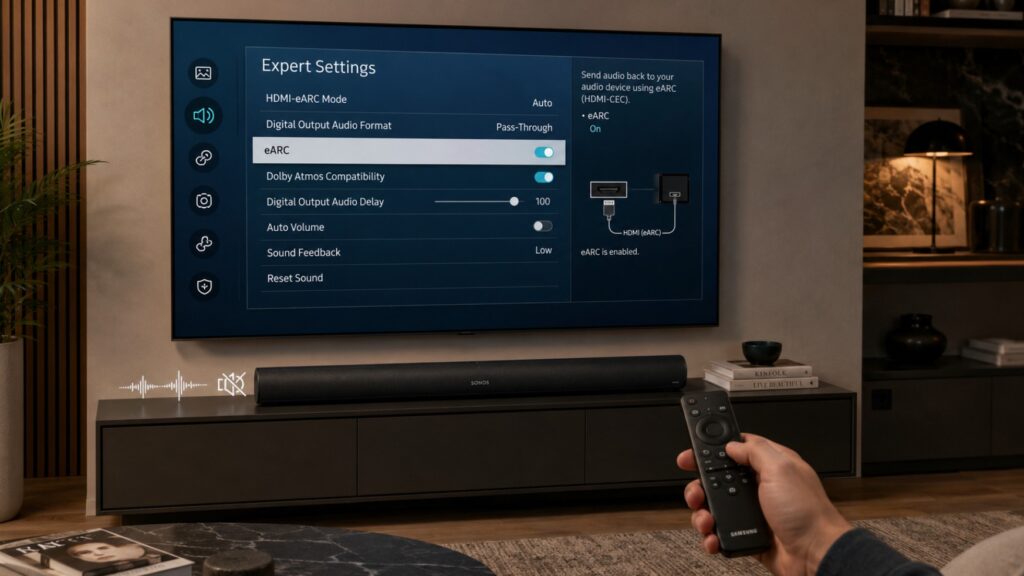
4. Use a stable Samsung eARC baseline
Samsung menu names differ by model year, country and Tizen version, but the usual settings are found under:
Settings → All Settings → Sound → Expert Settings
Start with this configuration:
| Samsung setting | Recommended starting point | Purpose |
| Sound Output | Receiver HDMI or Receiver HDMI-eARC | Sends TV audio to Arc Ultra |
| HDMI-eARC Mode | Auto | Enables eARC when available |
| Digital Output Audio Format | Auto | Safest first test across apps and sources |
| Dolby Atmos Compatibility | On | Allows compatible Atmos output |
| Anynet+ (HDMI-CEC) | On | Required for normal ARC/eARC control |
| Digital Output Audio Delay | 0 during testing | Avoids adding unnecessary delay |
| Input Signal Plus | On for 4K HDR or high-refresh sources | Primarily affects the source input, not Arc Ultra |
Anynet+ is usually under:
Settings → All Settings → Connection or General → External Device Manager → Anynet+
The exact path can change after an operating-system update.
After applying these settings, restart the TV and test one Samsung app before reconnecting every external source.
Auto or Pass-Through?
The correct option depends on what you are playing.
| Digital Output setting | Best use | Limitation |
| Auto | Samsung apps and mixed sources | TV may process or convert some formats |
| Pass-Through | Compatible external HDMI sources | May be unavailable with internal TV apps |
| PCM | Diagnostic testing | May reduce output to stereo on some sources or models |
| eARC Off | Temporary ARC test | Can remove TrueHD, Dolby MAT or multichannel PCM |
Pass-Through being greyed out while using a Samsung TV app is not necessarily a fault. There is no external HDMI signal for the television to pass through in the same way. Switch to the relevant HDMI source before judging whether the option is available.
If Pass-Through causes interruptions, return to Auto and test again. Do not keep Pass-Through simply because it sounds like the technically superior choice.
5. Use PCM to prove whether the problem is format-related
PCM is one of the most useful diagnostic tools in this situation.
Temporarily select:
Sound → Expert Settings → Digital Output Audio Format → PCM
Then replay the exact scene, game or application that normally causes the interruption.
If PCM remains stable, you have learned three useful things:
- the Arc Ultra can maintain an HDMI audio connection;
- the soundbar is probably not losing power;
- the problem is more likely related to Dolby audio, multichannel output, Pass-Through or eARC negotiation.
PCM is not automatically the permanent fix. Depending on your source and TV, it may reduce the signal to two-channel audio and remove Dolby Atmos.
After the test, restore Auto or Pass-Through and continue isolating the affected format.
6. Check what the Arc Ultra is actually receiving
Do not rely only on the Dolby Atmos label shown by the streaming service. Check the signal that reaches the soundbar.
Open the Sonos app, select the Arc Ultra room and look at the audio-format badge on the Now Playing screen.
Depending on the source, you may see:
- Stereo PCM;
- Dolby Digital;
- Dolby Digital Plus;
- Dolby Atmos;
- Dolby TrueHD;
- Multichannel PCM;
- Dolby Multichannel PCM.
Use the badge before and after an interruption.
| What the Sonos app shows | What to investigate |
| Stereo PCM when Atmos was expected | Source or Samsung output configuration |
| Dolby Digital Plus with Atmos | Typical compressed streaming Atmos path |
| Dolby Multichannel PCM | Dolby MAT or processed multichannel source |
| Multichannel PCM | Console or external player output |
| Format disappears during the dropout | HDMI/eARC connection is being renegotiated |
| Format remains visible but only rears stop | Sonos surround connection rather than TV eARC |
This test prevents you from chasing an Atmos problem when the Arc Ultra is only receiving stereo PCM.
7. Test HDMI-eARC Mode Off without keeping it off
Set HDMI-eARC Mode to Off, restart the television and repeat the same content.
If the interruptions disappear, the result points toward eARC negotiation, a higher-bandwidth format or firmware interaction. It does not prove that the cable is defective, and it does not mean ARC is the best permanent setup.
With eARC disabled, you may lose:
- Dolby TrueHD;
- lossless Dolby Atmos over TrueHD;
- multichannel PCM;
- Dolby MAT from compatible sources;
- some console audio configurations.
Compressed Dolby Atmos over Dolby Digital Plus may still work from compatible streaming apps.
Use this test to identify the problem, then return eARC to Auto and continue with the source-specific steps below. 🎬
8. Fix Apple TV 4K dropouts
Apple TV 4K can use Dolby MAT to maintain smooth transitions between stereo, multichannel and Dolby Atmos audio. This depends on a stable eARC chain when the signal travels through the Samsung TV.
Samsung TV sound cuts out with Sonos Arc Ultra only on Apple TV 4K
On Apple TV, open:
Settings → Video and Audio → Audio Format
Use this baseline:
| Apple TV setting | Starting value |
| Change Format | Off |
| Dolby Atmos | On |
| Continuous Audio Connection | On |
| Audio Output | TV through HDMI |
| Reduce Loud Sounds | Off during diagnosis |
Continuous Audio Connection is designed to prevent gaps while the audio format changes. However, compatibility can still vary between television firmware, HDMI devices and tvOS versions.
If the interruptions continue:
- Turn Continuous Audio Connection off.
- Restart Apple TV and the Samsung TV.
- Test the same title.
- Turn the setting back on and test again.
- Temporarily enable Change Format and select Dolby Digital 5.1.
If Dolby Digital 5.1 is stable but Atmos is not, you have isolated the problem to the Dolby MAT, Atmos or eARC path. Dolby Digital 5.1 is then a temporary fallback, not the full-quality solution.
Keep Apple TV connected directly to the Samsung TV during diagnosis. Arc Ultra does not provide an extra HDMI input for routing an external source through the soundbar.
9. Check PS5 and Xbox audio separately 🎮
Console menus and available formats can change through system updates, so use the format test rather than copying one permanent setting for every console.
| Device | Atmos or surround test | Stability test |
| PS5 | Select the appropriate HDMI device type and Dolby Atmos where supported | Test Linear PCM or Dolby Audio |
| Xbox Series X/S | Select Dolby Atmos for home theater where supported | Test Stereo Uncompressed or another supported basic format |
| Blu-ray player | Use Bitstream for TrueHD/Atmos | Test Dolby Digital or PCM |
| PC | Use the configured Atmos or multichannel output | Test stereo PCM at a fixed refresh rate |
For PS5, connect the console directly to the TV and confirm that HDMI is selected as the audio output. Choose the HDMI device type that matches your setup rather than automatically selecting an AV receiver configuration with the wrong speaker layout.
If Arc Ultra is used alone, the Sound Bar option may be the more appropriate starting point. If you use a complete Sonos surround system, verify the available channel configuration carefully.
For Xbox, confirm that the Dolby Access configuration has completed before testing Dolby Atmos for home theater. If a basic uncompressed format is stable but Atmos drops, focus on eARC and audio-format handling rather than replacing the soundbar immediately.
Do not change the console’s 4K, VRR and 120Hz settings at the same time as its audio format. Change one variable, retest and write down the result.
10. Disconnect other HDMI devices temporarily
Anynet+ allows every compatible HDMI device to participate in the same control network. One misbehaving streamer, console, receiver or switch can disturb the connection even when it is not the active source.
Disconnect every HDMI device except the Arc Ultra.
Test a Samsung app. If the sound remains stable, reconnect devices one at a time.
When the interruption returns, temporarily disable HDMI-CEC on that external device rather than immediately disabling Anynet+ on the TV. This may preserve TV remote volume control and the eARC connection while removing the unwanted CEC commands from the problem source.
Common names for HDMI-CEC include:
- Anynet+ on Samsung;
- Control for HDMI on PlayStation;
- HDMI-CEC on Xbox;
- Control TVs and Receivers on Apple TV;
- Simplink on LG devices;
- Bravia Sync on Sony devices.
Do not permanently disable Anynet+ before testing the consequences. ARC/eARC detection and TV remote control may stop working correctly.
11. Update the TV, Arc Ultra and source device
Firmware can change HDMI timing, audio formats and standby behaviour. Update all three parts of the chain rather than updating only the soundbar.
Samsung TV
Open:
Settings → All Settings → Support → Software Update → Update Now
Samsung firmware is model- and region-specific. Check the full model code before using a USB firmware package, and never install software intended for a similar-looking regional model.
Sonos Arc Ultra
In the Sonos app, check the system-update section and install any available product update. Also update the Sonos app through your phone’s app store.
As of July 14, 2026, Sonos lists system software version 96.0-78270, described as including bug fixes and performance improvements. Rollouts may take place gradually, so not every system receives an update at exactly the same time.
Do not assume that a generic “performance improvement” specifically fixes Samsung eARC dropouts unless Sonos confirms that change.
External devices
Update:
- Apple TV and tvOS;
- PS5 system software;
- Xbox system software;
- Blu-ray player firmware;
- streaming apps;
- HDMI switch or receiver firmware, if one is used.
After updating, perform another complete cold boot. An update can install correctly while the old HDMI state remains active until every device is restarted.
12. Run Samsung’s built-in diagnostics
Samsung TVs provide diagnostic options that may include:
- Sound Test;
- HDMI Troubleshooting;
- Signal Information;
- HDMI-CEC Check;
- Device Care.
The usual path on recent models is:
Settings → Support → Device Care → Self Diagnosis
Run the Sound Test using TV Speaker first. If the television’s own test audio also cuts out, the problem is no longer limited to Sonos or eARC.
An HDMI-CEC check can also reveal abnormal communication with a connected soundbar or external device, although the available tests vary by model and software version.
13. Reset settings only after the targeted tests
A factory reset should not be your first response to a one-second dropout. It removes useful evidence and forces you to rebuild the entire system without knowing which setting mattered.
Use this order:
- Reset only the affected source’s audio settings.
- Re-run TV Setup for Arc Ultra in the Sonos app.
- Reset Samsung sound settings, where available.
- Reset Smart Hub if only Samsung apps are affected.
- Factory-reset the Samsung TV only after documenting your picture, network and accessibility settings.
- Factory-reset Arc Ultra only when Sonos support recommends it or the soundbar cannot be configured normally.
A Sonos factory reset erases the product’s registration and system information. It is not a routine fix for a format-specific HDMI interruption.
14. When optical audio is worth testing
Optical can help prove whether HDMI control or eARC is causing the interruption. It removes ARC, eARC and most CEC behaviour from the audio path.
However, optical is a fallback with clear limitations:
- no lossless Dolby TrueHD;
- no multichannel PCM;
- no Dolby MAT;
- no Dolby Atmos from the normal TV connection;
- different remote-control behaviour;
- an optical adapter may be required.
Use optical temporarily when you need stable basic sound or want to isolate the HDMI path. It should not be presented as an equal replacement for a working eARC connection.
When the problem probably needs support or service
| Result after testing | Best next step |
| TV Speaker cuts out during Samsung Sound Test | Contact Samsung support |
| Arc Ultra drops Sonos music as well as TV audio | Contact Sonos support |
| Multiple known-good cables fail on the eARC port | Ask Samsung to test the HDMI/eARC hardware |
| Arc Ultra cannot be detected by another compatible TV | Contact Sonos support |
| Dropouts began immediately after a documented update | Report model, version and reproduction steps |
| Only one app fails | Contact the app provider after reinstalling or resetting it |
| Only one external source fails | Contact the source manufacturer |
| Video and audio disappear together | Investigate HDMI input, source cable or TV hardware |
| Audio is stable on ARC but never stable on eARC | Provide Samsung and Sonos with format-specific test results |
Before contacting support, collect:
- complete Samsung model code;
- TV software version;
- Sonos system version;
- source-device model and software;
- HDMI port used;
- cable tested;
- audio format shown in the Sonos app;
- whether PCM is stable;
- whether eARC Off is stable;
- whether Samsung apps and external sources behave differently;
- approximate time between interruptions.
These details are much more useful than saying only that the sound “sometimes disappears.”
Frequently asked questions
Why does Sonos Arc Ultra cut out only with Dolby Atmos?
Dolby Atmos may arrive through Dolby Digital Plus, Dolby TrueHD or Dolby MAT. These formats do not place the same demands on the HDMI path. If PCM is stable but Atmos cuts out, the problem is more likely connected to format handling, eARC or the source device.
Should Samsung Digital Output Audio Format be Auto or Pass-Through?
Start with Auto. Pass-Through is useful for compatible external HDMI sources, but it may be unavailable for Samsung apps and may expose compatibility problems in some device chains. Keep the option that delivers the correct format without interruptions.
Why is Pass-Through greyed out?
Pass-Through may become available only when the active source is an external HDMI device. Samsung apps originate inside the TV, so there may be no external signal to pass through.
Will turning eARC off stop the dropouts?
It may stop them if eARC negotiation or a higher-bandwidth format is responsible. You can also lose Dolby TrueHD, multichannel PCM or Dolby MAT, so use eARC Off as a test before accepting it as a permanent compromise.
Can Wi-Fi cause Arc Ultra TV audio dropouts?
The TV-to-Arc Ultra audio connection uses HDMI, not Wi-Fi. Wi-Fi becomes a stronger suspect when music also cuts out or when only wireless surrounds and the Sub disappear while the Arc Ultra continues playing.
Does Arc Ultra need an HDMI 2.1 port?
Arc Ultra needs the TV’s compatible HDMI ARC or eARC port. The source devices use the TV’s other HDMI inputs. For the highest-bandwidth audio formats, both the television and soundbar must maintain a working eARC connection.
Why does the Samsung TV switch from Receiver HDMI-eARC to Receiver HDMI?
That change suggests the eARC connection has fallen back to standard ARC or has been renegotiated. Check Anynet+, the direct cable connection, connected CEC devices and firmware.
Will replacing the HDMI cable definitely fix it?
No. A cable can cause dropouts, but firmware, source formats and CEC behaviour can produce the same symptom. Test the supplied Sonos cable and one known-good alternative before buying several expensive cables.
The setup I would keep ✅
For most Samsung TV and Sonos Arc Ultra systems, I would keep:
- Arc Ultra connected directly to the labelled Samsung eARC port;
- Anynet+ enabled;
- HDMI-eARC Mode set to Auto;
- Dolby Atmos Compatibility enabled;
- Digital Output Audio Format on Auto initially;
- Pass-Through used only when the external source handles it reliably;
- Apple TV Continuous Audio Connection enabled unless testing proves it causes a compatibility problem;
- consoles connected directly to the television;
- optical reserved for diagnosis or a temporary fallback.
The most revealing tests are PCM, eARC Off and source isolation. If PCM fixes the interruption, the soundbar is probably maintaining the physical audio connection and the problem sits higher in the format chain. If removing one HDMI source fixes it, investigate that device’s CEC and audio settings. If every source fails, including native Samsung apps, focus on the direct TV-to-Arc Ultra connection.
You should not have to accept random audio cuts from a premium television and soundbar. Work through the chain in order, preserve the formats that remain stable and only reset the system after the targeted tests have failed.
Related TVComparePro guides
- Samsung TV settings greyed out — unlock Picture, Broadcasting and Reset
- Best soundbar for Samsung S95F — Q-Symphony and eARC
- Best streaming device for Samsung S95F
- Samsung TV keeps turning off — stop shutdowns and CEC loops
- Choosing between Samsung and LG for your home theater? Our Samsung QS90H vs LG H7 comparison covers current prices, Dolby Atmos, HDMI connectivity, bass and expansion options.