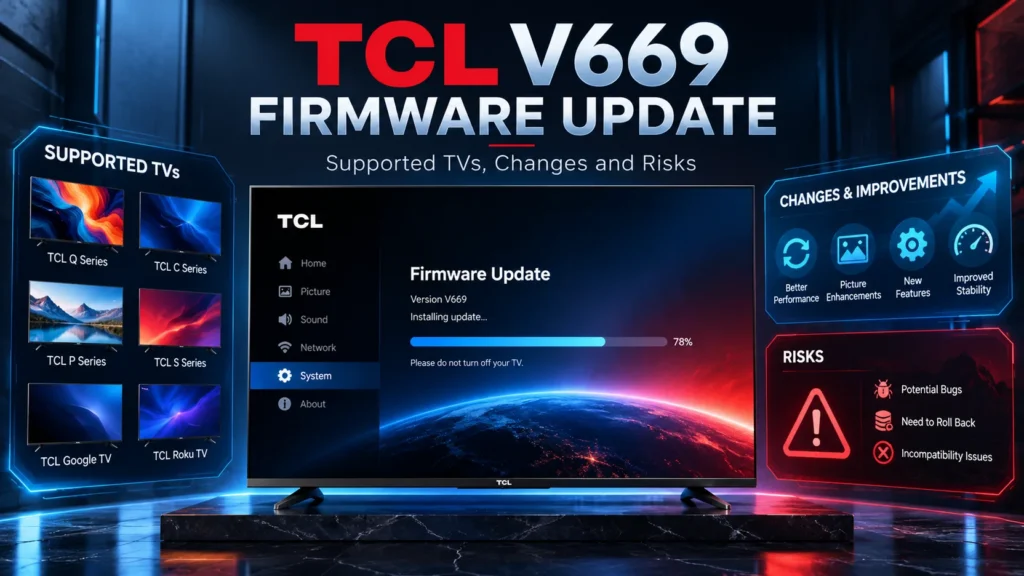

A firmware update can change how a television handles a console, an HDMI receiver or a dark movie scene. But the first question is whether the software belongs on that particular TV. The TCL V669 firmware update targets a defined Google TV platform family, and that hardware distinction matters just as much as the version number.
V669 is a newer build in TCL’s Pentonic 700 software line. Its build details, supported platform identifiers and comparison with V667 provide a useful foundation for understanding the update. The sensible approach is to identify the exact television, look at the functions that matter in your setup and choose the correct installation path. A higher number by itself is not a picture-quality upgrade.
TCL V669 version details
The V669 package is identified by V8-0012T01-LF1V669.003402. The platform portion, 0012T01, corresponds to the T653T01 firmware family used across multiple generations of TCL televisions. The package was built on September 29, 2026, and contains an Android 14 Google TV software base.
| Build field | TCL V669 | Why it matters |
|---|---|---|
| Full version | V8-0012T01-LF1V669.003402 | Identifies this firmware build precisely |
| Platform family | 0012T01 / T653T01 | Separates it from TCL’s older T615 and newer T655 branches |
| Build date | September 29, 2026 | Compilation date, not the date every region receives an update |
| Operating system | Android 14 / Google TV | Continues the Android base already present on V667 |
| Security patch level | June 5, 2026 | Same patch date identified for V667 |
| Package formats | About 2.04 GB OTA; 3.34 GB IMG | Different packaging and installation purposes |
There are two details worth noticing. First, the build date is not a promise of regional availability. A model-specific update can be released in stages. Second, the operating system number does not increase when moving from V667 to V669. Anyone already running V667 is already on Android 14.
V667 vs V669: the actual baseline
I would start here rather than with a long list of potential improvements. Firmware comparisons make sense only when we know the starting version. An older V590-series installation and V667 do not represent the same baseline, even if both televisions are otherwise similar.
| Field | V667 | V669 |
|---|---|---|
| Full revision | LF1V667.003365 | LF1V669.003402 |
| Build date | September 15, 2026 | September 29, 2026 |
| Android | Android 14 | Android 14 |
| Security patch | June 5, 2026 | June 5, 2026 |
| OTA package | About 2.25 GB | About 2.04 GB |
V669 advances the firmware revision without introducing a new Android version or security patch date relative to V667. The approximately 210 MB difference between their OTA package sizes does not tell us whether an image-processing feature has improved. Package size depends on how software partitions, components and update payloads are assembled. It is not a performance benchmark.
Which TCL TVs belong to the V669 platform?
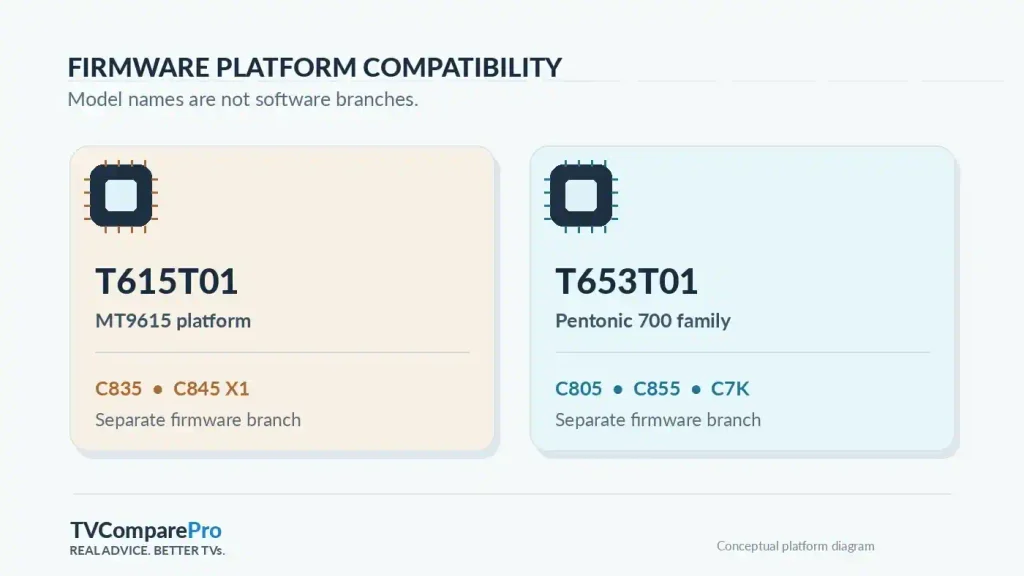
The key is TCL’s internal software architecture, not a simple sequence of model names. C805 and C855 share the Pentonic 700 family despite occupying different price tiers and model years. C835, which sits numerically between C805 and C855, uses an older platform and therefore belongs to a different firmware branch.
| TV family | Examples | Platform relationship |
|---|---|---|
| 2025 Mini LED ranges | C6K, C7K, C8K, C9K, X11K | T653T01 / 0012T01 family on relevant regional variants |
| 2026 selected ranges | C6L, C7L, RM7L, C7M | Related T653 platform variants; verify the regional chassis |
| Earlier Pentonic 700 TVs | C755, C765, C805, C855, C955, X955 | T653T01 family on the corresponding versions |
| Revision-sensitive TVs | C745 X2, C845 X2 | Do not confuse X2 hardware with an older X1 revision |
| Different hardware branches | C835, C845 X1, C8L, X11L | Not the same T653T01 firmware target |
This is a platform-family guide, not a substitute for checking the precise product identifier and regional firmware channel. Even two televisions built on a similar MediaTek SoC can have different panel control tables, board configurations and permitted project identifiers. Software compatibility must account for those details.
Why C835 Does Not Use the Same Firmware as C805 and C855
TCL model numbers can be a little misleading. You might expect the C835 to have a newer processor than the C805 simply because 835 is a higher number. But that is not how TCL’s product generations work.
The C835 arrived in 2022 with the MediaTek MT9615 processor, using the T615 firmware family on its European variants. The C805 came a year later with the newer MT9653, also known as Pentonic 700. TCL then used the same processor family in the more premium C855 in 2024.
That doesn’t make the C835 a bad television. Far from it. It remains a capable Mini LED model, with strong HDR performance and a good built-in sound system. The difference here is mainly about the hardware platform and software compatibility, not which television is necessarily better.
The important thing to remember is that firmware designed for T653T01 cannot be installed on a C835 using T615T01. These are different hardware platforms, and installing the wrong package could leave your television unusable.
What About the TCL C845 X1 and X2?
The C845 makes things even more interesting because TCL released different hardware revisions under the same model name.
The earlier C845 X1 uses the older platform, while the revised C845 X2 moved to the newer Pentonic 700 family.
That’s why I would never choose a firmware update based on the model name alone. Always check the hardware revision and full software version first. Two televisions that look almost identical on the outside can require completely different firmware.
Why C8L and C8K Are Different
The same principle applies to newer TCL televisions.
The C8K uses the T653 platform, while the newer C8L and X11L are associated with TCL’s later T655/Pentonic 800 family in their respective markets.
Even though these are all premium Mini LED televisions, their firmware packages should not be treated as interchangeable.
The safest approach is simple: match the firmware to your television’s actual hardware platform, not just its model name or release year.
What Can V669 Change for Picture Quality, Gaming and Sound?
A firmware update can affect much more than the Google TV interface. Modern Mini LED televisions rely on several systems working together, from controlling the backlight to processing HDR, managing HDMI signals and sending audio to a soundbar.
That’s why a software change can improve one area without necessarily affecting everything else.
When evaluating V669, I would pay attention to the features you actually use. A smoother gaming experience, more consistent HDR or fewer audio interruptions matter much more than a higher firmware version number.
Gaming at 120Hz and 144Hz: What to Check
If you use a PS5 or Xbox Series X, start with the basics: 4K at 120Hz, VRR support and a stable HDMI connection.
For PC gaming, some TCL models can also reach 144Hz with compatible hardware. Just remember that PS5 and Xbox Series X are limited to 120Hz output, so a 144Hz option on the television doesn’t mean your console will run at that refresh rate.
After updating, I recommend opening a game you already know well, preferably one that supports VRR. Play for a few minutes, return to the console dashboard and launch the game again.
Pay attention to a few things:
- Does the television detect VRR correctly?
- Do you notice brief black screens when switching between the game and dashboard?
- Does the picture remain stable when the frame rate changes?
- Do dark areas look noticeably different from before?
If something seems wrong, check your HDMI cable, input settings and console output first. Changing every picture setting immediately can make it harder to identify the actual problem.
Dolby Vision and Mini LED Local Dimming
Dolby Vision and local dimming work together to produce the HDR image you see, but they handle different jobs.
Dolby Vision helps the television interpret and display HDR content, while local dimming controls how brightly different areas of the Mini LED backlight illuminate the screen.
A firmware update can change how these systems interact. You might notice differences in shadow detail, blooming around subtitles or how bright highlights appear.
My advice is to compare something familiar rather than relying on a random movie scene.
Choose a dark scene with a few bright objects, preferably from a film you’ve watched before. Keep the same picture mode and settings, then look for differences in:
- Brightness around subtitles and other small white objects.
- Detail in dark backgrounds.
- Bright highlights, especially whether they lose visible detail.
- Overall contrast and consistency between scenes.
One thing firmware cannot change is the physical number of local dimming zones. A software update may improve how those zones are controlled, but it cannot give your television more Mini LEDs.
I also wouldn’t automatically copy picture settings from another TCL model. Different panel sizes, backlight systems and firmware versions can produce different results, even when the menus look identical.
eARC, Dolby Atmos and Soundbar Connections
Audio problems can be frustrating because the television may appear to work perfectly until you change apps, switch HDMI inputs or wake it from standby.
With eARC, the television and soundbar or receiver need to communicate correctly. HDMI-CEC, audio format settings and device handshakes all play a role.
If you use Dolby Atmos, try playing the same familiar movie or streaming title before and after the update.
If the sound suddenly disappears or the audio format changes, check whether:
- eARC is still enabled.
- The digital audio output is set correctly.
- Passthrough or PCM has been selected unexpectedly.
- Your soundbar or receiver reports the expected audio format.
Don’t rely entirely on a Dolby Atmos logo in an app. The information shown by your soundbar or AV receiver is often more useful for checking what signal it actually receives.
Standby, Quick Start and Google TV Performance
Not every improvement is about picture or sound. Firmware can also affect how quickly the television starts, how smoothly Google TV responds and how reliably connected devices wake up.
I would check two everyday situations after updating.
First, turn the television off normally and wake it from standby. Does it respond as expected? Does your soundbar turn on with it?
Then try a complete restart and see whether apps load normally.
If you notice slower startup, missing HDMI-CEC control or apps restarting unexpectedly, check whether those problems happen consistently before changing more settings.
And I wouldn’t rush into a factory reset. It removes your preferences and requires setting everything up again. Save that step for persistent problems after simpler troubleshooting hasn’t helped.
How to check your TCL firmware and update safely
The most useful information is already available on the television. TCL’s Google TV menus can vary slightly by year and software version, but the standard update route is straightforward.
- Open Settings on the TV and go to System > About.
- Open Product Information or the software information screen and record the complete installed version, not just the last three digits.
- Look for the platform component, such as
T615T01,T653T01or0012T01. - Open System update, then choose Network update or Check for update, according to the TV’s menu.
- If your TV offers an update, allow the process to finish without removing power.
- After the restart, verify the version and review picture mode, HDMI format, VRR, local dimming and audio output on the inputs you use most.
Important: OTA and IMG/PKG files serve different update workflows. Do not treat a recovery image as a routine replacement for the television’s built-in update function. A platform prefix alone does not prove that a package matches the panel, project ID, size and regional configuration of your exact TV.
If the TV reports that its software is current, it may simply mean that your specific device has no newer update available through its assigned regional channel at that moment. It does not prove that a similarly named firmware package is safe to install manually.
Should you install V669?
My recommendation depends on the starting point. If the television offers V669 through its normal update menu, I would record the current firmware and picture settings, then follow the built-in process. That gives you a supported path and a clean baseline for any comparison.
If your TV already runs V667 without problems, I would not change its gaming, HDR or audio setup simply because V669 exists. Update through the appropriate channel and compare identical scenes or signals before deciding that a new picture preset is necessary. An apparent improvement caused by a reset setting is not the same thing as improved image processing.
If you own a C835, C845 X1, C8L or a configuration whose platform does not match the package, stop at the identifier check. There is nothing to gain from forcing software for a different motherboard family. The same principle applies to special large-screen configurations whose panel and project identifiers can differ from smaller versions.
For readers who want background on the broader platform transition, my TCL Android 14 update guide covers the operating-system changes. If your concern is 120Hz or 144Hz output rather than the firmware itself, see my TCL 144Hz and Game Bar setup guide.
The practical conclusion: V669 is a meaningful new revision for the T653T01/0012T01 software family, but the right decision begins with identifying your TV’s platform. Get that right first. Then evaluate VRR, Dolby Vision, dimming and audio on the equipment and settings you actually use.