
TCL has spent the last few years turning its higher-end TVs into increasingly serious gaming displays. The next step no longer depends on an HDMI cable at all. The Xbox app on TCL TVs is officially coming, allowing supported models to stream Xbox games directly from the cloud without an Xbox Series X or Series S connected underneath the screen.
The announcement sounds simple. The compatibility story is not.
TCL says the app will reach eligible smart TVs through software updates, but the company has not yet published a complete model list. That leaves owners of popular 2026 models such as the C8L, QM8L, C7L and QM7L asking the obvious question: is my TV actually getting it?
For now, one model family stands above the uncertainty.
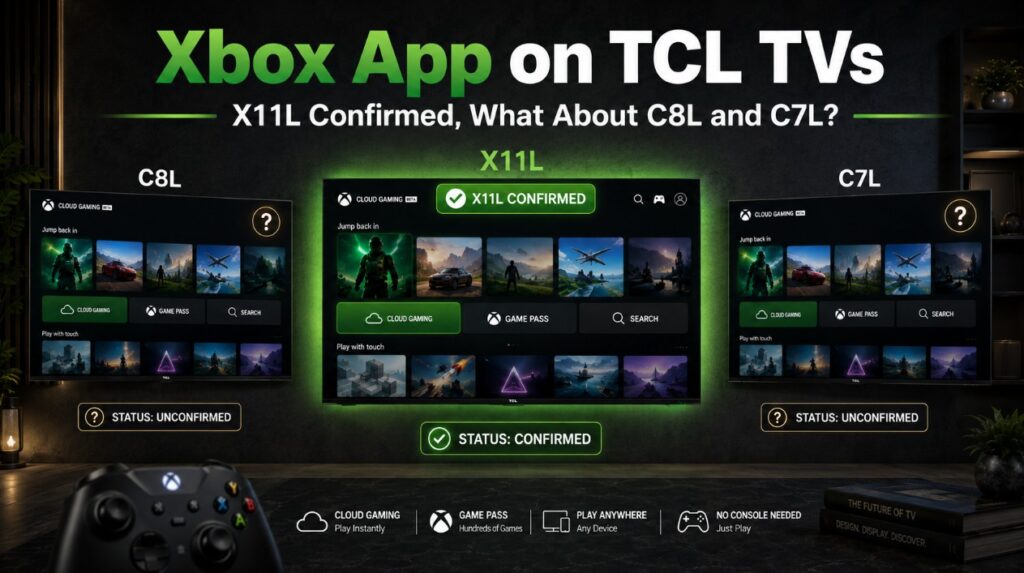
The TCL X11L is already confirmed.
What is actually confirmed for TCL right now?
The new Xbox integration is built around cloud gaming. The television decodes the video stream, the game itself runs remotely, and controller inputs travel back to Microsoft’s servers.
No local console rendering is involved.
| TCL Xbox feature | Current status |
|---|---|
| Xbox app coming to TCL TVs | Confirmed |
| Delivery | Software update |
| Rollout | Phased |
| Console required | No |
| Bluetooth controller | Required |
| Xbox account | Required |
| Internet connection | Required |
| X11L | Confirmed |
| C8L / QM8L | Not confirmed yet |
| C7L / QM7L | Not confirmed yet |
| P8L | Not confirmed yet |
| Older TCL Google TVs | Not confirmed generally |
| Native 4K cloud stream | Not confirmed |
| HDR cloud stream | Not confirmed |
| 120Hz cloud stream | Not confirmed |
The important part is that TCL has not described Xbox as a universal Google TV feature.
A recent TCL television can have a powerful SoC, Wi-Fi, Bluetooth, HDMI 2.1 and a 144Hz panel and still require separate certification before Xbox appears.
TCL X11L is already on the Xbox roadmap
The X11L is the strongest case because TCL had already listed an Xbox Game Pass app for gaming without a console as a planned OTA feature when the North American series was introduced.
That means the X11L was not merely inferred from today’s broader TCL-Xbox announcement.
It had already been named.
| TCL X11L | Xbox status |
|---|---|
| 75-inch X11L | Confirmed in North American X11L family |
| 85-inch X11L | Confirmed |
| 98-inch X11L | Confirmed |
| App live today | Not broadly confirmed |
| Delivery | OTA software update |
| Exact release date | Not announced |
The X11L is also a logical showcase for cloud gaming.
It has a high-refresh panel, four HDMI 2.1 ports for local gaming, strong motion processing, Wi-Fi connectivity and TCL’s newest premium hardware. None of those features are required to render Xbox Cloud Gaming locally, but they give the display plenty of headroom once the stream reaches the TV.
Our TCL X11L review notes cover the panel, Mini LED system and gaming hardware separately.
What about C8L and QM8L?
This is where we need to resist the temptation to turn technical capability into confirmation.
The C8L and QM8L look like obvious candidates.
They are modern Google TVs with strong processing, Bluetooth, fast panels and gaming-focused hardware. The C8L can also push well beyond what Xbox Cloud Gaming currently needs in terms of refresh capability.
But TCL has not named C8L or QM8L yet.
That means this table is more useful than speculation:
| TCL model | Could the hardware handle cloud gaming? | Official Xbox confirmation |
|---|---|---|
| X11L | Yes | Yes |
| C8L | Very likely capable | No confirmation yet |
| QM8L | Very likely capable | No confirmation yet |
| C7L | Very likely capable | No confirmation yet |
| QM7L | Very likely capable | No confirmation yet |
| P8L | Likely capable | No confirmation yet |
⚠️ Capability and eligibility are two different things.
A TV app such as Xbox depends on operating-system integration, decoding support, DRM, controller certification, regional licensing and firmware validation.
That is why a lower-performance TV can theoretically receive an app before a faster one.
Why C8L owners should not sideload the Xbox app
Because TCL uses Google TV on models such as C8L, there will inevitably be attempts to sideload Android APK files.
I would avoid that.
The TV version of Xbox Cloud Gaming is more than a normal phone app displayed on a large screen. Proper implementation can depend on:
- device certification;
- DRM support;
- controller mapping;
- TV-specific video decoding;
- app permissions;
- low-latency streaming paths;
- account integration;
- firmware-level compatibility.
Installing a random APK does not add those pieces.
It can also create instability or leave an outdated app installed after TCL eventually pushes the official version.
Wait for the supported firmware.
A 144Hz or 288Hz TCL does not mean Xbox Cloud Gaming at 144fps
This is one of the most important technical points.
TCL’s premium televisions are capable of far more display bandwidth than cloud gaming currently sends them.
A C8L can accept a high-refresh local gaming signal from a PC. The X11L can also process very high refresh rates in supported modes.
Xbox Cloud Gaming works differently.
The game frame is rendered in a remote data center, encoded into a compressed video stream, sent across the internet and decoded by the television.
The panel refresh rate cannot magically increase the frame rate inside that stream.
| TV hardware | What it means for Xbox Cloud Gaming |
|---|---|
| 4K panel | TV can display 4K, but stream may be lower resolution |
| 120Hz panel | Does not guarantee 120fps cloud gaming |
| 144Hz panel | Does not create a 144fps cloud stream |
| 288Hz Game Accelerator | Not directly useful for current Xbox cloud output |
| Mini LED brightness | Does not create HDR if stream is SDR |
| VRR | Cloud stream behavior is different from HDMI VRR |
| Low input lag | Still useful on the TV side |
🎮 The biggest latency factor is no longer simply the panel or HDMI input.
It is the whole path:
controller → TV → network → Xbox server → game render → video encode → network → TV decode → panel
That is why cloud gaming can feel different even on two televisions with similar display specs.
How sharp will Xbox games look on a TCL 4K TV?
Xbox has already increased the ceiling of its higher-quality cloud streaming.
On supported hardware, higher-tier cloud streams can now reach up to 1440p with higher bitrate.
That is a significant improvement on a large TV, but it is still not the same as a native 4K render coming from an Xbox Series X through HDMI.
The differences become easiest to see in:
- fine grass;
- distant geometry;
- text;
- foliage;
- fast camera movement;
- particle effects;
- dark gradients;
- high-motion scenes.
Compression has less time to preserve tiny detail when the entire frame changes rapidly.
A good TCL processor can upscale and present the stream cleanly, but it cannot reconstruct every detail that was discarded before the video reached the television.
📺 That means a premium C8L or X11L can make Xbox Cloud Gaming look good without making it equivalent to local 4K gaming.
Internet quality matters more than raw speed
Xbox recommends a fast connection, with around 20Mbps or higher being a sensible target for TV use.
But a 500Mbps connection is not automatically better for gaming than a stable 50Mbps connection.
What matters heavily is:
- latency;
- packet loss;
- jitter;
- Wi-Fi interference;
- distance from the access point;
- congestion;
- distance from the cloud server.
Ethernet remains the cleanest option if the TV is close enough to the router.
If Ethernet is impractical, 5GHz Wi-Fi is preferable to a congested 2.4GHz connection.
A mesh system can also work very well, but only if the television has a strong connection to the nearest node.
Controllers that can already work with Xbox on TV
One of the nicer parts of Xbox Cloud Gaming is that you are not necessarily locked to an Xbox controller.
The current TV ecosystem supports several well-known controllers.
| Controller | Xbox TV support |
|---|---|
| Xbox Wireless Controller | Yes |
| Xbox Elite Wireless Controller Series 2 | Yes |
| Xbox Adaptive Controller | Yes |
| Xbox One Bluetooth controller | Yes |
| PlayStation DualSense | Yes |
| PlayStation DualShock 4 | Yes |
| Selected third-party Bluetooth controllers | Depends on model |
The final TCL compatibility list may not be identical for every controller, but these are the safest mainstream choices.
An Xbox Wireless Controller is still the simplest option if you are buying one specifically for cloud gaming.
Game Pass is also changing
The timing of TCL’s Xbox rollout is interesting because Xbox Cloud Gaming itself is changing.
Beginning in November, cloud gaming hours are moving to a capped model inside Game Pass:
| Game Pass tier | Included cloud gaming |
|---|---|
| Ultimate | 15 hours per month |
| Premium | 10 hours per month |
| Essential | 5 hours per month |
Additional cloud playtime will be available separately after the included allowance is used.
Xbox also plans to allow players without a recurring Game Pass subscription to purchase cloud playtime and stream eligible games they own.
That could matter a lot for TV users.
Someone who only wants occasional cloud gaming may eventually be able to use the TCL app without keeping an expensive gaming subscription active every month.
The final pricing has not yet been announced.
What happens to saves and achievements?
The TV is simply another Xbox client.
Your account remains the center of the experience.
That means supported games can carry:
- cloud saves;
- achievements;
- friends;
- profile data;
- supported owned games;
- Game Pass library access.
You could play a game on another Xbox device, stop, then continue later through the TCL TV.
For casual household use, that may be more useful than replacing a console entirely.
A bedroom TV or second living-room screen suddenly becomes a usable gaming device without another box under it.
Practical setup notes before the Xbox update arrives
There is not much worth changing on the TV yet. 🔧
Keep things simple:
- Keep the TCL on official firmware.
- Leave normal app updates enabled.
- Keep some free internal storage.
- Update the firmware on your controller.
- Use Ethernet where practical.
- If using Wi-Fi, prefer a strong 5GHz network.
- Do not install firmware intended for another region.
- Do not sideload unofficial Xbox TV builds.
If you own a C8L or QM8L and also use the TV for normal console gaming, our TCL C8L / QM8L picture settings guide covers Game Mode, VRR and HDR separately.
Cloud gaming does not replace those HDMI settings when you are using a real console.
Which TVs already have the Xbox app?
TCL is not entering an empty market.
Samsung and LG already have mature Xbox TV implementations, while Hisense has started rolling the app onto newer VIDAA televisions.
Here is the short model-oriented version.
| Brand | TV models / families | Xbox app status |
|---|---|---|
| Samsung | 2020 Q950T/Q900T/Q800T, Q95T/Q90T/Q80T/Q60T, TU8500/TU8000/TU7000, Frame/Serif/Sero/Terrace; 2021 QN900A/QN800A/QN700A, QN95A-QN85A, Q80A-Q50A, AU9000/AU8000/AU7000; all 2022+ Samsung Smart TVs with Gaming Hub, including OLED S95B, S90C/S95C, S90D/S95D, S90F/S95F and 2026 S90H/S95H families | Available now |
| LG | 2022 OLED A2/B2/C2/G2/Z2/CS, LG Flex and Posé after webOS update; 2023 B3/C3/G3/Z3 and compatible QNED/NanoCell/UHD models; 2024+ webOS24 TVs including B4/C4/G4/M4 and newer B5/C5/G5 and B6/C6/G6 families | Available now on compatible webOS24+ TVs |
| Hisense | VIDAA models with OS 9.6, including 2026 U6S, U7S, U8S/U85, UR8S, UR9S and 116UX in markets where these variants use VIDAA | Rollout already underway |
| TCL | X11L confirmed; C8L/QM8L/C7L/QM7L still awaiting individual confirmation | Coming by software update |
Samsung is currently the broadest native-TV implementation because support reaches back to specific 2020 and 2021 models and becomes much broader from 2022 onward.
LG support starts later but includes a large number of OLED owners after the webOS upgrade path.
Hisense is newer to the list, with VIDAA OS 9.6 acting as the important software requirement.
TCL is next.
TCL may eventually be one of the most interesting Xbox TV platforms
There is a good reason this announcement matters beyond simply adding another app icon.
TCL sells a huge number of TVs that already sit in the exact segment cloud gaming wants to reach: large screens, strong gaming marketing and relatively affordable hardware.
If support eventually extends from X11L down into C8L, C7L or other high-volume Google TV models, Xbox could suddenly become available on a very large installed base.
That is still an if.
For now, the clean answer is simple:
X11L is confirmed.
C8L, QM8L, C7L and QM7L are not yet confirmed.
If TCL adds those models, owners will gain a genuinely useful gaming option. If it does not, their TVs remain excellent local gaming displays through HDMI, but Xbox Cloud Gaming will need another supported device.
For buyers thinking further ahead to local next-generation gaming rather than cloud streaming, our TV for PS6 and Xbox Helix guide covers the very different requirements of HDMI 2.1, 4K120, VRR and future console hardware.