
At first glance, this looks like a simple technology fight. TCL puts SQD Mini LED at the top of its LCD range, while Hisense uses an RGB Mini LED backlight that can generate red, green and blue light directly. But the TCL X11L vs Hisense UR9 comparison gets much more interesting once you stop looking at the labels and start looking at how the two 75-inch TVs are actually built.
Our 75-inch X11L sits at roughly 4,100-4,200 nits on a 10% HDR window. For the 75-inch UR9, we use about 3,850 nits at 10%. TCL therefore keeps a modest peak-brightness advantage, but both TVs are already operating in extreme HDR territory. The more important differences are local dimming density, color architecture, processing, refresh rate, Dolby Vision 2 support and connectivity.
Hisense sells this 2026 RGB Mini LED family as UR9 in North America, while European models use the UR9S name, including the 75UR9S discussed here.
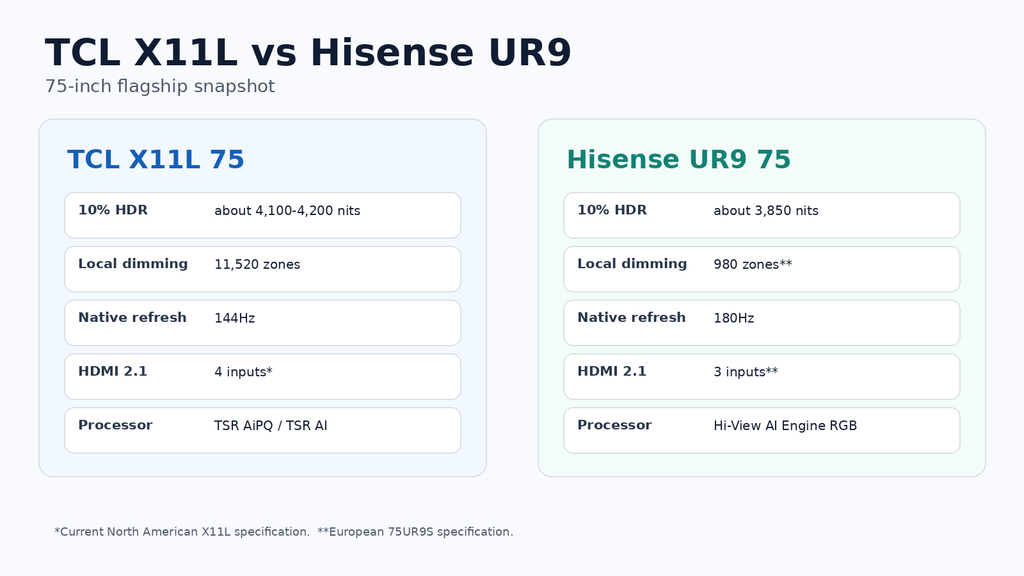
75-inch hardware at a glance
| Feature | TCL X11L 75 | Hisense UR9 75 |
|---|---|---|
| Display architecture | SQD Mini LED + WHVA 2.0 Ultra LCD | RGB Mini LED + VA LCD |
| Local dimming | 11,520 Precise Dimming Zones | 980 zones on European 75UR9S |
| TVComparePro 10% HDR figure | About 4,100-4,200 nits | About 3,850 nits |
| Native refresh | 144Hz | 180Hz |
| Gaming mode | Game Accelerator up to 288Hz at reduced resolution | Native 180Hz Game Mode |
| Processor | TSR AiPQ / TSR AI platform, depending on region naming | Hi-View AI Engine RGB |
| HDMI 2.1 | 4 inputs on current North American specification | 3 inputs on European 75UR9S |
| Dolby Vision 2 | Dolby Vision 2 Max planned via OTA on X11L | UR9 included in Hisense Dolby Vision 2 Max rollout |
| HDR formats | Dolby Vision, HDR10+, HDR10, HLG | Dolby Vision 2, HDR10+, HDR10, HLG |
Check Current 75-Inch Flagship Pricing
Both are premium 75-inch Mini LED TVs, but current pricing can change the value equation quickly. Check the exact model and regional version before ordering.
TVComparePro may earn a commission from qualifying purchases through these links.
TCL’s 75-inch SQD Mini LED flagship with 11,520 dimming zones, 144Hz native refresh and four HDMI 2.1 inputs.
Check price on Amazon →Hisense’s RGB Mini LED flagship family. North America uses UR9 naming, while European models use UR9S.
Find Hisense UR9 on Amazon →SQD Mini LED and RGB Mini LED solve color differently
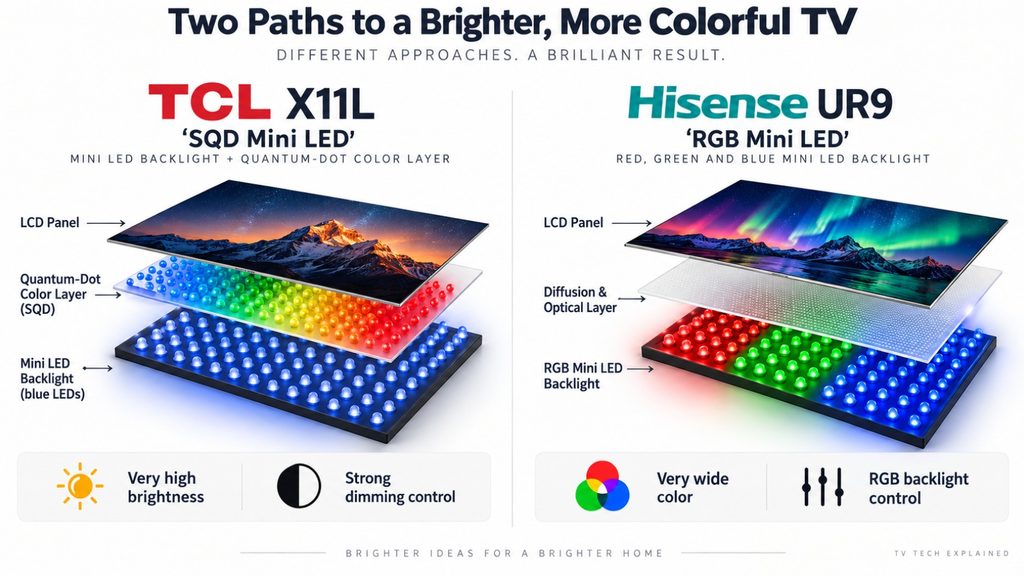
X11L starts with a blue Mini LED light source, then uses TCL’s Super Quantum Dot system, Ultra Color Filter and WHVA 2.0 Ultra panel to create the final image. Hisense takes the more radical route. The UR9 backlight itself contains red, green and blue Mini LEDs, so it can change both brightness and color before light reaches the LCD layer.
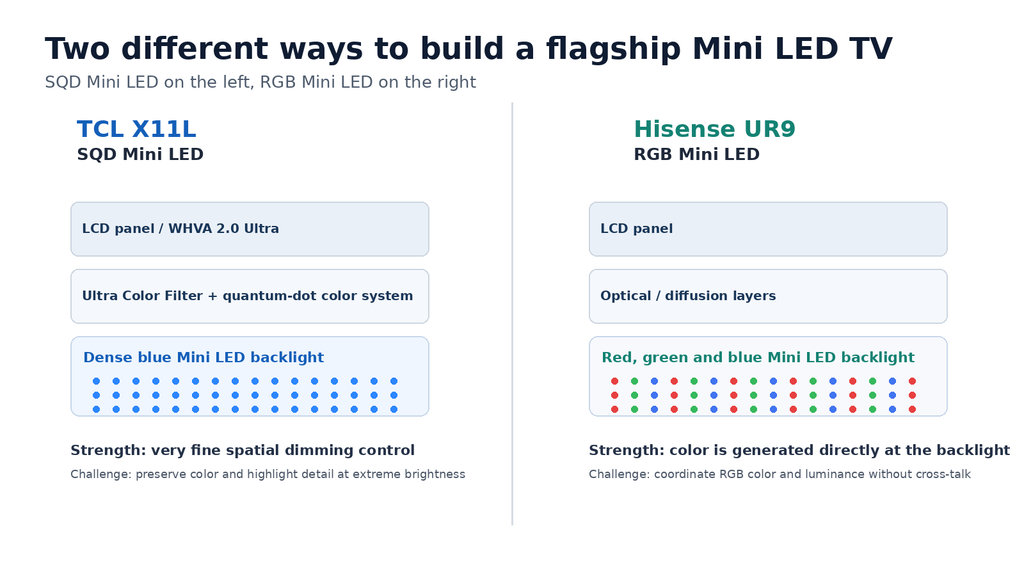
That difference sounds simple, but it changes what the processor has to control. On UR9, the TV has to decide how bright each controlled area should be and how much red, green and blue it needs. On X11L, the backlight problem is mostly about where and how much light should be produced, while color is handled higher in the optical stack.
This is why RGB Mini LED is not automatically the winner just because it is newer. The architecture has excellent color potential, but it also gives the control system more variables to manage. X11L answers with brute-force spatial precision: 11,520 dimming zones at 75 inches, a 26-bit backlight-control architecture and a very small optical distance between the backlight and LCD layer.
10% HDR brightness: TCL keeps a small lead
Our X11L 75-inch figure of 4,100-4,200 nits is only a few hundred nits above the 3,850-nit UR9 figure we use here. At this level, that is a relatively small gap. Both sets can produce extremely intense highlights, and both have enough light output for bright rooms.
| HDR behavior | TCL X11L 75 | Hisense UR9 75 |
|---|---|---|
| 10% HDR | About 4,100-4,200 nits | About 3,850 nits |
| Peak advantage | Small | Very close behind |
| What matters more | Highlight isolation and dimming precision | RGB backlight control and tone mapping |
| Best HDR strength | Tiny bright objects against dark backgrounds | Very bright scenes with strongly saturated color |
A 300-nit difference sounds large on paper, but it is much less important when both TVs are already close to 4,000 nits. In actual viewing, a clean highlight with controlled blooming is more impressive than a slightly brighter one that lifts the surrounding black level.
11,520 zones versus 980 is the biggest hardware split
TCL lists 11,520 Precise Dimming Zones on the 75X11L. The European 75UR9S lists 980 zones. Those numbers are not perfectly equivalent because UR9’s RGB backlight is doing more than simply changing luminance, but the spatial difference is still enormous.
X11L can divide the image into much smaller controlled areas, which gives the dimming algorithm more room to protect black levels around stars, subtitles, reflections and tiny HDR highlights. UR9 has fewer physical regions, but each region can manipulate red, green and blue light independently.
| Dimming hardware | TCL X11L 75 | Hisense UR9 75 |
|---|---|---|
| Official zone count | 11,520 | 980 on European 75UR9S |
| Backlight control | Extremely dense luminance control | Luminance plus RGB color control |
| Control philosophy | Many small zones | Fewer but color-aware RGB zones |
| Main challenge | Keep thousands of zones stable and natural | Keep RGB color and luminance aligned with the LCD image |
Processors: TSR AiPQ versus Hi-View AI Engine RGB
The X11L uses TCL’s TSR AiPQ / TSR AI processing platform. The name varies slightly by market, but the job is the same: upscale lower-resolution material, manage motion, control contrast and color, and coordinate the huge local-dimming grid without making the picture look synthetic.
Hisense’s Hi-View AI Engine RGB has an even stranger backlight problem to solve. It has to coordinate red, green and blue illumination in real time, not just brightness. Hisense specifically positions the processor around synchronizing color and luminance across RGB Mini LED zones.
That makes processor quality unusually important here. These are not displays where the panel does most of the work and the processor simply adds polish. Both TVs depend on heavy real-time control to make their respective backlight designs behave naturally.
Gaming: 144Hz with more HDMI or native 180Hz?
For a console-only setup, both are already far beyond what current consoles need. X11L has a 144Hz native panel, VRR, ALLM, FreeSync Premium Pro and a Game Accelerator mode that can reach 288Hz at reduced resolution. Hisense uses a 180Hz native panel, VRR, ALLM, HDR10+ gaming support and Dolby Vision Gaming.
The bigger practical difference is connectivity. The current North American X11L specification lists four HDMI 2.1 ports. The European 75UR9S has three HDMI 2.1 inputs, all capable of up to 4K180, with eARC on HDMI 3. Hisense also specifies input lag of no more than 7 ms at 4K120 on the European model.
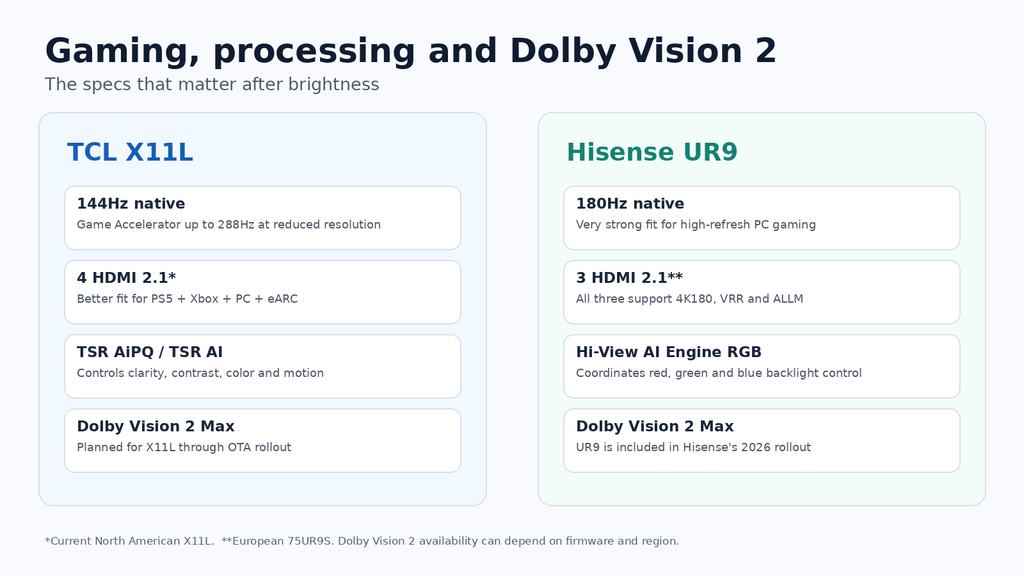
If you use a PS5, Xbox, gaming PC and an eARC soundbar or AVR at the same time, TCL’s extra HDMI input is genuinely useful. If the TV is primarily connected to a powerful PC, Hisense’s native 180Hz panel is the more interesting specification.
Dolby Vision 2: both are in the 2026 rollout, but not in the same way
This is an important 2026 difference that deserves more than a line in a specification table. Hisense has included the UR9 family in its Dolby Vision 2 Max rollout. The European 75UR9S already lists Dolby Vision 2 in its current specification, while Hisense says its premium UR9 models are part of the Max tier rollout.
TCL has also committed its X and C lineups to Dolby Vision 2 during 2026. For X11L specifically, TCL announced Dolby Vision 2 Max via OTA. That means buyers should check the installed firmware rather than assuming every unit has the same Dolby Vision 2 status on day one.
The practical upgrade is not simply a brighter Dolby Vision mode. Dolby Vision 2 introduces a new image engine, Content Intelligence and new motion and environment-aware processing. On TVs this bright, the interesting part is how the format uses all that headroom without turning every scene into a brightness demo.
Ports and I/O: X11L is easier for a crowded system
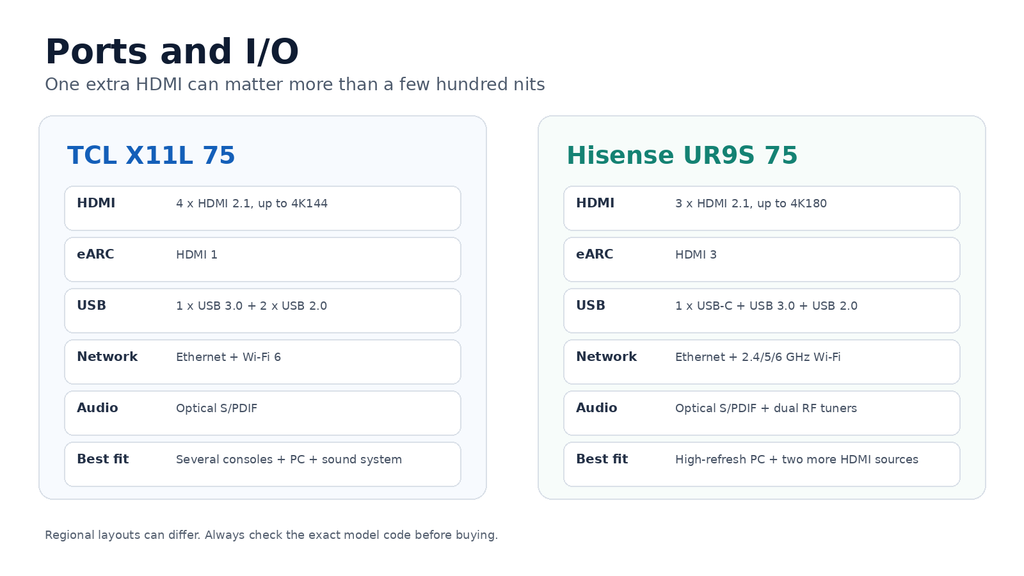
| I/O | TCL X11L 75 | Hisense UR9S 75 |
|---|---|---|
| HDMI 2.1 | 4 x up to 4K144 | 3 x up to 4K180 |
| eARC | HDMI 1 on current North American spec | HDMI 3 on European 75UR9S |
| USB | 1 x USB 3.0 + 2 x USB 2.0 | 1 x USB-C + 1 x USB 3.0 + 1 x USB 2.0 |
| Ethernet | Yes | Yes |
| Optical audio | Yes | Yes |
| Wireless | Wi-Fi 6 + Bluetooth | 2.4/5/6 GHz Wi-Fi + Bluetooth |
| RF tuners | Region dependent | Dual RF tuners on European 75UR9S |
Bright rooms, reflections and color
Neither TV needs help producing enough light for daytime viewing. Hisense specifically equips the UR9S with its Anti-Reflection & Glare-Free treatment. TCL combines very high output with the WHVA 2.0 Ultra panel and a low-reflection optical stack.
The more interesting question is what happens to dark detail and saturated color once room reflections are present. Hisense’s RGB backlight has an obvious theoretical advantage in producing highly saturated color directly at the light source. TCL’s SQD system answers with very wide color plus a far denser dimming grid.
Practical setup notes
On X11L, choose your HDR philosophy first. With this much headroom, there is little reason to push every enhancement to maximum. A balanced HDR preset lets the backlight isolate highlights without making faces and midtones unnecessarily bright.
On UR9, start with a cinema-oriented mode and disable automatic room-light compensation while setting the picture. RGB Mini LED gives the processor more variables to control, so judge neutral greys, skin tones and dark scenes before deciding that the most aggressive backlight setting is the best one.
For gaming, plan the HDMI map before mounting the TV. On the European UR9S, the three high-bandwidth HDMI inputs disappear quickly once eARC is occupied. X11L is more forgiving if you own several current-generation sources.
Which 75-inch flagship makes more sense?
| Priority | Better fit | Reason |
|---|---|---|
| Local-dimming density | TCL X11L | 11,520 zones at 75 inches |
| 10% HDR peak | TCL X11L | Small lead at about 4,100-4,200 vs 3,850 nits |
| Native high-refresh PC gaming | Hisense UR9 | 180Hz native panel |
| Multiple HDMI 2.1 sources | TCL X11L | Four high-bandwidth inputs on current North American spec |
| RGB backlight technology | Hisense UR9 | Direct red, green and blue Mini LED light generation |
| Dolby Vision 2 | Both | Hisense UR9 in Dolby Vision 2 Max rollout; TCL X11L planned via OTA |
Hisense UR9 is the more radical display design. Its RGB Mini LED backlight changes the way color is generated, and its native 180Hz panel is especially attractive for PC gaming. X11L feels like the more aggressive refinement of the Mini LED idea: an enormous number of zones, a sophisticated control system, a premium WHVA 2.0 Ultra panel and four HDMI 2.1 inputs.
At 75 inches, our brightness figures are close enough that peak nits should not decide the purchase. Choose X11L if you care most about local-dimming precision, connectivity and a mature high-zone-count implementation. Choose UR9 if you specifically want RGB Mini LED, native 180Hz gaming and the technical potential of a color-generating backlight.