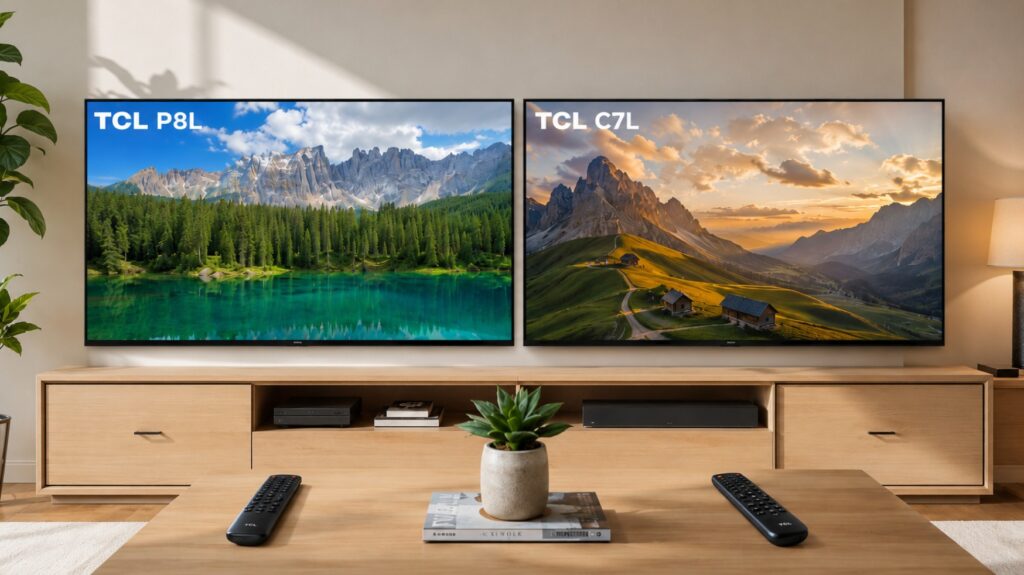

TCL now offers two Mini LED choices that can look unusually similar when you compare only Google TV, Dolby Vision and 144Hz gaming. Once you examine TCL P8L vs C7L more closely, however, the reason for the price gap becomes clear.
The P8L is the affordable route into TCL’s QD-Mini LED range. The C7L moves to SQD-Mini LED, a denser local-dimming system, a newer HVA 2.0 Pro panel and much stronger HDR headroom. The P8L keeps most of the gaming and smart-TV features, so the real question is whether the C7L’s picture upgrade is large enough for your room and budget. 📺
TCL P8L vs C7L at a glance
| Category | TCL P8L | TCL C7L |
|---|---|---|
| Lineup position | Affordable QD-Mini LED | Premium SQD-Mini LED step-up |
| Main 65-inch panel | HVA | HVA 2.0 Pro |
| 65-inch brightness figure | Up to around 1,200 nits | Up to 3,000 nits |
| 65-inch dimming zones | Not officially stated on the regional page reviewed | 1,152 zones |
| Native refresh rate | 144Hz | 144Hz |
| Smart platform | Google TV | Google TV |
| Memory | 3GB RAM / 32GB storage reported on common variants | 3GB RAM / 64GB storage officially listed in Australia |
| 65-inch audio | ONKYO 2.1, around 40W | Bang & Olufsen-tuned 2.1, around 40W |
| Best reason to buy | Lower price and strong gaming value | Better HDR, color and blooming control |
Regional configurations can still differ.
TVComparePro may earn a commission from qualifying purchases through this link.
TCL P8L vs C7L for 65-inch buyers
This comparison uses the 65-inch models as the main reference because that is the most useful mainstream size and the one with the clearest C7L specifications.
| Core specification | TCL 65P8L | TCL 65C7L |
|---|---|---|
| Resolution | 3840 × 2160 | 3840 × 2160 |
| Backlight | QD-Mini LED local dimming | SQD-Mini LED Precise Dimming |
| Panel family | HVA | HVA 2.0 Pro |
| Claimed HDR peak | Around 1,200 nits | Up to 3,000 nits |
| Local-dimming zones | Not publicly confirmed for this size | 1,152 |
| Refresh rate | Native 144Hz | Native 144Hz |
| HDR formats | Dolby Vision, HDR10+, HDR10, HLG | Dolby Vision, HDR10+, HDR10, HLG |
| Reduced-resolution accelerator | Up to 288Hz in supported modes | Up to 288Hz in supported modes |
| Operating system | Google TV | Google TV |
TCL also warns that specifications can vary by size and region.
Processor, RAM and storage: they are not identical 🔬
TCL’s official Australian specification for the 55-, 65- and 75-inch C7L lists 3GB RAM and 64GB storage. The P8L has already been published by TVComparePro with 3GB RAM and 32GB storage for common 65-inch variants. Buyers should still verify the complete local model code before purchase.
| Hardware area | TCL P8L | TCL C7L |
|---|---|---|
| TCL processor branding | AiPQ Processor | TSR AiPQ Processor |
| Underlying SoC | Not officially named by TCL on the regional page checked | Pentonic 700-class platform identified in documented units |
| CPU reference | Four Cortex-A73 cores, up to 1.4GHz on Pentonic 700 | Four Cortex-A73 cores, up to 1.4GHz on Pentonic 700 |
| GPU reference | Mali-G52 MC1 on Pentonic 700 | Mali-G52 MC1 on Pentonic 700 |
| RAM | 3GB reported | 3GB officially listed in Australia |
| Storage | 32GB reported | 64GB officially listed in Australia |
| Google TV | Yes | Yes |
The CPU and GPU rows describe the Pentonic 700 reference platform, not an official TCL declaration that every P8L regional version uses exactly that configuration.
Using the same SoC does not force two televisions to use identical memory. MediaTek defines a supported memory interface—up to 64-bit DDR4 at 3200Mbps—but TCL still chooses the physical RAM chips and eMMC storage for each model. C7L’s larger storage gives you more space for apps, updates and cached data; it does not make picture processing twice as fast.
Size differences matter
TCL changes backlight and audio configurations by diagonal, especially on the P8L.
| Size | TCL P8L | TCL C7L |
|---|---|---|
| 55-inch | 16-bit backlight control; 2.0 audio | 800 zones; up to 2,700 nits |
| 65-inch | 16-bit backlight control; ONKYO 2.1 | 1,152 zones; up to 3,000 nits |
| 75-inch | 22-bit backlight control; ONKYO 2.1 | 1,352 zones; up to 3,000 nits |
| 85-inch | Up to 112 zones on the regional specification reviewed | 1,624 zones; up to 3,000 nits |
| 98-inch | Up to 512 zones on selected P8L/P8LS versions | 2,176 zones; up to 3,000 nits |
TCL confirms 16-bit backlight control for the 55- and 65-inch P8L and 22-bit control for the 75- and 85-inch models on its Indian product page. The official C7L range publishes progressively higher zone counts by diagonal.
C7L’s dimming structure scales far more aggressively across the range, which is why the gap becomes especially important on larger screens.
Practical setup notes 🛠️
Both TVs need careful HDMI planning. On the commonly documented four-port layouts, HDMI 1 and HDMI 2 are the high-refresh gaming inputs, supporting 4K at up to 144Hz with VRR. TCL’s reduced-resolution 288Hz Game Accelerator also uses these two ports. HDMI 3 and HDMI 4 are 4K 60Hz inputs, making them better suited to streaming boxes, Blu-ray players, cable receivers, Nintendo Switch, PS4 or other devices that do not require 4K 120Hz or 144Hz. Connect a PS5, PS5 Pro, Xbox Series X or gaming PC to HDMI 1 or HDMI 2. Use the HDMI port physically marked eARC/ARC for your soundbar or AV receiver, as its exact port number can vary by region and model configuration.
Start with a neutral movie mode and confirm that local dimming is active before changing motion, tone mapping or shadow detail. Aggressive brightness settings can make blooming more noticeable on the P8L, while the C7L’s denser backlight gives you more freedom to increase HDR impact without spreading as much light around subtitles and small bright objects.
HDR brightness and local dimming ☀️
This is where the C7L earns most of its premium.
| HDR behavior | TCL P8L | TCL C7L |
|---|---|---|
| Headline brightness | Around 1,200 nits | Up to 3,000 nits |
| 65-inch zone count | Not officially disclosed | 1,152 |
| Small bright highlights | Strong for the price | Far more intense |
| Dark-scene precision | Basic Mini LED advantage | Much finer control |
| Subtitle blooming | More visible | Better contained |
| Bright-room impact | Good | Clearly stronger |
| Large HDR scenes | Less headroom | Better highlight and color retention |
P8L should still look more dynamic than a basic LED or entry-level QLED. It can produce convincing sunlight, reflections and game effects without moving into premium pricing.
C7L has a much larger performance reserve. Its 65-inch version combines the 3,000-nit product claim with 1,152 zones and HVA 2.0 Pro panel technology. You will notice the difference most in a bright living room, high-quality HDR movies and games that combine dark environments with intense light sources.
Movies, subtitles and color 🎬
P8L is a sensible movie TV when price matters more than maximum local-dimming precision. It supports Dolby Vision and HDR10+, provides strong direct-view contrast and has enough brightness to separate HDR from SDR clearly.
| Viewing priority | Better model | Why |
|---|---|---|
| Dolby Vision movies | C7L | Greater HDR headroom |
| Dark films with subtitles | C7L | Denser local dimming |
| Casual streaming | P8L | Strong performance for less |
| Bright daytime viewing | C7L | More brightness and improved reflection handling |
| Large cinematic screen | C7L | Better backlight scaling |
| Budget home cinema | P8L | Keeps both major dynamic HDR formats |
C7L’s SQD-Mini LED and Ultra Color Filter positioning should also help saturated colors remain stronger at high brightness. That matters for neon lights, animation, nature documentaries and colorful games. P8L still uses quantum-dot color, but C7L has the more ambitious color system. 🌈
Gaming: similar features, different picture quality 🎮
You do not need the C7L simply to obtain 144Hz. Both models already offer native 144Hz panels, VRR, ALLM and Game Bar features.
| Gaming feature | TCL P8L | TCL C7L |
|---|---|---|
| 4K 120Hz consoles | Yes | Yes |
| 4K 144Hz PC | Yes | Yes |
| VRR | Yes | Yes |
| ALLM | Yes | Yes |
| FreeSync | Premium on common listings | Premium Pro on common listings |
| Dolby Vision gaming | Supported on compatible paths | Supported on compatible paths |
| Game Bar | Yes | Yes |
| Reduced-resolution 288Hz | Supported mode | Supported mode |
| Exact input lag | Varies by firmware and test method | Varies by firmware and test method |
P8L is the better gaming value because it preserves the refresh-rate features buyers care about. C7L is the better gaming display because HDR highlights, black-level control and daytime visibility are stronger.
Current consoles operate at up to 120Hz, so 144Hz primarily benefits compatible PCs. The advertised 288Hz accelerator uses a reduced-resolution mode; it is not 4K 288Hz. TCL lists native 144Hz for both ranges, while MediaTek’s Pentonic 700 reference platform supports 4K up to 144Hz.
Audio, ports and daily ownership
| Ownership area | TCL P8L | TCL C7L |
|---|---|---|
| 65-inch audio | ONKYO 2.1, around 40W | Bang & Olufsen-tuned 2.1, around 40W |
| Dolby Atmos | Yes | Yes |
| DTS | DTS Virtual:X listed on P8L regional pages | Check the exact regional specification |
| App storage | 32GB reported | 64GB officially listed in Australia |
| Smart platform | Google TV | Google TV |
| Main ownership advantage | Value and familiar ONKYO system | More storage and premium tuning |
P8L’s ONKYO system is useful when you do not plan to buy a soundbar immediately. TCL confirms 2.1 audio for the 65-, 75- and 85-inch P8L, while the 55-inch version uses a 2.0 system. C7L uses Bang & Olufsen-tuned audio, but output and channel configuration should still be checked by size and region.
Is the C7L worth the extra money?
| C7L premium over P8L | Best choice |
|---|---|
| Up to about 20% | C7L is the easy upgrade |
| Around 20–35% | C7L for HDR and movies; P8L for value |
| Around 35–45% | P8L becomes more attractive |
| More than about 45% | Choose P8L unless picture quality is the priority |
C7L gives you a real panel and backlight upgrade, not only different branding. P8L remains competitive because it keeps Google TV, 144Hz gaming and support for both Dolby Vision and HDR10+.
Which one is better for you?
| Your priority | Better TV |
|---|---|
| Lowest purchase price | TCL P8L |
| Best overall picture | TCL C7L |
| Bright living room | TCL C7L |
| Dark movies and subtitles | TCL C7L |
| Gaming features for less | TCL P8L |
| Best HDR gaming image | TCL C7L |
| More internal storage | TCL C7L |
| Familiar ONKYO audio | TCL P8L |
| Premium panel and color | TCL C7L |
| Large Mini LED on a tighter budget | TCL P8L |
The better TCL Mini LED for your money ✅
The TCL C7L is the better television for picture-quality-focused buyers. At 65 inches it combines 1,152 dimming zones, brightness claimed up to 3,000 nits, HVA 2.0 Pro panel technology, stronger color handling and 64GB storage on the officially documented Australian model. You will see the upgrade in HDR highlights, subtitle control, daytime viewing and difficult dark scenes.
The TCL P8L is the better value. It keeps Google TV, native 144Hz, Dolby Vision, HDR10+, VRR, ALLM and ONKYO 2.1 audio. Its commonly reported 3GB RAM and 32GB storage are sufficient for normal streaming use, even though C7L gives you more storage.
Choose C7L when the premium is reasonable and picture quality is the reason you are upgrading. Choose P8L when you want the core TCL Mini LED and gaming experience at the lowest practical price.